Jukebox Action Bar Fix
Fixes a bug with the jukebox action bar where the colours are wrong. Adds various settings for the action bar and adds the option to make all action bars coloured.
Screenshots
Über diese Mod
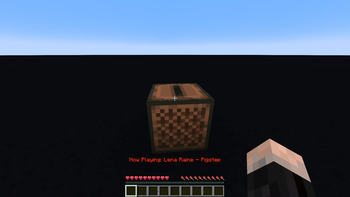
This mod fixes bug report MC-132961. This bug causes the colour changing text that says which disc is playing, to suddenly stop changing colours. In horror I quickly fixed this bug by making a small change in the code. This worked, but still, I was not satisfied. I tried raising the chromacity, but it just didn't look quite right. Most of the animation was taken up by blue and green, neglecting the colour spectrum's full beauty. This led me into the rabbit hole of perceptual colour spaces.
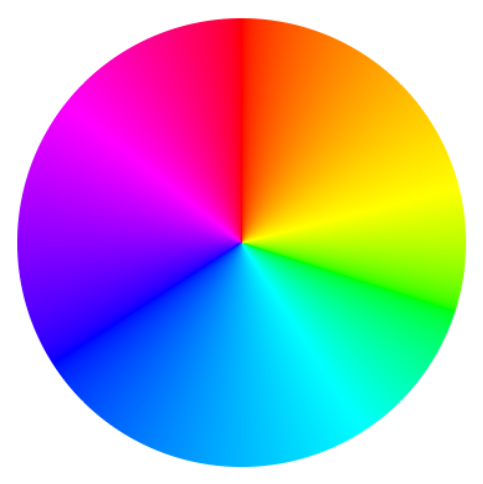
After countless hours delving into the intricacies of human color perception, deciphering mathematical equations, and extensive coding, I proudly present the perfect color wheel, with each hue is in its rightful position. And now, with this mod, you can enjoy these colours in the action bar for 3 seconds every time you play a music disc.
If desired, you can customize the mod's default settings to:
- Extend the duration of the action bar display.
- Adjust the animation speed to your preference.
- Enable the colorful text to appear e.g. during a player's attempt to sleep through the night or whenever an action bar is triggered.
- Make the action bar colours extra vibrant.
Check out the Oklab colour space by Björn Ottosson and this Oklab colour picker
Verfügbare Versionen
Jukebox Action Bar Fix auf deinem Client installieren
Mod-Loader lokal installieren
Installiere fabric für deine lokale Minecraft-Version.
Passende Datei herunterladen
Wähle die Jukebox Action Bar Fix-Datei für fabric und Minecraft 1.21.4.
Mod installieren
Lege die .jar-Datei in deinem lokalen .minecraft/mods-Ordner ab und starte Minecraft neu. Eine Installation auf dem Server ist nicht nötig.
Kompatibilität
Mod-Loader
Minecraft-Versionen
1.21.4, 1.21, 1.20.6 (+2 weitere)
Server-seitig
✗ Nicht unterstütztEmpfohlener RAM
4 GB(min. 3 GB)Häufige Fragen
Muss Jukebox Action Bar Fix auf dem Minecraft Server installiert werden?
Nein. Modrinth kennzeichnet Jukebox Action Bar Fix serverseitig als nicht unterstützt. Installiere die Mod nur im lokalen Minecraft-Mods-Ordner. Dein Server kann unverändert bleiben, sofern die Mod-Seite keine zusätzliche Abhängigkeit nennt.
Welche Version und welchen Loader braucht Jukebox Action Bar Fix?
Nutze eine Datei für fabric und exakt deine Minecraft-Version. Unterstützte Versionen sind unter anderem 1.21.4, 1.21, 1.20.6. Loader-Dateien sind nicht untereinander austauschbar.
Jukebox Action Bar Fix funktioniert nicht – was kann ich prüfen?
Prüfe zuerst Minecraft-Version, Loader-Version und erforderliche Abhängigkeiten. Lege die .jar-Datei im lokalen .minecraft/mods-Ordner ab und entferne ältere Duplikate. Da die Mod clientseitig ist, löst mehr Server-RAM dieses Problem nicht.
Ähnliche Mods


Minecraft Server für deine Gruppe
Jukebox Action Bar Fix bleibt auf deinem Client. Hoste dazu eine kompatible Welt für deine Mitspieler.
Details
- Lizenz
- GNU General Public License v3.0 or later
- Server-seitig
- Nicht unterstützt