
Keep Inventory Orbs
A cross-platform fully server-side approach to the gravestone concept introducing 'orbs' to store your inventory upon death.
Screenshots

Über diese Mod
Keep Inventory Orbs
A cross-platform fully server-side approach to the gravestone concept introducing 'orbs' to store your inventory upon death.
Cross-platform, compatible with Minecraft Bedrock Players!
(as long as the datapack/mod is installed on a Java server)
Upon death:
- An Orb will spawn that will keep your inventory safe. [Incompatible with Backpack mods]
- A compass to help you locate your last orb will be given to you. [Customizable]
Recovering Inventory:
When an Orb is broken, it will attempt to restore its inventory only to its owner.
If the Orb's owner is not nearby (within 6 blocks), nothing will happen and the orb will not break.
Orb Stealing is [OFF] by default. To steal an Orb that is not yours, an Admin needs to enable it in the Menu [see below]
Orbs will re-equip your armor and items exactly into the slot they were.
If the slot is occupied by something else, the item will drop in the player's position.
Orb behavior:
- Orbs will always spawn on the player's death position
- Orbs will spawn in the world's minimum height if the player dies in the void
- Orbs will never despawn.
- Orbs have gravity and will fall if they have no support.
- Orbs will move upwards if they are inside of a block.
- Orbs cannot be moved by pistons
Server-side advantages
If you are a server owner or admin, installing this datapack/mod into the server makes it work for everyone!
There is no need to install it on the client side!
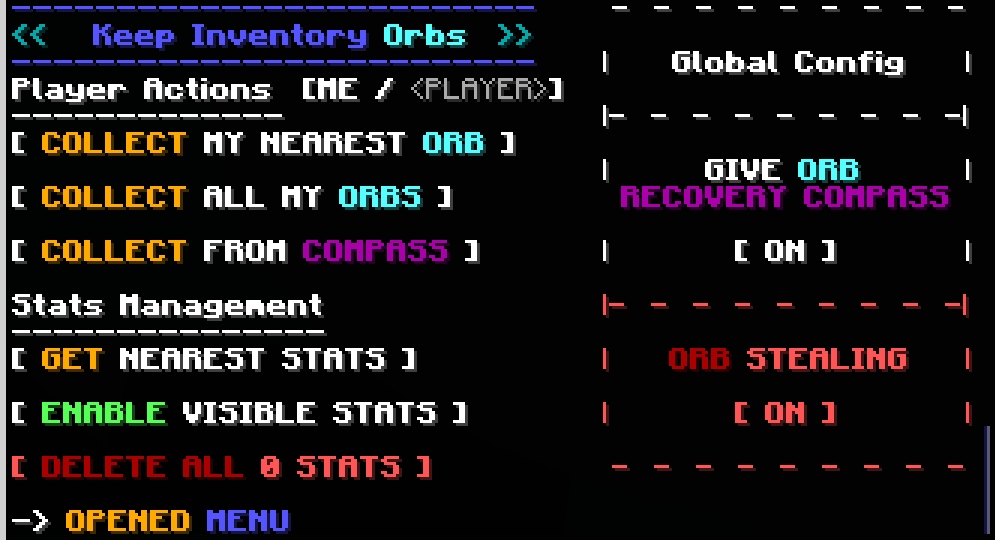
Menu (for Server Admins)
The following command opens the built-in Chat Menu:
/function #keep_inventory_orbs:menu
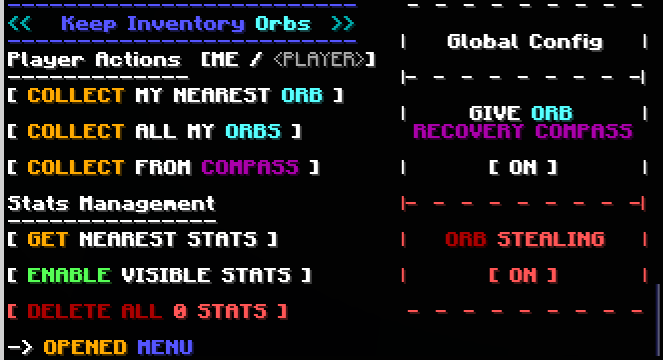
Orb Stealing
Orb Stealing will enable all players to steal an Orb even if it is not theirs
Buttons:
- Toggle [ON/OFF] orb stealing for all players
Give Orb Recovery Compass
Toggles whether players will receive an orb recovery compass pointing towards their last orb after respawning
Buttons:
- Toggle [ON/OFF] orb recovery compass for all players
Player Actions
These actions will apply to yourself or to a specified
To toggle between these, click the [ME /
Buttons:
- Collect My Nearest Orb
- Collects your nearest orb within loaded chunks
- Collect All My Orbs
- Collects all your orbs within loaded chunks
- Collect From Compass
- Collects the orb nearest to the death location indicated by the orb recovery compass held in the player's hand, even in unloaded chunks.
Stats Management
Orbs keep 'Stats' with information about the player's death. These stats are kept even after the orbs are collected.
Buttons:
- Get Nearest Stats
- Shows the Stats from the nearest Stats/Orb
- Gives you options to:
- Show the inventory saved by the Stats/Orbs
- Collect/Destroy/Respawn specific Orbs
- Erase specific Stats
- Enable/Disible Visible Stats
- When enabled, shows particles locating Stats/Orb within 16 blocks, and points towards the nearest selected one
- Delete All Stats
- Counts all Stats/Orb in currently loaded chunks and deletes them
Verfügbare Versionen
Keep Inventory Orbs auf dem Server installieren
Server bestellen
Bestelle einen Minecraft Java Server mit mindestens 3 GB RAM (4 GB empfohlen).
datapack Loader setzen
Wähle im Panel unter "Egg" den datapack-Loader und die passende Minecraft-Version (26.3).
Mod installieren
Öffne den Mod-Browser im Dashboard und suche nach "Keep Inventory Orbs". Klicke "Installieren" – fertig! Alternativ: Lade die .jar via SFTP in den /mods Ordner.
Kompatibilität
Mod-Loader
Minecraft-Versionen
26.3, 26.2, 26.1.2 (+27 weitere)
Server-seitig
✓ ErforderlichEmpfohlener RAM
4 GB(min. 3 GB)Häufige Fragen
Keep Inventory Orbs Server crasht beim Start – was tun?
Häufigste Ursache: falsche datapack-Version oder zu wenig RAM. Prüfe im Server-Log (latest.log), ob ein "OutOfMemoryError" oder "Mixin"-Fehler auftritt. Bei Mado Hosting: Stelle sicher, dass mindestens 3 GB RAM zugewiesen sind und der Loader zur Mod-Version passt (26.3). Über das Panel kannst du den Loader mit einem Klick wechseln.
Ist Keep Inventory Orbs mit datapack und fabric und forge und neoforge und quilt kompatibel?
Keep Inventory Orbs unterstützt offiziell datapack, fabric, forge, neoforge, quilt für Minecraft 26.3, 26.2, 26.1.2. Achtung: Forge- und Fabric-Mods sind NICHT untereinander kompatibel – wähle einen Loader und bleibe dabei. Im Mado Dashboard werden inkompatible Loader-Kombinationen automatisch erkannt.
Server laggt mit Keep Inventory Orbs – wie optimiere ich die Performance?
Empfohlener RAM: 4 GB (+1 GB pro 8 Spieler). Prüfe mit /spark profiler, ob Keep Inventory Orbs den meisten Tick-Time verbraucht. Häufige Fixes: Server-View-Distance auf 8-10 reduzieren, bei Forge "performant" oder "starlight" als Zusatz-Mod installieren. Bei Mado Hosting läuft dein Server auf NVMe-SSDs mit dedizierten CPU-Kernen für minimale Latenz.
Ähnliche Mods






Modded Server mieten
Installiere Keep Inventory Orbs mit nur einem Klick auf deinem Server.