
Lani Client
Lani Client is a lightweight Fabric mod that brings together performance improvements, customization, and quality-of-life features to enhance the vanilla Minecraft experience.
Screenshots
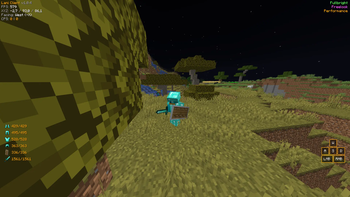
Über diese Mod
Lani Client
Lani Client is a lightweight, all-in-one utility mod built for Fabric. It aims to provide essential PvP features, visual enhancements, and quality-of-life improvements without the bloat of heavy modpacks. Whether you are playing survival or competitive multiplayer, Lani Client has everything you need.
Features
PvP & Utilities
- PvP Mode: One-click optimization to disable camera shaking (distortion/FOV effects) for a stable combat experience.
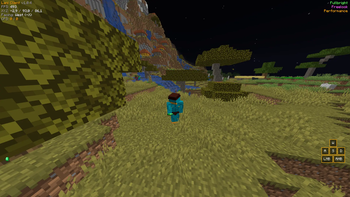
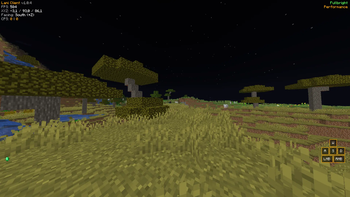
- Keystrokes & Armor Status: Fully customizable HUD to see your movement keys, mouse clicks, and armor durability at a glance.
- Toggle Sprint: Never hold your sprint key again.
- CPS Counter: Live Left-Click and Right-Click tracking.
Visuals & Camera
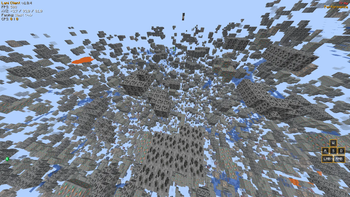
- 360° Freelook: Look around your character smoothly without changing your movement direction (Orbit camera)(Doesn't work on servers without opt-in).
- Zoom: Smooth, OptiFine-style zooming to see far distances.
- Fullbright: See perfectly in the darkest caves without torches.
- Xray: Find ores easily (Doesn't work on servers without opt-in).
Customization & QoL
- HUD Editor: A modern drag-and-drop system to position your HUD elements anywhere on the screen!
- Theme Colors: Choose between 7 different UI colors (Aqua, Red, Green, Yellow, White, Gold, Light Purple) to match your style.
- Performance Mode: Instantly applies optimized graphical settings for a quick FPS boost. Reverts back to your original settings when disabled.
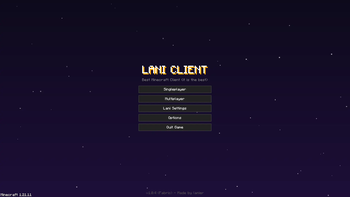
- Clean Main Menu: A redesigned, sleek main menu with easy access to all Lani Settings.
How to Use
Press Right Shift in-game to open the ClickGUI, where you can toggle all modules. You can also access the Lani Settings directly from the Main Menu to change HUD positions, theme colors, and zoom multipliers.
Thanks for your supports.
Verfügbare Versionen
Lani Client auf deinem Client installieren
Mod-Loader lokal installieren
Installiere fabric für deine lokale Minecraft-Version.
Passende Datei herunterladen
Wähle die Lani Client-Datei für fabric und Minecraft 1.21.11.
Mod installieren
Lege die .jar-Datei in deinem lokalen .minecraft/mods-Ordner ab und starte Minecraft neu. Eine Installation auf dem Server ist nicht nötig.
Kompatibilität
Mod-Loader
Minecraft-Versionen
1.21.11
Server-seitig
✗ Nicht unterstütztEmpfohlener RAM
4 GB(min. 3 GB)Häufige Fragen
Muss Lani Client auf dem Minecraft Server installiert werden?
Nein. Modrinth kennzeichnet Lani Client serverseitig als nicht unterstützt. Installiere die Mod nur im lokalen Minecraft-Mods-Ordner. Dein Server kann unverändert bleiben, sofern die Mod-Seite keine zusätzliche Abhängigkeit nennt.
Welche Version und welchen Loader braucht Lani Client?
Nutze eine Datei für fabric und exakt deine Minecraft-Version. Unterstützte Versionen sind unter anderem 1.21.11. Loader-Dateien sind nicht untereinander austauschbar.
Lani Client funktioniert nicht – was kann ich prüfen?
Prüfe zuerst Minecraft-Version, Loader-Version und erforderliche Abhängigkeiten. Lege die .jar-Datei im lokalen .minecraft/mods-Ordner ab und entferne ältere Duplikate. Da die Mod clientseitig ist, löst mehr Server-RAM dieses Problem nicht.
Ähnliche Mods




![[ETF] Entity Texture Features](https://cdn.modrinth.com/data/BVzZfTc1/af683d206d50b05258d865b0d6e4aa2f2cee12f2_96.webp)

Minecraft Server für deine Gruppe
Lani Client bleibt auf deinem Client. Hoste dazu eine kompatible Welt für deine Mitspieler.