
lazyboost-render
A client-side optimization mod for Minecraft Fabric, offering weather, entity, sound, and HUD customization for better FPS and gameplay experience.
Screenshots
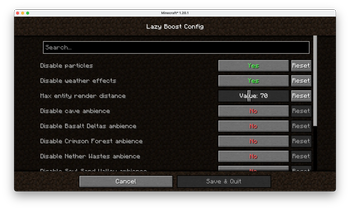
Über diese Mod
LazyBoost
LazyBoost is a Minecraft Fabric mod that boosts client rendering performance and provides many configurable visual and audio options for a smoother gameplay experience.
This mod requred modmenu, if not, you may not open the configure menu
Features
easier hand toggle
Use that toggle to easier toggle render hand.toggle gamma (brightness)
Easy to get more brightness, easy to take pictures.simple entity render
If the entity is out of config entity render distance and also in vanilla entity distance, the mod will use a red box to render it.Auto FPS Reduction
Automatically lowers FPS limit to 12 when Minecraft window is unfocused or minimized, saving system resources.ModMenu Integration
All options can be configured in-game via ModMenu or the config file.
Installation
- Download the latest release from Modrinth.
- Place the downloaded
.jarfile into your Minecraftmodsfolder. - Make sure you have installed Fabric Loader and Fabric API.
- (Optional) Install ModMenu for in-game configuration.
Configuration
- Press the LazyBoost key (configurable in Controls) to open the configuration GUI.
- You can also use ModMenu to access the config screen.
- All options are saved in the config file and take effect immediately.
License
Licensed under the Apache License 2.0. See LICENSE for details.
Verfügbare Versionen
lazyboost-render auf deinem Client installieren
Mod-Loader lokal installieren
Installiere fabric für deine lokale Minecraft-Version.
Passende Datei herunterladen
Wähle die lazyboost-render-Datei für fabric und Minecraft 1.21.11.
Mod installieren
Lege die .jar-Datei in deinem lokalen .minecraft/mods-Ordner ab und starte Minecraft neu. Eine Installation auf dem Server ist nicht nötig.
Kompatibilität
Mod-Loader
Minecraft-Versionen
1.21.11, 1.21.10, 1.21.9 (+8 weitere)
Server-seitig
✗ Nicht unterstütztEmpfohlener RAM
4 GB(min. 3 GB)Häufige Fragen
Muss lazyboost-render auf dem Minecraft Server installiert werden?
Nein. Modrinth kennzeichnet lazyboost-render serverseitig als nicht unterstützt. Installiere die Mod nur im lokalen Minecraft-Mods-Ordner. Dein Server kann unverändert bleiben, sofern die Mod-Seite keine zusätzliche Abhängigkeit nennt.
Welche Version und welchen Loader braucht lazyboost-render?
Nutze eine Datei für fabric, quilt und exakt deine Minecraft-Version. Unterstützte Versionen sind unter anderem 1.21.11, 1.21.10, 1.21.9. Loader-Dateien sind nicht untereinander austauschbar.
lazyboost-render funktioniert nicht – was kann ich prüfen?
Prüfe zuerst Minecraft-Version, Loader-Version und erforderliche Abhängigkeiten. Lege die .jar-Datei im lokalen .minecraft/mods-Ordner ab und entferne ältere Duplikate. Da die Mod clientseitig ist, löst mehr Server-RAM dieses Problem nicht.
Ähnliche Mods






Minecraft Server für deine Gruppe
lazyboost-render bleibt auf deinem Client. Hoste dazu eine kompatible Welt für deine Mitspieler.