
Leaf Decay Instant
Leaves decay instantly when trees are cut. Chain mode, extra drops, in-game commands, 20+ config options. No floating leaf blobs!
Screenshots

Über diese Mod
Leaf Decay Instant


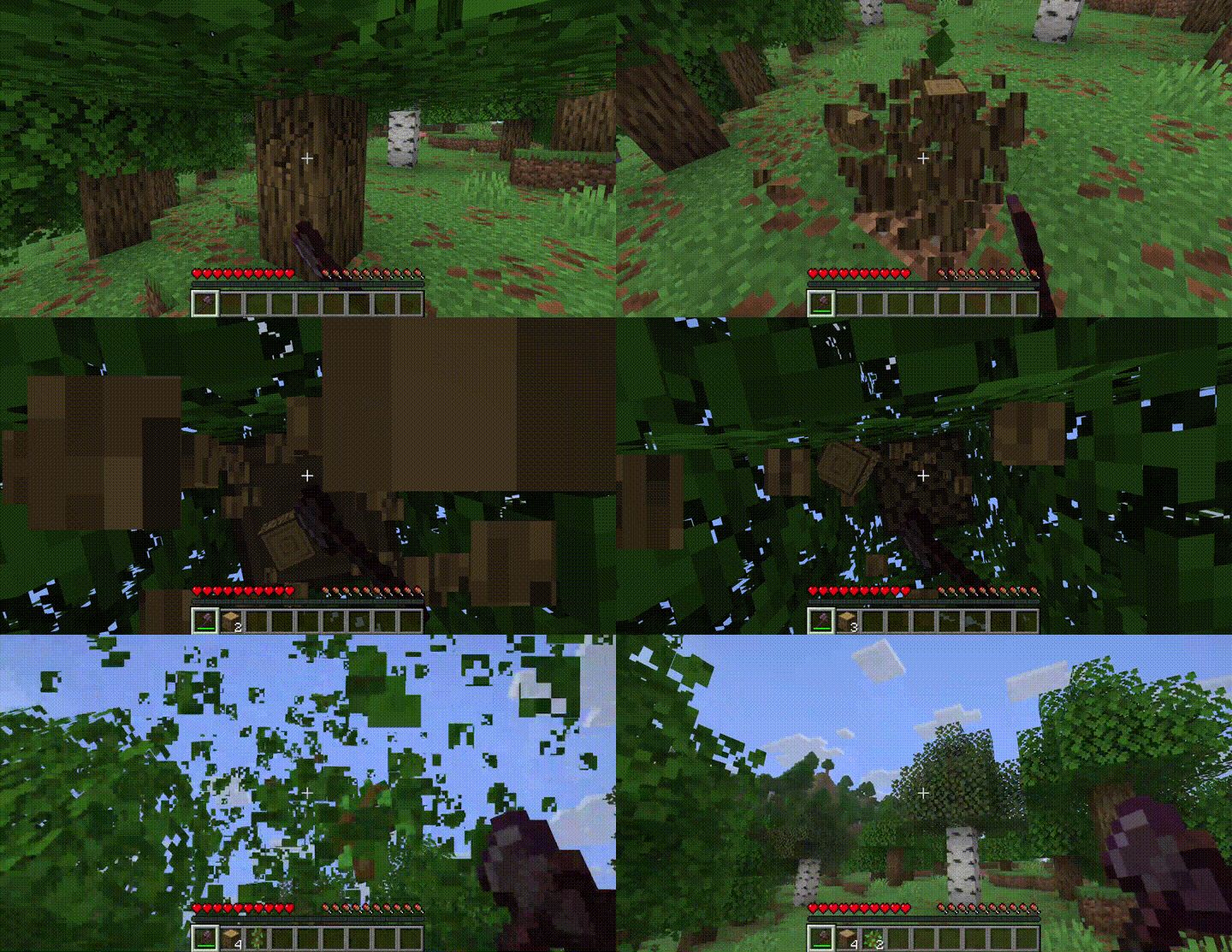
Tired of floating leaves after cutting down a tree? Leaf Decay Instant removes them immediately — no more ugly leaf blobs hovering in the sky.
Features
- Instant decay — leaves disappear the moment they lose connection to a log
- Chain decay mode — watch leaves cascade in a satisfying wave from the trunk outwards
- Extra drops — configurable bonus chance for saplings, sticks, and apples
- Sound variety — multiple break sounds with configurable chance and pitch
- Particle options — choose between leaf texture, composter, or happy villager particles
- In-game commands — change any setting at runtime with
/leafdecay set <option> <value> - Performance friendly — uses Minecraft's native tick system, minimal overhead
- Highly configurable — 20+ options to tune the mod to your taste
- Mod compatible — works with any mod that extends the base
LeavesBlock - Server-side — clients don't need the mod installed
Commands
Note: Commands require OP level 2. On multiplayer servers, use LuckPerms to restrict
/leafdecayto staff.
/leafdecay reload
/leafdecay set <option> <value>
Examples:
/leafdecay set chainDecay true
/leafdecay set chainDelay 3
/leafdecay set soundChance 0.5
/leafdecay set particleType composter
/leafdecay set extraSaplingChance 2.0
/leafdecay reload
Configuration
Config file is created on first launch at config/instant_leaf_decay.json.
Core
| Option | Type | Default | Description |
|---|---|---|---|
enabled |
bool | true |
Master toggle |
decayTicks |
int | 2 |
Ticks to wait before leaves decay |
Particles
| Option | Type | Default | Description |
|---|---|---|---|
particles |
bool | true |
Enable particle effects |
particleCount |
int | 8 |
Number of particles per decay |
particleType |
string | "block" |
"block", "composter", or "happy" |
Sound
| Option | Type | Default | Description |
|---|---|---|---|
sound |
bool | true |
Enable sound effects |
soundVolume |
float | 0.8 |
Volume (0.0 – 1.0) |
soundPitchMin |
float | 1.0 |
Minimum pitch |
soundPitchMax |
float | 1.2 |
Maximum pitch |
soundChance |
float | 0.3 |
Chance per leaf to play sound |
Supported sound IDs:minecraft:block.grass.break, minecraft:block.azalea_leaves.break, minecraft:block.moss.break, minecraft:block.azalea.break, minecraft:block.flowering_azalea.break, minecraft:block.cherry_leaves.break, minecraft:block.sweet_berry_bush.break
Chain Decay
| Option | Type | Default | Description |
|---|---|---|---|
chainDecay |
bool | false |
Enable cascading wave decay |
chainDelay |
int | 2 |
Spread factor (higher = slower wave) |
Extra Drops
| Option | Type | Default | Description |
|---|---|---|---|
extraSaplingChance |
float | 0.0 |
Bonus sapling roll multiplier |
extraStickChance |
float | 0.0 |
Bonus stick roll multiplier |
extraAppleChance |
float | 0.0 |
Bonus apple roll (oak/dark oak only) |
Filters
| Option | Type | Default | Description |
|---|---|---|---|
blacklistedLeaves |
list | [] |
Block IDs to exclude |
disabledDimensions |
list | [] |
Dimension IDs to disable in |
Performance
| Option | Type | Default | Description |
|---|---|---|---|
requirePlayerNearby |
bool | false |
Only decay near players |
playerRadius |
float | 64.0 |
Player detection radius |
License
MIT — free to use, modify, and include in modpacks. No permission needed.
Verfügbare Versionen
Leaf Decay Instant auf dem Server installieren
Server bestellen
Bestelle einen Minecraft Java Server mit mindestens 3 GB RAM (4 GB empfohlen).
fabric Loader setzen
Wähle im Panel unter "Egg" den fabric-Loader und die passende Minecraft-Version (26.2).
Mod installieren
Öffne den Mod-Browser im Dashboard und suche nach "Leaf Decay Instant". Klicke "Installieren" – fertig! Alternativ: Lade die .jar via SFTP in den /mods Ordner.
Kompatibilität
Mod-Loader
Minecraft-Versionen
26.2, 26.2-snapshot-2, 26.1.2 (+3 weitere)
Server-seitig
✓ ErforderlichEmpfohlener RAM
4 GB(min. 3 GB)Häufige Fragen
Leaf Decay Instant Server crasht beim Start – was tun?
Häufigste Ursache: falsche fabric-Version oder zu wenig RAM. Prüfe im Server-Log (latest.log), ob ein "OutOfMemoryError" oder "Mixin"-Fehler auftritt. Bei Mado Hosting: Stelle sicher, dass mindestens 3 GB RAM zugewiesen sind und der Loader zur Mod-Version passt (26.2). Über das Panel kannst du den Loader mit einem Klick wechseln.
Ist Leaf Decay Instant mit fabric und forge und neoforge kompatibel?
Leaf Decay Instant unterstützt offiziell fabric, forge, neoforge für Minecraft 26.2, 26.2-snapshot-2, 26.1.2. Achtung: Forge- und Fabric-Mods sind NICHT untereinander kompatibel – wähle einen Loader und bleibe dabei. Im Mado Dashboard werden inkompatible Loader-Kombinationen automatisch erkannt.
Server laggt mit Leaf Decay Instant – wie optimiere ich die Performance?
Empfohlener RAM: 4 GB (+1 GB pro 8 Spieler). Prüfe mit /spark profiler, ob Leaf Decay Instant den meisten Tick-Time verbraucht. Häufige Fixes: Server-View-Distance auf 8-10 reduzieren, bei Forge "performant" oder "starlight" als Zusatz-Mod installieren. Bei Mado Hosting läuft dein Server auf NVMe-SSDs mit dedizierten CPU-Kernen für minimale Latenz.
Ähnliche Mods


Modded Server mieten
Installiere Leaf Decay Instant mit nur einem Klick auf deinem Server.