
Librarian Trade Finder
A fabric mod that helps you find the enchantments you need from a Librarian Villager.
Screenshots
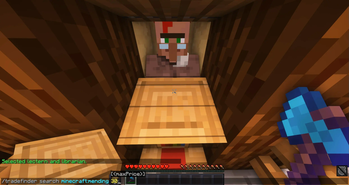
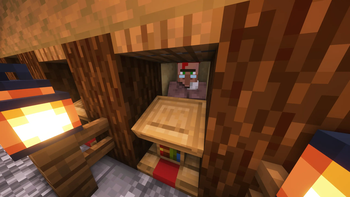
Über diese Mod
Librarian Trade Finder
A fabric mod that helps you find the enchantments you need from a Librarian Villager.
Installation
Download the jar from modrinth.
If you are playing on a server using an old minecraft version consider using ViaFabric to use the latest client version.

Or clone the repository and run ./gradlew build.
The compiled jar should be under build/libs/.
Usage
- Encase the villager in a 1x1 area.
- Place down a Lectern in front of the villager.
- (Optional) Set Keybindings (Open Config Screen [Default:
C], Start/Stop Search [Default:O], Select Lectern [Default:I]) - Look at the Lectern and either press keybinding to Select (Default:
I) or execute/tradefinder select. - Put enough lecterns in your off-hand and an axe in your main-hand. The faster the axe can break the lectern, the faster the mod will be able to search.
- Open Config Screen with the keybinding (Default:
C) or execute/tradefinder config. - On the left side, select the enchantments you want to search for, by simply clicking on them. Then enter the maximum price and level you want to search for.
- Configure the other settings on the right to your liking.
- Either press the Button
Start Search, exit the config screen and press the keybinding to start the search (Default:O) or execute/tradefinder start. - If you want to stop the search before you found the enchantment, execute
/tradefinder stopor press the keybinding (Default:O).
Usage Demo Video
1.19.4 and below
click to view
Common Steps
- Encase the villager in a 1x1 area.
- Place down a Lectern in front of the villager.
- Look at the Lectern and execute
/tradefinder select. - Put enough lecterns in your off-hand and an axe in your main-hand. The faster the axe can break the lectern, the faster the mod will be able to search.
Continuation Single Search
- Execute
/tradefinder searchSingle <enchantment> <maxPrice>to start searching for you preferred enchantment. As soon as the mod found it, it will stop the search and message you. - If you want to stop the search before you found the enchantment, execute
/tradefinder stop.
Continuation List Search
- Execute
/tradefinder configor open the config gui using modmenu. - Switch to 'List Enchantments' Tab. Then select all the enchantments you want to search for.
- Execute
/tradefinder searchListto start searching for the list. As soon as the mod found any enchantment you selected, it will stop the search and message you. - If you want to stop the search before you found a enchantment, execute
/tradefinder stop.
Demo
Common Issues
- The error: "You are not looking at a lectern."
- Make sure you are looking at the lectern and not the villager.
- The lectern doesn't get broken.
- Some anti-cheats can prevent breaking the lectern or interacting with the villager if you are not looking at it.
- My Lecterns are disappearing.
- Sometimes the lecterns dropped, can get behind the lectern or somewhere else. Stop the mod, break the lectern, and try to find all the items. Then start the search again.
If you have any further issues, create an issue on my github or message me on Discord @greenman999.
Verfügbare Versionen
Librarian Trade Finder auf deinem Client installieren
Mod-Loader lokal installieren
Installiere fabric für deine lokale Minecraft-Version.
Passende Datei herunterladen
Wähle die Librarian Trade Finder-Datei für fabric und Minecraft 26.1.2.
Mod installieren
Lege die .jar-Datei in deinem lokalen .minecraft/mods-Ordner ab und starte Minecraft neu. Eine Installation auf dem Server ist nicht nötig.
Kompatibilität
Mod-Loader
Minecraft-Versionen
26.1.2, 26.1.1, 26.1 (+21 weitere)
Server-seitig
✗ Nicht unterstütztEmpfohlener RAM
4 GB(min. 3 GB)Häufige Fragen
Muss Librarian Trade Finder auf dem Minecraft Server installiert werden?
Nein. Modrinth kennzeichnet Librarian Trade Finder serverseitig als nicht unterstützt. Installiere die Mod nur im lokalen Minecraft-Mods-Ordner. Dein Server kann unverändert bleiben, sofern die Mod-Seite keine zusätzliche Abhängigkeit nennt.
Welche Version und welchen Loader braucht Librarian Trade Finder?
Nutze eine Datei für fabric und exakt deine Minecraft-Version. Unterstützte Versionen sind unter anderem 26.1.2, 26.1.1, 26.1. Loader-Dateien sind nicht untereinander austauschbar.
Librarian Trade Finder funktioniert nicht – was kann ich prüfen?
Prüfe zuerst Minecraft-Version, Loader-Version und erforderliche Abhängigkeiten. Lege die .jar-Datei im lokalen .minecraft/mods-Ordner ab und entferne ältere Duplikate. Da die Mod clientseitig ist, löst mehr Server-RAM dieses Problem nicht.
Ähnliche Mods




![[ETF] Entity Texture Features](https://cdn.modrinth.com/data/BVzZfTc1/af683d206d50b05258d865b0d6e4aa2f2cee12f2_96.webp)

Minecraft Server für deine Gruppe
Librarian Trade Finder bleibt auf deinem Client. Hoste dazu eine kompatible Welt für deine Mitspieler.