
librarianroller
a pure client-side mod that automates breaking and placing lecterns, causing librarian villagers to continuously refresh their trades for efficient farming of specific enchanted books.
Screenshots
Über diese Mod
Features
- 🧩 Pure Client - Runs entirely on the client side, does not modify server data, safe and reliable
- 🔄 Automated Loop - Automatically breaks and re-places lecterns to refresh villager trades
- 🎯 Enchantment Filtering - Specify desired enchantments and levels for precise targeting
- 👥 Multi-Villager Support - Supports 1, 4, or 6 villagers simultaneously for faster farming
- 🛡️ Durability Protection - Automatically stops when axe durability drops below threshold to prevent breakage
- ⚙️ Flexible Configuration - All parameters adjustable via config file
Usage
V1 Mode (Recommended)
- Prepare a librarian villager and a lectern
- Configure the target enchantment list
- Face the lectern and villager (Player → Lectern → Villager)
- Press
J(default) to start/stop the automation loop
V4 Mode
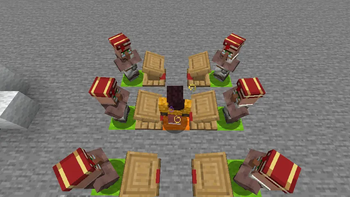
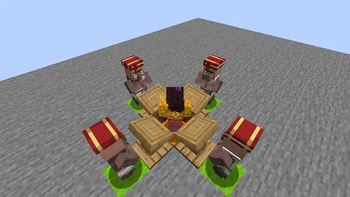
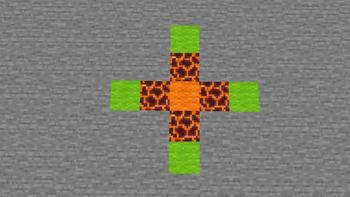
- Place librarian villagers and lecterns in the specific arrangement shown below
- Configure the target enchantment list
- Stand in the designated position
- Press
J(default) to start/stop the automation loop
V6 Mode
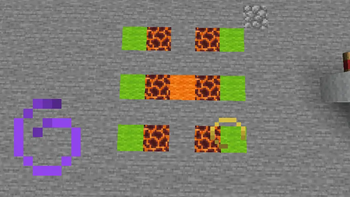
- Place librarian villagers and lecterns in the specific arrangement shown below
- Configure the target enchantment list
- 👁 Player's line of sight must be parallel to the two rows of lecternsy
- Stand in the designated position
- Press
J(default) to start/stop the automation loop
V4 & V6 Layout
- See images in the image gallery section
- Color Legend:
- 🟧 Orange: Player
- 🟩 Green: Villager
- 🟥 Magma Block: Lectern
Configuration Options
| Option | Description |
|---|---|
| Auto-Buy | Automatically purchases and locks the enchantment when found (Not yet implemented) |
| Prevent Axe Breaking | Stops automation when axe durability falls below 10 to protect the tool |
| Legit Mode | Makes player eyes follow the target lectern/villager (Not yet implemented, considering removal) |
| Villager Count | Selects V1/V4/V6 mode as described above |
| Enchantment Entries | List of enchantments to target (format: enchantment_name level, one per line) |
Example:
Smite 5
Sharpness 5
Silk Touch
Enchantments without a specified level are excluded from the filter list.
Verfügbare Versionen
librarianroller auf dem Server installieren
Server bestellen
Bestelle einen Minecraft Java Server mit mindestens 3 GB RAM (4 GB empfohlen).
fabric Loader setzen
Wähle im Panel unter "Egg" den fabric-Loader und die passende Minecraft-Version (1.21.11).
Mod installieren
Öffne den Mod-Browser im Dashboard und suche nach "librarianroller". Klicke "Installieren" – fertig! Alternativ: Lade die .jar via SFTP in den /mods Ordner.
Kompatibilität
Mod-Loader
Minecraft-Versionen
1.21.11
Server-seitig
✗ Nicht unterstütztEmpfohlener RAM
4 GB(min. 3 GB)Häufige Fragen
librarianroller Server crasht beim Start – was tun?
Häufigste Ursache: falsche fabric-Version oder zu wenig RAM. Prüfe im Server-Log (latest.log), ob ein "OutOfMemoryError" oder "Mixin"-Fehler auftritt. Bei Mado Hosting: Stelle sicher, dass mindestens 3 GB RAM zugewiesen sind und der Loader zur Mod-Version passt (1.21.11). Über das Panel kannst du den Loader mit einem Klick wechseln.
Ist librarianroller mit fabric kompatibel?
librarianroller unterstützt offiziell fabric für Minecraft 1.21.11. Im Mado Dashboard werden inkompatible Loader-Kombinationen automatisch erkannt.
Server laggt mit librarianroller – wie optimiere ich die Performance?
Empfohlener RAM: 4 GB (+1 GB pro 8 Spieler). Prüfe mit /spark profiler, ob librarianroller den meisten Tick-Time verbraucht. Häufige Fixes: Server-View-Distance auf 8-10 reduzieren, bei Forge "performant" oder "starlight" als Zusatz-Mod installieren. Bei Mado Hosting läuft dein Server auf NVMe-SSDs mit dedizierten CPU-Kernen für minimale Latenz.
Ähnliche Mods




![[ETF] Entity Texture Features](https://cdn.modrinth.com/data/BVzZfTc1/af683d206d50b05258d865b0d6e4aa2f2cee12f2_96.webp)

Modded Server mieten
Installiere librarianroller mit nur einem Klick auf deinem Server.