Locator Heads
Show player heads on the locator bar and other usefull settings.
Screenshots





Über diese Mod



Locator Heads
is a client-side Minecraft mod that displays nearby players as heads on your XP bar, making it easy to track their location and direction at a glance. Customize colors, borders, filtering options, and add a compass overlay to enhance your multiplayer experience.



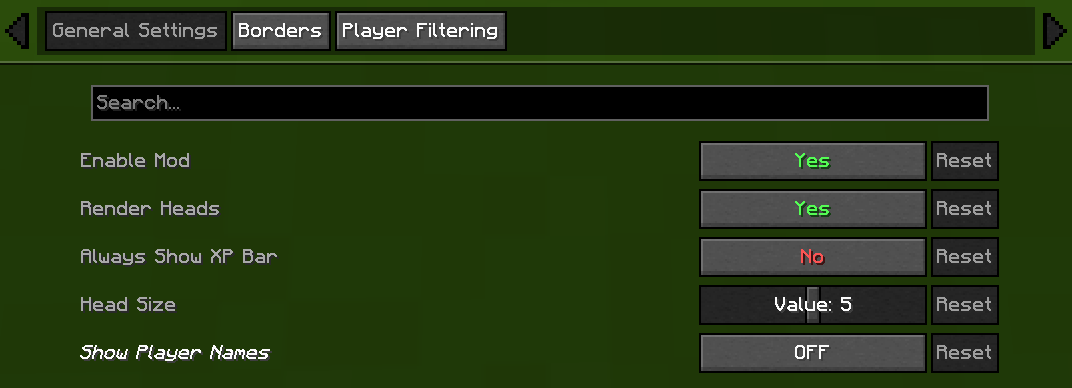
⚙️ General Settings
- Enable/Disable Mod
Chose weather or not mod is on or off. - Render Heads
Choose if you want heads to be rendered (can be used to only show names) - Always show XP bar
- Head Size
Change the size of the heads - Show Player Names
| Player Name Option | Description |
|---|---|
| Never | No names on the locator bar. (default) |
| Always | Names permanently visible above all player heads. |
| Looking At | Names appear only when you look within a 30° |
| Player List | Names show when the in-game player list is open. |

🧭 Compass
- Show Compass
Toggle the compass overlay on or off - Compass Colour
Customize the color of the compass direction letters using hex color picker - Compass Shadow
Toggle black outline around compass letters for better visibility

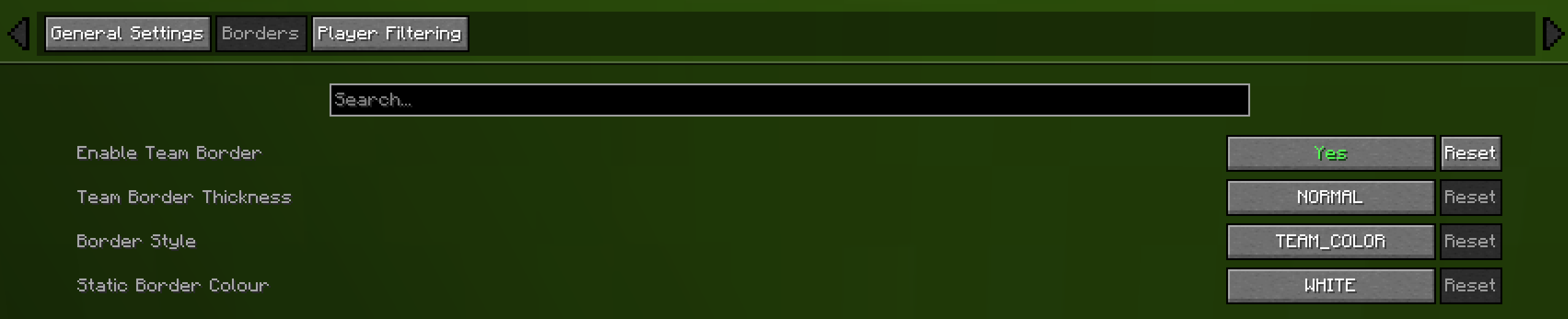
🎨 Borders
- Enable Border
If enabled the border is on - Border Thickness
How many pixels thick the border should be - Border Style
Can be eithere "TEAM_COLOUR" or "STATIC_COLOUR" - Static Border Colour
Choose what colour the static border will have

🎯 Advanced Player Filtering
choose who appear on your locator bar:
- All Players (default)
Shows everyone. - Include Only
Display only the players listed in your filter. - Exclude Only
Hide only the players listed, showing all others.
Filter Syntax
- Separate names by commas (
,), semicolons (;), colons (:), or periods (.).
Example:
Jeb_, Dinnerbone; LadyAgnes

🔗 Dependencies
Required
Optional (Recommended)

Compatibility
| Mod | Compatibility |
|---|---|
| Flashback | Automatically hides the locator bar and compass while viewing replays. |
| Gnetum | Integrates with Gnetum's Info Bar to prevent HUD overlap. |
👥 Credits
- Original Head Rendering Concept & Code — MCRcortex

🔧 Update Help


💡 Feature Requests
- Always show XP bar — TechPro424
- Static border — Starrider37
- Compass — xisumavoid
and Zedaph


Verfügbare Versionen
Locator Heads auf deinem Client installieren
Mod-Loader lokal installieren
Installiere fabric für deine lokale Minecraft-Version.
Passende Datei herunterladen
Wähle die Locator Heads-Datei für fabric und Minecraft 26.3.
Mod installieren
Lege die .jar-Datei in deinem lokalen .minecraft/mods-Ordner ab und starte Minecraft neu. Eine Installation auf dem Server ist nicht nötig.
Kompatibilität
Mod-Loader
Minecraft-Versionen
26.3, 26.2, 26.1.2 (+7 weitere)
Server-seitig
✗ Nicht unterstütztEmpfohlener RAM
4 GB(min. 3 GB)Häufige Fragen
Muss Locator Heads auf dem Minecraft Server installiert werden?
Nein. Modrinth kennzeichnet Locator Heads serverseitig als nicht unterstützt. Installiere die Mod nur im lokalen Minecraft-Mods-Ordner. Dein Server kann unverändert bleiben, sofern die Mod-Seite keine zusätzliche Abhängigkeit nennt.
Welche Version und welchen Loader braucht Locator Heads?
Nutze eine Datei für fabric und exakt deine Minecraft-Version. Unterstützte Versionen sind unter anderem 26.3, 26.2, 26.1.2. Loader-Dateien sind nicht untereinander austauschbar.
Locator Heads funktioniert nicht – was kann ich prüfen?
Prüfe zuerst Minecraft-Version, Loader-Version und erforderliche Abhängigkeiten. Lege die .jar-Datei im lokalen .minecraft/mods-Ordner ab und entferne ältere Duplikate. Da die Mod clientseitig ist, löst mehr Server-RAM dieses Problem nicht.
Ähnliche Mods






Minecraft Server für deine Gruppe
Locator Heads bleibt auf deinem Client. Hoste dazu eine kompatible Welt für deine Mitspieler.
Details
- Lizenz
- GNU Lesser General Public License v3.0 only
- Server-seitig
- Nicht unterstützt