
Modrinth · Fabric, Forge, NeoForge
Longwings auf deinem Minecraft Server
Longwings läuft auf Minecraft Servern mit Fabric oder Forge oder NeoForge. Bestell deinen Server, stell den Loader im Panel ein und installiere die Mod mit einem Klick im Mod-Browser.
All things Butterflies (and Moths!)
- Downloads
- 188.3K
- Autor
- CicadaBluw
- Loader
- Fabric, Forge, NeoForge
- Minecraft
- 1.20 – 1.21.1
- Aktualisiert
- –
Screenshots
So sieht Longwings aus


Bilder: Longwings auf Modrinth, vom Projektteam veröffentlicht.
Einrichtung
Longwings auf dem Server installieren
Server und Spieler brauchen denselben Loader und dieselbe Minecraft-Version. Sichere die Welt, bevor du Mods hinzufügst oder aktualisierst.
- 01
Konfigurieren
4 GB RAM sind vorausgewählt. Laufzeit und Add-ons wählst du selbst, bezahlt wird per Kreditkarte oder PayPal.
- 02
Loader einstellen
Stell im Panel die Serversoftware auf Fabric oder Forge oder NeoForge und wähl die passende Minecraft-Version, zum Beispiel 1.21.1.
- 03
Mod installieren
Such im Mod-Browser nach „Longwings“ und installiere die Version für deinen Loader. Alternativ lädst du die .jar per SFTP in den Ordner mods. Erforderliche Abhängigkeiten stehen auf der Projektseite.
- 04
Verbinden
Alle Spieler installieren Longwings in derselben Version lokal und verbinden sich über die Serveradresse aus dem Panel.
- Auf dem Server
- Erforderlich
- Auf dem Client
- Erforderlich
- Loader
- Fabric, Forge, NeoForge
- Minecraft
- 1.21.1, 1.21, 1.20.1 +1 weitere
- Lizenz
- LicenseRef-All-Rights-Reserved
Das Panel
Mods installieren, Fehler finden.
Echte Screenshots aus dem Mado Panel. Beides ist bei jedem Minecraft Server enthalten.
Mod-Browser
Modrinth und CurseForge direkt im Panel.
Der Browser filtert nach deiner Minecraft-Version. Mods installierst du mit einem Klick, ohne .jar-Dateien hochzuladen.

KI-Crash-Analyse
Wenn ein Mod crasht, liest die Analyse das Log.
Mods scheitern oft an einer falschen Loader-Version, Java-Version oder fehlenden Abhängigkeit. Die Analyse nennt eine wahrscheinliche Ursache und einen Lösungsvorschlag.

Versionen
Veröffentlichte Versionen
Nimm die Datei, die zu Loader und Minecraft-Version deines Servers passt. Server und Spieler brauchen dieselbe Version.
Longwings · Modrinth- Longwings v0.9.5 for 1.21.1 NeoForgebeta2. Mai 2026Minecraft 1.21, 1.21.1 · NeoForge
- Longwings v0.9.5 for 1.21.1 Fabricbeta2. Mai 2026Minecraft 1.21, 1.21.1 · Fabric
- Longwings v0.9.5 for 1.21.1 Forgebeta2. Mai 2026Minecraft 1.21, 1.21.1 · Forge
- Longwings v0.9.5 for 1.20.1 Fabricbeta25. April 2026Minecraft 1.20, 1.20.1 · Fabric
- Longwings v0.9.5 for 1.20.1 Forgebeta25. April 2026Minecraft 1.20, 1.20.1 · Forge, NeoForge
Originalbeschreibung des Projektautors
🦋 Longwings
Bring the ambience of Butterflies and Moths into your Minecraft world with... Longwings!
Longwings is a Minecraft mod that introduces Butterflies and Moths into the game, with additional blocks and items to assist you in Butterfly-Keeping. There are 70 different variants of Butterflies and Moths inspired by their real-life counterparts that can appear across the overworld (more to come!), with each variant having individual properties such as Rarity, Size, and Habitat.
More detailed information can be found in the following
Notes:
- Longwings supports version 1.20.1 and 1.21.1 as of now (More versions to come)
- Longwings supports Forge, Fabric, and NeoForge mod loaders
- Butterflies and their biome spawning conditions are compatible with any Biome mod
- You may use Longwings in your mod pack, but please ensure that credit is kept


🦋 Butterflies and Moths
Butterflies and Moths are common mobs that can be found spawning naturally in the overworld.
The many variants that they come in depend on the biome they spawn in! Most characteristics of Butterflies are also applied to Moths.
Learn more
Butterflies:
- Butterflies are a common mob that can spawn naturally in groups of 1-7 across the overworld, with one dominant variant appearing most in said group.
- There are currently 52 variants of Butterflies that can be found, with each variant having its own Rarity, Size, and Habitat properties
- Butterflies hold various interactions and behaviors based on their surrounding environment. Examples include but are not limited to... reducing flight activity based on low light level conditions, landing on walls, and more!
- Butterflies can be caught in Item form by right-clicking on one with a Catching Net item
- Butterflies feed on sugar water, which can be supplied using Butterfly Feeder Blocks. (More on that later)
- Butterflies have a chance in boosting crop growth when flying over respective crop blocks by default
- (More is planned for Butterflies in the future)
Moths:
- Moths are an uncommon mob that can spawn naturally in groups of 1-2 across the overworld
-There are currently 18 variants of Moths that can be found, with each variant having its own Rarity, Size, and Habitat properties
- Moths also boost crop growth when flying over them
- All behaviors from Butterflies apply to the Moths as well, with additional behaviors such as flying around light sources during nighttime
- Moths can also be caught in Item form by right-clicking on one with a Catching Net Item
- Moths also feed on sugar water
- (More is planned for Moths in the future)
🦋 Items
Learn more
Catching Net:
- The Catching Net is a key item that allows you to catch Butterflies/Moths and collect them into item form.
- Has durability and can break over time
- Crafted with 2 String and 2 Sticks
Butterfly & Moth Handbook:
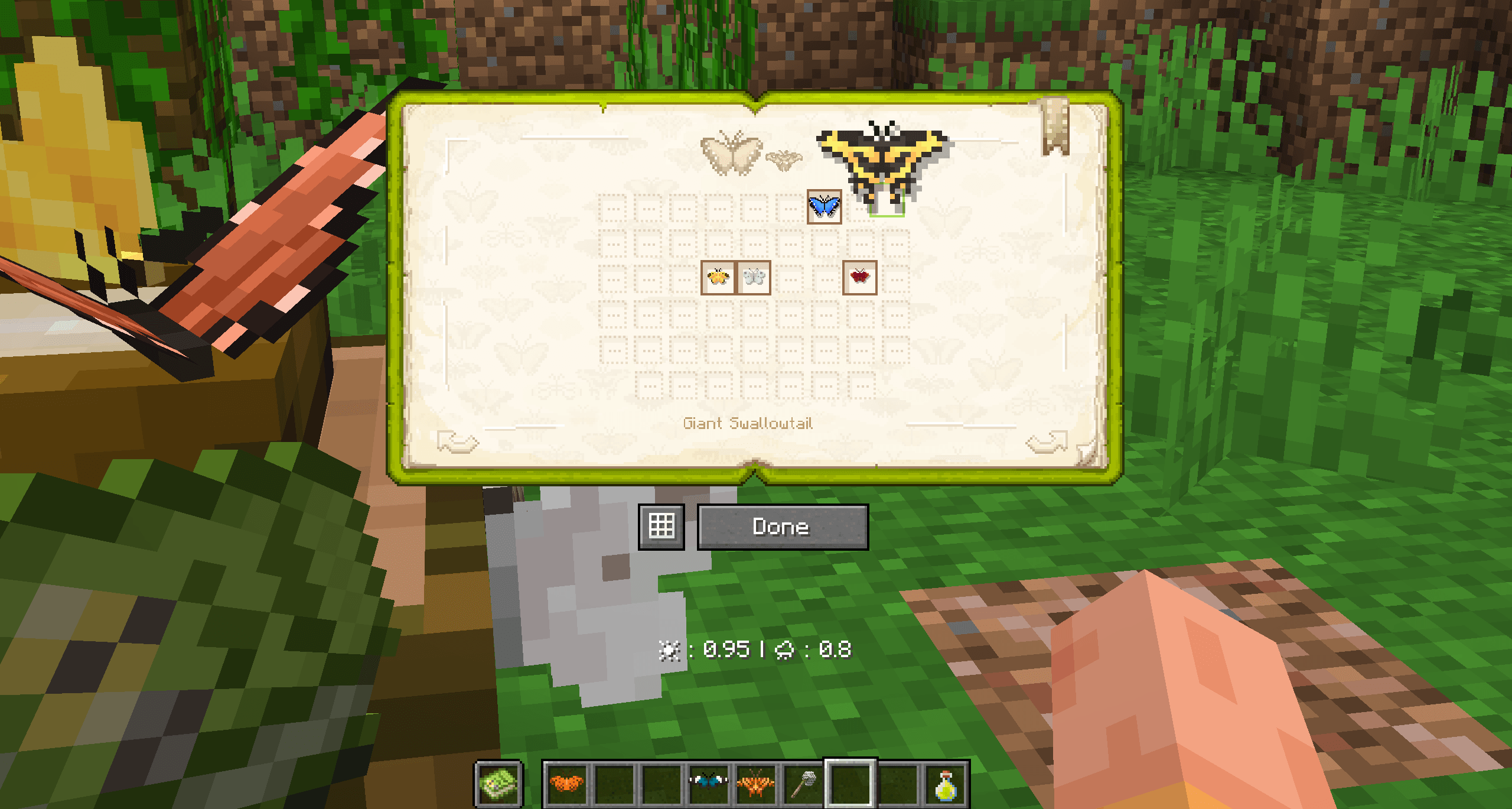
- The Butterfly & Moth Handbook is another key Item that can provide you with information about every Butterfly/Moth species in this mod!
- Each species has its own dedicated page that provides information such as habitat, rarity, type of lure, and more
- The handbook will keep track of all the Butterflies/Moths that you catch, as long as the Handbook is in your inventory
- You can combine or duplicate a Handbook's information by crafting 2 Handbooks together
- Some features of the Handbook are subject to change
- Crafted with 1 Book and 1 Catching Net
Butterfly (Item):
- A Butterfly in Item form. Obtainable by catching a Butterfly with a Catching Net
- You can place a Butterfly Item back into its Entity form by right-clicking on any block with the item in hand.
Moth (Item):
- A Moth in Item form. Obtainable by catching a Moth with a Catching Net
- You can place a Moth Item back into its Entity form by right-clicking on any block with the item in hand.
Brew:
- The Butterfly Brew Item is a type of Butterfly Lure that can be used in a Drip-Lure block to attract Butterflies/Moths to your location (More on that later)
- Butterfly Brew comes in three types: Apple, Berry, and Melon. Different Butterfly/Moth species are attracted to different Lure types, which can be identified in the Handbook Item.
- Butterfly Brew fills a Drip-Lure by 2 levels per Brew
- Crafted with 1 Water Bottle, 1 Sugar, and 1 [Apple / Melon Slice / Sweet Berry]
Sugar-Water Bowl:
- The Sugar-Water Bowl Item can be used to fill a Butterfly Feeder block and feed nearby Butterflies
- Crafted with a Bowl, a Water Bottle, and Sugar
🦋 Blocks
Learn more
Netting:
- Netting is a decorative block that can be used to build Butterfly enclosures
- Crafted with 9 String
Butterfly Feeder:
- A Butterfly Feeder is a block that can be filled with Butterfly food (Sugar Water)
- Butterflies will feed off of a filled Butterfly Feeder (Butterflies that are fed gain benefits such as increased maximum health and trusting nearby players)
- Filled Butterfly Feeders will gradually empty as Butterflies/Moths feed from them
- Crafted with 1 bowl and 1 dirt block
Butterfly Drip-Lure:
- The Drip-Lure is a block that can be supplied with Butterfly Brew to lure Butterflies and Moths to your location
- Drip-Lures can be filled with Apple, Berry, and Melon Butterfly Brew
- Filled Drip-Lures will gradually empty on their own, having a chance of attracting a Butterfly or Moth to your location (Drip-Lures will not Lure 100% of the time, so you'll probably need a good amount of Butterfly Brew to get the Butterfly you want)
- (Some behavior is subject to change)
- Crafted with 5 Copper Ingots and 3 Glass
Butterfly Brew Blocks (Berry/Apple/Melon)
Butterfly Brew Blocks are a storage and decorative block that have sticky properties (Stickier than Honey Blocks!).
- They come in three different types (Berry, Apple, and Melon)
- Crafted with 4 of the same Brew types together
- Butterflies will sometimes land on these blocks
Glass Jar:
- Currently, a decoration-only block that can be crafted with glass
- More is planned for Glass Jars in the future
🦋 Effects
You can obtain the following effects through something called "Butterfly Harmony". Butterfly Harmony can be obtained by drinking a Sugar-Water Bowl Item around 10 or more Butterflies/Moths
Learn more
Grace of the Butterflies Effect:
- Grace of the Butterflies is an effect obtainable by entering "Butterfly Harmony" with 10 or more nearby Butterflies/Moths
(Butterfly Harmony can be obtained by drinking a sugar-water bowl around Butterflies/Moths)
- This effect gives the player the ability to jump five blocks tall while maintaining a graceful descent, along with a bonus of absorption hearts. You can use this effect to enhance mobility in early-game building!
- The duration of this effect is dependent on the number of Butterflies nearby (The more Butterflies around, the larger the duration)
Seed Sniffer Effect:
- Seed Sniffer is an effect obtainable by entering "Butterfly Harmony" with 10 or more Moths
(Butterfly Harmony can be obtained by drinking a sugar-water bowl around Butterflies/Moths)
- This effect gives the ability to dig out flower seeds when breaking dirt or grass blocks. You can use this effect to obtain sniffer seeds early game!
- The duration of this effect is dependent on the number of Moths nearby (The more Moths around, the larger the duration)
Tracking Species with the Butterfly & Moth Handbook
- A Butterfly/Moth species habitat is measured through the Temperature and Humidity levels of a Biome. (These values are integrated among modded biomes)
- The specifics of each species' habitat can be found in its own dedicated page in the Butterfly & Moth Handbook Item.
- The current Biome Temperature and Humidity values will be displayed in your HUD when you hold a Handbook Item!
- In addition, collecting Butterflies and Moths will be tracked in the Handbook Atlas (shown in the first few pages of the Handbook Item)
- Some specifics are subject to change and will be adjusted based on feedback
Luring Butterflies and Moths
- For hard-to-find Butterflies/Moths, you can use a Drip-Lure block to attract a certain species to your location.
- Butterfly Drip-Lures can be filled with Butterfly Brew, a type of Lure that is divided among Berry, Apple, and Melon types.
- Filled Drip-Lures will empty on their own over time, with a chance of attracting a Butterfly/Moth every time they empty (Keep in mind Drip-Lures will sometimes empty without Luring)
- Using a certain type of Lure can increase your chances of attracting a certain type of species
- Lure specifics can be found on a species page in the Butterfly & Moth Handbook
- More is planned for Butterfly Luring in the future
Feeding Butterflies and Moths
- Butterflies and Moths like to feed on Sugar Water, which can be supplied to them through a Butterfly Feeder Block
- Butterflies/Moths that are fed will trust nearby players and be more resistant to accidental damage.
Longwings Server crasht beim Start – was tun?
Häufige Ursachen: Loader- oder Minecraft-Version passen nicht zur Mod-Datei, eine Abhängigkeit fehlt oder der RAM reicht nicht. Such im Log (latest.log) nach „OutOfMemoryError“, „Mixin“ oder fehlenden Mods. Bei Mado wertet die KI-Crash-Analyse das Log aus und schlägt eine Ursache vor. Loader und Version änderst du im Panel.
Mit welchem Loader läuft Longwings?
Laut Modrinth unterstützt Longwings Fabric, Forge, NeoForge für Minecraft 1.21.1, 1.21, 1.20.1. Forge- und Fabric-Dateien sind nicht untereinander austauschbar: Wähl einen Loader für Server und Clients.
Wie viel RAM braucht ein Server mit Longwings?
Als Orientierung 3–4 GB für einen Server mit dieser Mod. Das ist eine Schätzung, keine gemessene Mindestanforderung. Weitere Mods, viele Spieler und große Sichtweiten brauchen mehr. Ob eine Mod die Tick-Zeit belastet, siehst du mit dem spark-Profiler.
Ähnliche Mods
Beliebte Mods aus derselben Kategorie
 Server-fähig

Xaero's Minimap
von thexaero
Displays a map of the nearby world terrain, players, mobs, entities in the corner of your screen. Lets you create waypoints which help you find the locations you've marked.
 Server-fähig

Xaero's World Map
von thexaero
Adds a full screen world map which shows you what you have explored in the world. Works great together with Xaero's Minimap.
 Nur Client

Not Enough Animations
von tr7zw
Bringing first-person animations to the third-person
 Nur Client

3D Skin Layers
von tr7zw
Render the player skin layer in 3d!
Bereit für deinen Server mit Longwings?
4 GB RAM ab 8,00 € im Monat. 35 % auf den 1. Monat mit MADO35.