
Modrinth · Fabric
LumyMon auf deinem Minecraft Server
LumyMon läuft auf Minecraft Servern mit Fabric. Bestell deinen Server, stell den Loader im Panel ein und installiere die Mod mit einem Klick im Mod-Browser.
Craft maps to locate rare structures & gyms across every dimension, and collect unique legendary items to power up your Cobblemon experience!
- Downloads
- 4.9M
- Autor
- LUMYVERSE
- Loader
- Fabric
- Minecraft
- 1.21.1
- Aktualisiert
- –
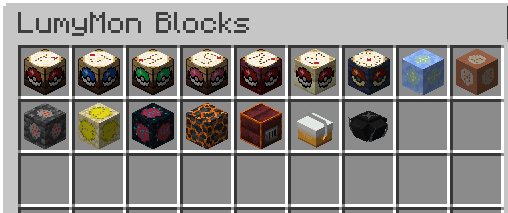
Screenshots
So sieht LumyMon aus


Bilder: LumyMon auf Modrinth, vom Projektteam veröffentlicht.
Einrichtung
LumyMon auf dem Server installieren
Server und Spieler brauchen denselben Loader und dieselbe Minecraft-Version. Sichere die Welt, bevor du Mods hinzufügst oder aktualisierst.
- 01
Konfigurieren
4 GB RAM sind vorausgewählt. Laufzeit und Add-ons wählst du selbst, bezahlt wird per Kreditkarte oder PayPal.
- 02
Loader einstellen
Stell im Panel die Serversoftware auf Fabric und wähl die passende Minecraft-Version, zum Beispiel 1.21.1.
- 03
Mod installieren
Such im Mod-Browser nach „LumyMon“ und installiere die Version für deinen Loader. Alternativ lädst du die .jar per SFTP in den Ordner mods. Erforderliche Abhängigkeiten stehen auf der Projektseite.
- 04
Verbinden
Alle Spieler installieren LumyMon in derselben Version lokal und verbinden sich über die Serveradresse aus dem Panel.
- Auf dem Server
- Erforderlich
- Auf dem Client
- Erforderlich
- Loader
- Fabric
- Minecraft
- 1.21.1
- Lizenz
- Creative Commons Attribution Non Commercial No Derivatives 4.0 International
Das Panel
Mods installieren, Fehler finden.
Echte Screenshots aus dem Mado Panel. Beides ist bei jedem Minecraft Server enthalten.
Mod-Browser
Modrinth und CurseForge direkt im Panel.
Der Browser filtert nach deiner Minecraft-Version. Mods installierst du mit einem Klick, ohne .jar-Dateien hochzuladen.

KI-Crash-Analyse
Wenn ein Mod crasht, liest die Analyse das Log.
Mods scheitern oft an einer falschen Loader-Version, Java-Version oder fehlenden Abhängigkeit. Die Analyse nennt eine wahrscheinliche Ursache und einen Lösungsvorschlag.

Versionen
Veröffentlichte Versionen
Nimm die Datei, die zu Loader und Minecraft-Version deines Servers passt. Server und Spieler brauchen dieselbe Version.
LumyMon · ModrinthOriginalbeschreibung des Projektautors

LumyMon: Forge Your Path to Legendary Adventures
LumyMon is a utility and content expansion designed to enhance the exploration and progression of your Cobblemon journey. It introduces dedicated systems to locate structures, track legendaries, and improve daily gameplay through quality-of-life features!
🗺️ Navigation & Exploration
Forget aimless wandering! LumyMon adds specialized tools to help you navigate your world with purpose:
- Regional Cartography Tables: Use these workstations to craft precise maps
- Gym & League Mapping: Forge unique items representing Gym Leaders and Champions (from Kanto to Sinnoh, and beyond!) to generate maps leading straight to their Gyms and Elite Four locations
- Regional Poké Radars: Combine rare Locator Chips with our custom Cartography Tables to track the exact positions of Legendary Pokémon across every region, from Kanto to Paldea
- Regi Ores & Resources: Discover unique ores to awaken the Titans, and use Apricorn Boxes for organized, handy storage on the go
✨ The Altar System
The mod features a special summoning system for Legendary and Mythical Pokémon in Minecraft:
- Altars and Shrines: Custom 3D blocks for Legendaries from Generations 1 through 4, plus others such as Eternatus, Regieleki, and Regidrago
- Summoning Mechanics: Use specific items on the altars to trigger encounters, complete with custom particle and sound effects
- Unique Dimensions: Venture into custom-built dimensions, like the ones for Arceus and Darkrai, featuring unique mechanics and atmospheric challenges
- The Hunt for Perfection: Every summoned Pokémon has randomized IVs and levels. Will you be lucky enough for a Shiny or a Perfect IV encounter?
🛠️ Quality of Life & Mechanics
Several features are included to streamline the Cobblemon experience:
- Remote PC Access: Access your Pokémon Boxes from anywhere (Default: "P")
- Better Riding: A dedicated hotkey allows you to dismount from your Pokémon instantly (Default: "V")
- Elemental Mounts: Your Pokémon now protects you during travel! Gain lava and fire immunity while riding Fire-types, and infinite water breathing while riding Water-type Pokémon
- Vanilla Replacements: Experience a more immersive world as some vanilla mobs are replaced by Pokémon counterparts (e.g., Happy Ghastlings becoming Gastly, or the Creaking becoming Trevenant)
- Optimized Performance: Built with compatibility in mind, featuring integration with many mods available in COBBLEVERSE
🤝 Perfect Synergy with COBBLEVERSE
While LumyMon works as a standalone expansion, it is the beating heart of the COBBLEVERSE modpack. It has been meticulously balanced to provide a progression-focused experience where every craft and every battle feels rewarding.
🚀 The Journey Continues
LumyMon is a passion project in constant evolution. We are committed to polishing and improving every aspect of it, and we have much more planned for future updates, including new mechanics, expanded content, and deeper integration with your Cobblemon experience.
Join our community on Discord, share your feedback, and help us build the ultimate Pokémon adventure!

While we're continually learning and growing in programming and texture creation, your patience and understanding as we improve are incredibly appreciated. Thank you! ❤️💙
Inspired by the world of Pokémon™ (Trademark of Nintendo, Creatures Inc., and GAME FREAK Inc.)
LumyMon Server crasht beim Start – was tun?
Häufige Ursachen: Loader- oder Minecraft-Version passen nicht zur Mod-Datei, eine Abhängigkeit fehlt oder der RAM reicht nicht. Such im Log (latest.log) nach „OutOfMemoryError“, „Mixin“ oder fehlenden Mods. Bei Mado wertet die KI-Crash-Analyse das Log aus und schlägt eine Ursache vor. Loader und Version änderst du im Panel.
Mit welchem Loader läuft LumyMon?
Laut Modrinth unterstützt LumyMon Fabric für Minecraft 1.21.1.
Wie viel RAM braucht ein Server mit LumyMon?
Als Orientierung 3–4 GB für einen Server mit dieser Mod. Das ist eine Schätzung, keine gemessene Mindestanforderung. Weitere Mods, viele Spieler und große Sichtweiten brauchen mehr. Ob eine Mod die Tick-Zeit belastet, siehst du mit dem spark-Profiler.
Ähnliche Mods
Beliebte Mods aus derselben Kategorie
 Server-fähig

Xaero's Minimap
von thexaero
Displays a map of the nearby world terrain, players, mobs, entities in the corner of your screen. Lets you create waypoints which help you find the locations you've marked.
 Server-fähig

Xaero's World Map
von thexaero
Adds a full screen world map which shows you what you have explored in the world. Works great together with Xaero's Minimap.
 Nur Client

Not Enough Animations
von tr7zw
Bringing first-person animations to the third-person
 Nur Client

3D Skin Layers
von tr7zw
Render the player skin layer in 3d!
Bereit für deinen Server mit LumyMon?
4 GB RAM ab 8,00 € im Monat. 35 % auf den 1. Monat mit MADO35.