
MapFrontiers
This mod is an addon for JourneyMap that allows you to divide the map into regions and assign them names and colors.
Über diese Mod
This mod is an addon for JourneyMap that allows you to divide the map into regions and assign them names and colors.
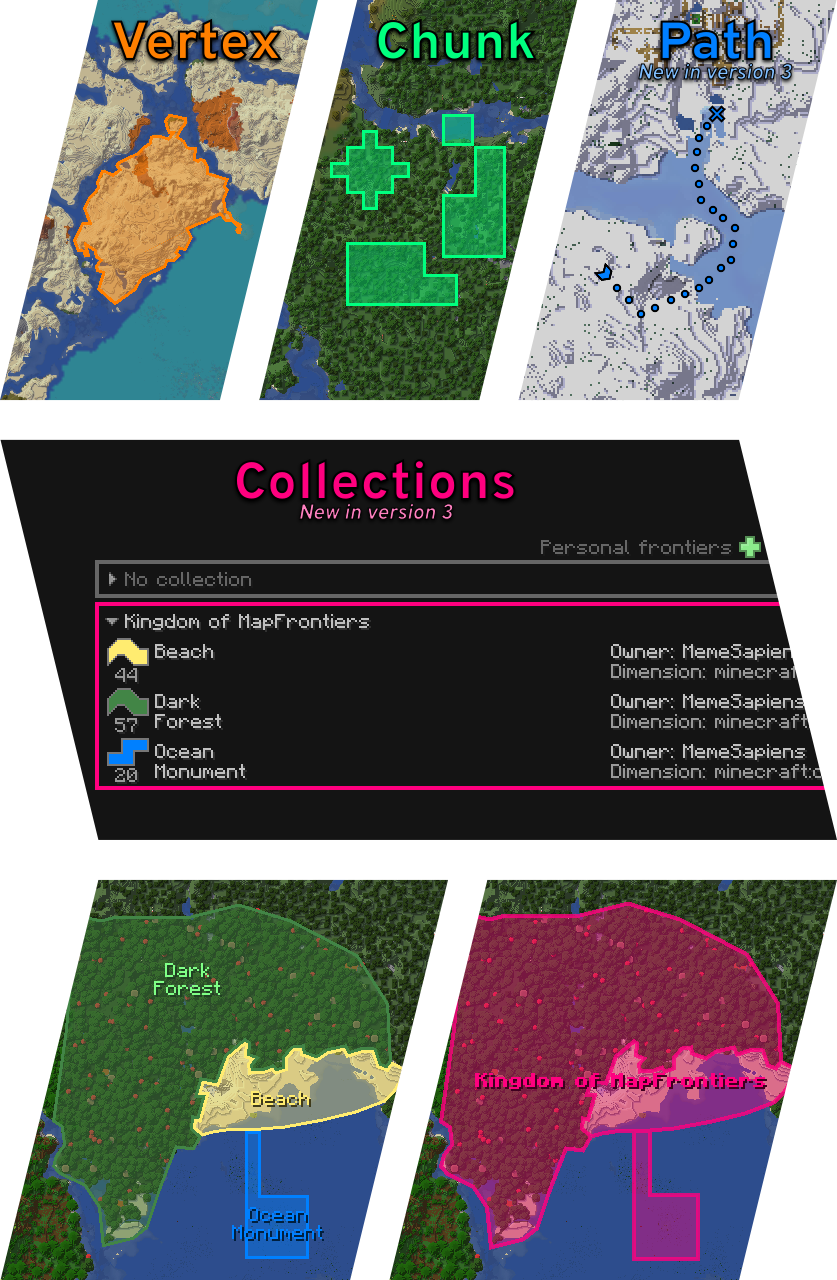
Version 3
Big changes are coming in this new version. The features already implemented are Path as a new shape, Collections for organizing frontiers, and an API so that anyone can create a plugin that interacts with MapFrontiers.
The API is published as SNAPSHOT and its design is not yet finalized.
From this version onwards, Forge Config API Port is no longer needed.
Features
- Vertex Frontier: A single polygon in any shape you want. Use the left mouse button to drag vertices. Use the right mouse button to open the menu where you can add and remove vertices.
- Chunk Frontier: A group of chunks that you can add and remove individually with the right mouse button.
- Path Frontier: A trail of markers. Use the left mouse button to drag points. Use the right mouse button to open the menu where you can add and remove points.
- Collections: Organize your frontiers into collections. Make them visible on the map when you zoom out.
- HUD: Next to the JourneyMap minimap, you can see which frontier you're within. You can edit appearance and screen location in settings.
- Banner: You can assign any banner you have in your hand to your frontiers. It can be displayed on the map and in the HUD.
- Permissions: In settings, players with OP permissions can change who can create, modify, and delete global frontiers.
Client or Server?
The mod is optional on both sides. It is placed on the client for the player who wants to see and use the frontiers. It is placed on the server so that global frontiers can be created (which can be seen by everyone who has the mod on their client) and so that personal frontiers can be shared with other players.
Current limitations
- Doesn't support vertex frontiers that intersect themselves.
- JourneyMap moves Minecraft effect indicators with the minimap. MapFrontiers doesn't do that so they end up in front of the frontier indicator.
You can see this and my other projects in alejandrocoria.games.
If you want to say something you can leave a comment here, create an issue on GitHub or write in the map-frontiers channel of the JourneyMap discord.
Patreon
Thank you s10w10rr1s for being my patreon for so long!
If you like the mod, you can become a patron and support me, or you can join for free and read my occasional updates.
https://www.patreon.com/alejandrocoria

Verfügbare Versionen
MapFrontiers auf dem Server installieren
Server bestellen
Bestelle einen Minecraft Java Server mit mindestens 3 GB RAM (4 GB empfohlen).
fabric Loader setzen
Wähle im Panel unter "Egg" den fabric-Loader und die passende Minecraft-Version (26.3).
Mod installieren
Öffne den Mod-Browser im Dashboard und suche nach "MapFrontiers". Klicke "Installieren" – fertig! Alternativ: Lade die .jar via SFTP in den /mods Ordner.
Kompatibilität
Mod-Loader
Minecraft-Versionen
26.3, 26.2, 26.1.2 (+21 weitere)
Server-seitig
~ OptionalEmpfohlener RAM
4 GB(min. 3 GB)Häufige Fragen
MapFrontiers Server crasht beim Start – was tun?
Häufigste Ursache: falsche fabric-Version oder zu wenig RAM. Prüfe im Server-Log (latest.log), ob ein "OutOfMemoryError" oder "Mixin"-Fehler auftritt. Bei Mado Hosting: Stelle sicher, dass mindestens 3 GB RAM zugewiesen sind und der Loader zur Mod-Version passt (26.3). Über das Panel kannst du den Loader mit einem Klick wechseln.
Ist MapFrontiers mit fabric und forge und neoforge und quilt kompatibel?
MapFrontiers unterstützt offiziell fabric, forge, neoforge, quilt für Minecraft 26.3, 26.2, 26.1.2. Achtung: Forge- und Fabric-Mods sind NICHT untereinander kompatibel – wähle einen Loader und bleibe dabei. Im Mado Dashboard werden inkompatible Loader-Kombinationen automatisch erkannt.
Server laggt mit MapFrontiers – wie optimiere ich die Performance?
Empfohlener RAM: 4 GB (+1 GB pro 8 Spieler). Prüfe mit /spark profiler, ob MapFrontiers den meisten Tick-Time verbraucht. Häufige Fixes: Server-View-Distance auf 8-10 reduzieren, bei Forge "performant" oder "starlight" als Zusatz-Mod installieren. Bei Mado Hosting läuft dein Server auf NVMe-SSDs mit dedizierten CPU-Kernen für minimale Latenz.
Ähnliche Mods




![[ETF] Entity Texture Features](https://cdn.modrinth.com/data/BVzZfTc1/af683d206d50b05258d865b0d6e4aa2f2cee12f2_96.webp)

Modded Server mieten
Installiere MapFrontiers mit nur einem Klick auf deinem Server.