
Masa Gadget
Added some features to the Masa collection of mods.
Über diese Mod
Masa Gadget







❗Before reporting a problem, be sure to try the latest beta version to check if the problem still exists.
Added some features to the Masa collection of mods.
The default hotkey to open the in-game config GUI is G + C.
Dependencies
| Dependency | Type | Download |
|---|---|---|
| Fabric-API | Required | CurseForge | Github |
| Litematica | Optional | CurseForge | Masa WebSite |
| Magiclib | Required | CurseForge | Github |
| MaliLib | Required | CurseForge | Masa WebSite |
| MiniHUD | Optional | CurseForge | Masa WebSite |
| Plusls-Carpet-Addition | Optional | Github |
| Tweakeroo | Optional | CurseForge | Masa WebSite |
Feature
Generic
autoSyncEntityData
Auto use pcaSyncProtocol to sync entity data
- Category:
Generic - Type:
boolean - Default value:
true
cacheContainerMenu
Cache container menu, minecraft will cache inventory data from server when open inventory
- Category:
Generic - Type:
boolean with hotkey - Default value:
true,no hotkey
debug
Display debug message
- Category:
Generic - Type:
boolean - Default value:
false
openConfigGui
A hotkey to open the in-game Config GUI
- Category:
Generic - Type:
hotkey - Default value:
G,C
renderNextRestockTime
Render next restock time on villager.
- Category:
Generic - Type:
boolean with hotkey - Default value:
true,no hotkey
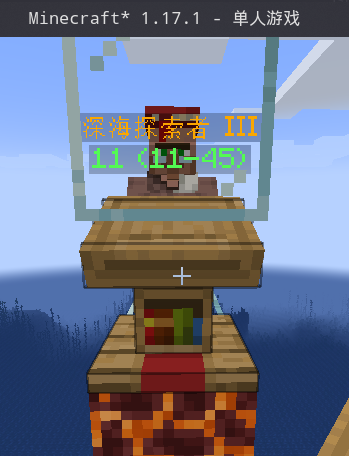
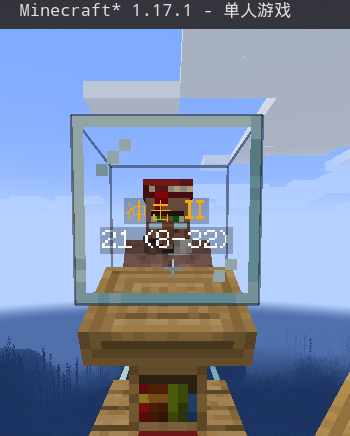
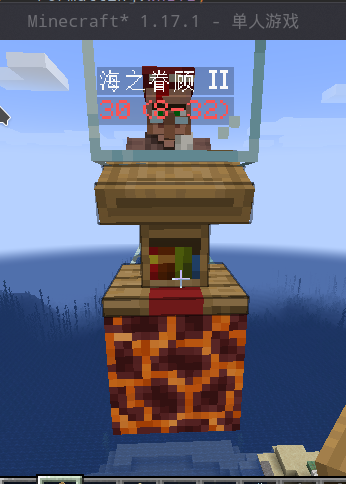
renderTradeEnchantedBook
Render trade enchanted book text on villager.
- Category:
Generic - Type:
boolean with hotkey - Default value:
true,no hotkey
good trader:
mid trader:
bad trader:
renderVillageHomeTracer
Render the tracking line of the villager to the home.
- Category:
Generic - Type:
boolean with hotkey - Default value:
true,no hotkey
renderVillageHomeTracerColor
renderVillageHomeTracer track line color.
- Category:
Generic - Type:
color - Default value:
#500000FF
renderVillageJobSiteTracer
Render tracking line of villager to the job site.
- Category:
Generic - Type:
boolean with hotkey - Default value:
true,no hotkey
renderVillageJobSiteTracerColor
renderVillageJobSiteTracer track line color.
- Category:
Generic - Type:
color - Default value:
#50FF0000
renderVillageHomeTracer
Render the tracking line of the villager to the home.
- Category:
Generic - Type:
boolean with hotkey - Default value:
true,no hotkey
searchMobSpawnPoint
Search mob spawn point. Need set §6Despawn Sphere§r in minihud,
and light check depends on §6lightLevelThresholdSafe§r in minihud
- Category:
Generic - Type:
hotkey - Default value:
no hotkey - Dependencies:
- And (All conditions need to be satisfied):
- minihud: *
- And (All conditions need to be satisfied):
searchMobSpawnPointBlackList
Don't search blocks in this list.
- Category:
Generic - Type:
string list - Default value:
[] - Dependencies:
- And (All conditions need to be satisfied):
- minihud: *
- And (All conditions need to be satisfied):
syncAllEntityData
Use pcaSyncProtocol to sync all entity data.
- Category:
Generic - Type:
hotkey - Default value:
no hotkey
Litematica
betterEasyPlaceMode
Easy place mode can open inventory (such as chest, hopper, etc.),
and can use beacon.
- Category:
Litematica - Type:
boolean with hotkey - Default value:
false,no hotkey - Dependencies:
- And (All conditions need to be satisfied):
- litematica: *
- And (All conditions need to be satisfied):
disableLitematicaEasyPlaceFailTip
Disable easyPlace failure that annoying prompt window.
- Category:
Litematica - Type:
boolean with hotkey - Default value:
false,no hotkey - Dependencies:
- And (All conditions need to be satisfied):
- litematica: *
- And (All conditions need to be satisfied):
fixAccurateProtocol
Fix accurate protocol support
- Category:
Litematica - Type:
boolean with hotkey - Default value:
false,no hotkey - Dependencies:
- And (All conditions need to be satisfied):
- litematica: *
- And (All conditions need to be satisfied):
nudgeSelectionSupportFreeCamera
Nudge Selection Support Free Camera
- Category:
Litematica - Type:
boolean - Default value:
true - Dependencies:
- And (All conditions need to be satisfied):
- litematica: *
- tweakeroo: *
- minecraft: <=1.15.2
- And (All conditions need to be satisfied):
saveInventoryToSchematicInServer
Use pcaSyncProtocol to sync inventory data to local and save to schematic
- Category:
Litematica - Type:
boolean - Default value:
false - Dependencies:
- And (All conditions need to be satisfied):
- litematica: *
- And (All conditions need to be satisfied):
useRelativePath
Save and load schematic use relative path
- Category:
Litematica - Type:
boolean - Default value:
false - Dependencies:
- And (All conditions need to be satisfied):
- litematica: *
- And (All conditions need to be satisfied):
Malilib
backportI18nSupport
Backport masa mod i18n support from 1.18.x
- Category:
Malilib - Type:
boolean - Default value:
true - Dependencies:
- And (All conditions need to be satisfied):
- minecraft: <=1.17.1
- And (All conditions need to be satisfied):
fastSwitchMasaConfigGui
Render drop down list widget, player can switch other masa's mod config gui quickly.
- Category:
Malilib - Type:
boolean with hotkey - Default value:
true,no hotkey - Dependencies:
- And (All conditions need to be satisfied):
- modmenu: *
- And (All conditions need to be satisfied):
favoritesSupport
Users can favorite and filter their frequently used options.
- Category:
Malilib - Type:
boolean with hotkey - Default value:
false,no hotkey
fixConfigWidgetWidth
Use the length of getTranslatedGuiDisplayName as widget width
- Category:
Malilib - Type:
boolean - Default value:
true - Dependencies:
- And (All conditions need to be satisfied):
- minecraft: <=1.17.1
- And (All conditions need to be satisfied):
fixGetInventoryType
Fix AbstractFurnaceBlock inventory type
- Category:
Malilib - Type:
boolean - Default value:
true - Dependencies:
- And (All conditions need to be satisfied):
- minecraft: <=1.17.1
- And (All conditions need to be satisfied):
fixSearchbarHotkeyInput
Fix searchbar input when press hotkey to open config gui.
- Category:
Malilib - Type:
boolean - Default value:
true
optimizeConfigWidgetSearch
Make search support uppercase, translate text, and can use §6modified§r to search modified config
- Category:
Malilib - Type:
boolean - Default value:
true - Dependencies:
- And (All conditions need to be satisfied):
- minecraft: <=1.17.1
- And (All conditions need to be satisfied):
showOriginalConfigName
Show original config name when config gui display name no the same as original config name.
- Category:
Malilib - Type:
boolean with hotkey - Default value:
false,no hotkey
showOriginalConfigNameScale
Original config name font scale.
- Category:
Malilib - Type:
double - Default value:
0.65 - Min value:
0.0 - Max value:
2.0
Minihud
minihudI18n
Minihud display text support i18n translate.
- Category:
Minihud - Type:
boolean with hotkey - Default value:
true,no hotkey - Dependencies:
- And (All conditions need to be satisfied):
- minihud: *
- And (All conditions need to be satisfied):
pcaSyncProtocolSyncBeehive
Press §6inventoryPreview§r hotkey to use PCA sync protocol to sync Beehive
- Category:
Minihud - Type:
boolean - Default value:
true - Dependencies:
- And (All conditions need to be satisfied):
- minihud: *
- tweakeroo: *
- minecraft: >1.14.4
- And (All conditions need to be satisfied):
Tweakeroo
inventoryPreviewSupportComparator
Inventory preview will render the output of comparator.
- Category:
Tweakeroo - Type:
boolean - Default value:
true - Dependencies:
- And (All conditions need to be satisfied):
- tweakeroo: *
- And (All conditions need to be satisfied):
inventoryPreviewSupportPlayer
Player can use inventory preview to show the inventory of player and ender chest inventory
- Category:
Tweakeroo - Type:
boolean - Default value:
true - Dependencies:
- And (All conditions need to be satisfied):
- tweakeroo: *
- And (All conditions need to be satisfied):
inventoryPreviewSupportSelect
When player press the inventory preview hotkey,
player can use the mouse wheel to select items (player can view the enchantment information), and when player select the shulker box in the chest, player can press the mouse scroll to preview the items in the box
- Category:
Tweakeroo - Type:
boolean with hotkey - Default value:
true,no hotkey - Dependencies:
- And (All conditions need to be satisfied):
- tweakeroo: *
- And (All conditions need to be satisfied):
inventoryPreviewSupportShulkerBoxItemEntity
Inventory preview support shulker box item entity.
- Category:
Tweakeroo - Type:
boolean - Default value:
true - Dependencies:
- And (All conditions need to be satisfied):
- tweakeroo: *
- And (All conditions need to be satisfied):
inventoryPreviewSupportTradeOfferList
Inventory preview will preview the trade offer list of merchant
- Category:
Tweakeroo - Type:
boolean - Default value:
true - Dependencies:
- And (All conditions need to be satisfied):
- tweakeroo: *
- And (All conditions need to be satisfied):
inventoryPreviewSyncData
When toggle inventory preview, use pcaSyncProtocol to sync block entity data and entity data from server, such as chest, villager
- Category:
Tweakeroo - Type:
boolean with hotkey - Default value:
true,no hotkey - Dependencies:
- And (All conditions need to be satisfied):
- tweakeroo: *
- And (All conditions need to be satisfied):
inventoryPreviewSyncDataClientOnly
Open inventory to sync inventory data when use inventory preview
- Category:
Tweakeroo - Type:
boolean with hotkey - Default value:
false,no hotkey - Dependencies:
- And (All conditions need to be satisfied):
- tweakeroo: *
- And (All conditions need to be satisfied):
inventoryPreviewUseCache
Inventory preview get the hit result from cache, to reduce lag when render
- Category:
Tweakeroo - Type:
boolean - Default value:
true - Dependencies:
- And (All conditions need to be satisfied):
- tweakeroo: *
- And (All conditions need to be satisfied):
restockWithCrafting
Automatically craft required items in the 2x2 crafting grid
when Tweakeroo can't find the item. This feature requires ItemScroller。
- Category:
Tweakeroo - Type:
boolean with hotkey - Default value:
true,no hotkey - Dependencies:
- And (All conditions need to be satisfied):
- tweakeroo: *
- itemscroller: *
- And (All conditions need to be satisfied):
restockWithCraftingRecipes
Recipe indexes in ItemScroller recipe storage. Note: only 2x2 recipes are supported.
- Category:
Tweakeroo - Type:
string list - Default value:
[] - Dependencies:
- And (All conditions need to be satisfied):
- tweakeroo: *
- itemscroller: *
- And (All conditions need to be satisfied):
Development
Support
Current main development for Minecraft version: 1.20.1
And use preprocess to be compatible with all versions.
Note: We only accept the following versions of issues. Please note that this information is time-sensitive and any version of the issue not listed here will be closed
- Minecraft 1.14.4
- Minecraft 1.15.2
- Minecraft 1.16.5
- Minecraft 1.17.1
- Minecraft 1.18.2
- Minecraft 1.19.2
- Minecraft 1.19.3
- Minecraft 1.19.4
- Minecraft 1.20.1
Mappings
We are using the Mojang official mappings to de-obfuscate Minecraft and insert patches.
Document
The English doc and the Chinese doc are aligned line by line.
License
This project is available under the LGPL-3.0 license. Feel free to learn from it and incorporate it in your own projects.
Verfügbare Versionen
Masa Gadget auf deinem Client installieren
Mod-Loader lokal installieren
Installiere fabric für deine lokale Minecraft-Version.
Passende Datei herunterladen
Wähle die Masa Gadget-Datei für fabric und Minecraft 1.21.5.
Mod installieren
Lege die .jar-Datei in deinem lokalen .minecraft/mods-Ordner ab und starte Minecraft neu. Eine Installation auf dem Server ist nicht nötig.
Kompatibilität
Mod-Loader
Minecraft-Versionen
1.21.5, 1.21.4, 1.21.3 (+23 weitere)
Server-seitig
✗ Nicht unterstütztEmpfohlener RAM
4 GB(min. 3 GB)Häufige Fragen
Muss Masa Gadget auf dem Minecraft Server installiert werden?
Nein. Modrinth kennzeichnet Masa Gadget serverseitig als nicht unterstützt. Installiere die Mod nur im lokalen Minecraft-Mods-Ordner. Dein Server kann unverändert bleiben, sofern die Mod-Seite keine zusätzliche Abhängigkeit nennt.
Welche Version und welchen Loader braucht Masa Gadget?
Nutze eine Datei für fabric, neoforge, quilt und exakt deine Minecraft-Version. Unterstützte Versionen sind unter anderem 1.21.5, 1.21.4, 1.21.3. Loader-Dateien sind nicht untereinander austauschbar.
Masa Gadget funktioniert nicht – was kann ich prüfen?
Prüfe zuerst Minecraft-Version, Loader-Version und erforderliche Abhängigkeiten. Lege die .jar-Datei im lokalen .minecraft/mods-Ordner ab und entferne ältere Duplikate. Da die Mod clientseitig ist, löst mehr Server-RAM dieses Problem nicht.
Ähnliche Mods




![[ETF] Entity Texture Features](https://cdn.modrinth.com/data/BVzZfTc1/af683d206d50b05258d865b0d6e4aa2f2cee12f2_96.webp)

Minecraft Server für deine Gruppe
Masa Gadget bleibt auf deinem Client. Hoste dazu eine kompatible Welt für deine Mitspieler.
Details
- Lizenz
- GNU Lesser General Public License v3.0 only
- Server-seitig
- Nicht unterstützt