Material Beacons
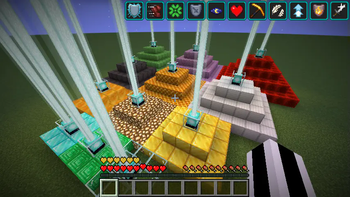
Changes the effect of beacons to be based on the material used to construct them.
Screenshots
Über diese Mod

Material Beacons
Changes how beacons work depending on the material used.
Instead of beacons being built out of any valid material and then selecting an effect,
the material used to build the beacon determines the effect.
Based on the concept of
Hardcore Beacons
from the
Better Than Wolves
mod.
Current Materials and Effects
| Block | Effect |
|---|---|
| Diamond | Strength |
| Emerald | Luck |
| Glass | None |
| Glowstone | Night vision |
| Gold | Haste |
| Honey | Regeneration |
| Honeycomb | Absorption |
| Iron | Resistance |
| Netherite | Fire Resistance |
| Purpur | Slow Falling |
| Redstone | Speed |
| Slime | Jump Boost |
Datapacks
Beacon materials and effects can be added/modified using datapacks.
The example json below creates a beacon using wool and/or clay with two tiers of effects:
- Tier 1: Blindness and Nausea
- Tier 2: Regeneration III
(/data/[namespace]/beacon/wool_clay.json)
{
  "bases": [
    "#minecraft:wool",
    "minecraft:clay"
  ],
  "powers": [
    [
      {
        "effect": "minecraft:blindness",
        "duration": 11,
        "amplifier": 0,
        "range": 10
      },
      {
        "effect": "minecraft:nausea",
        "duration": 11,
        "amplifier": 0,
        "range": 30
      }
    ],
    [
      {
        "effect": "minecraft:regeneration",
        "duration": 17,
        "amplifier": 3,
        "range": 30
      }
    ]
  ]
}
Bases are defined as a list of block tags or block ids. Powers are a list, with each index corresponding to a tier.
Each tier contains a list of effects. As shown in the first tier, multiple effects can be assigned to a single tier.
Note that each tier is independent of the others, and different effects and ranges can be applied for each tier.
Verfügbare Versionen
Material Beacons auf dem Server installieren
Server bestellen
Bestelle einen Minecraft Java Server mit mindestens 3 GB RAM (4 GB empfohlen).
fabric Loader setzen
Wähle im Panel unter "Egg" den fabric-Loader und die passende Minecraft-Version (26.3).
Mod installieren
Öffne den Mod-Browser im Dashboard und suche nach "Material Beacons". Klicke "Installieren" – fertig! Alternativ: Lade die .jar via SFTP in den /mods Ordner.
Kompatibilität
Mod-Loader
Minecraft-Versionen
26.3, 26.2, 26.1.2 (+16 weitere)
Server-seitig
✓ ErforderlichEmpfohlener RAM
4 GB(min. 3 GB)Häufige Fragen
Material Beacons Server crasht beim Start – was tun?
Häufigste Ursache: falsche fabric-Version oder zu wenig RAM. Prüfe im Server-Log (latest.log), ob ein "OutOfMemoryError" oder "Mixin"-Fehler auftritt. Bei Mado Hosting: Stelle sicher, dass mindestens 3 GB RAM zugewiesen sind und der Loader zur Mod-Version passt (26.3). Über das Panel kannst du den Loader mit einem Klick wechseln.
Ist Material Beacons mit fabric und neoforge kompatibel?
Material Beacons unterstützt offiziell fabric, neoforge für Minecraft 26.3, 26.2, 26.1.2. Im Mado Dashboard werden inkompatible Loader-Kombinationen automatisch erkannt.
Server laggt mit Material Beacons – wie optimiere ich die Performance?
Empfohlener RAM: 4 GB (+1 GB pro 8 Spieler). Prüfe mit /spark profiler, ob Material Beacons den meisten Tick-Time verbraucht. Häufige Fixes: Server-View-Distance auf 8-10 reduzieren, bei Forge "performant" oder "starlight" als Zusatz-Mod installieren. Bei Mado Hosting läuft dein Server auf NVMe-SSDs mit dedizierten CPU-Kernen für minimale Latenz.
Ähnliche Mods






Modded Server mieten
Installiere Material Beacons mit nur einem Klick auf deinem Server.