
Mind Your Bubbles
Mind Your Bubbles is a client-side Fabric mod for Minecraft that turns the vanilla air bar into a more consistent survival indicator.
Über diese Mod
Mind Your Bubbles
Mind Your Bubbles is a client-side Fabric mod for Minecraft that turns the vanilla air bar into a more consistent survival indicator.
Why this mod?
Minecraft stores the player's remaining breath as the entity Air value. The vanilla HUD only shows that value in a few situations. Many players only notice it underwater, even though it is part of the survival rules.
Mind Your Bubbles makes that value easier to notice and gives it a more consistent display. The entity Air value can support more than an underwater warning, and mods, plugins, maps, and gameplay experiments can treat it as a resource worth designing around.
Features
- Vanilla air bar visibility modes:
VANILLAby default,WHEN_NOT_FULL, andALWAYS - Smooth air bar animation for large entity
Airvalue changes, enabled by default - JSON configuration
- Optional in-game config screen through Mod Menu and Cloth Config
Display modes
Choose how the vanilla air bar appears:
| Mode | Behavior |
|---|---|
VANILLA |
Uses Minecraft's original air bar behavior. |
WHEN_NOT_FULL |
Shows the air bar when the player's Air value is below its maximum. |
ALWAYS |
Shows the air bar at all times. |
Note: A Water Breathing potion, or a similar effect, can keep Air full underwater. In that case, VANILLA still shows the air bar because the player is in water, while WHEN_NOT_FULL hides it because Air is full.
Visual smoothing
When a server-side plugin or datapack changes Air in larger steps, vanilla bubble transitions can be skipped or delayed. The smooth animation setting fills in those visual steps so bubble popping, brief blank slots, and empty slots appear in a more natural order.
Large Air value changes:
| Vanilla | Smoothed |
|---|---|
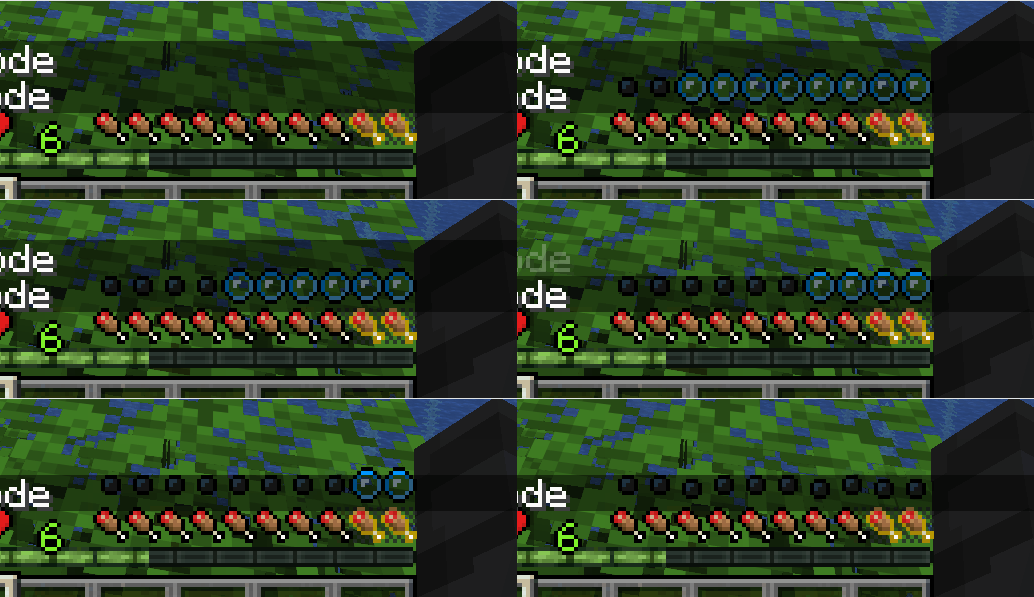 |
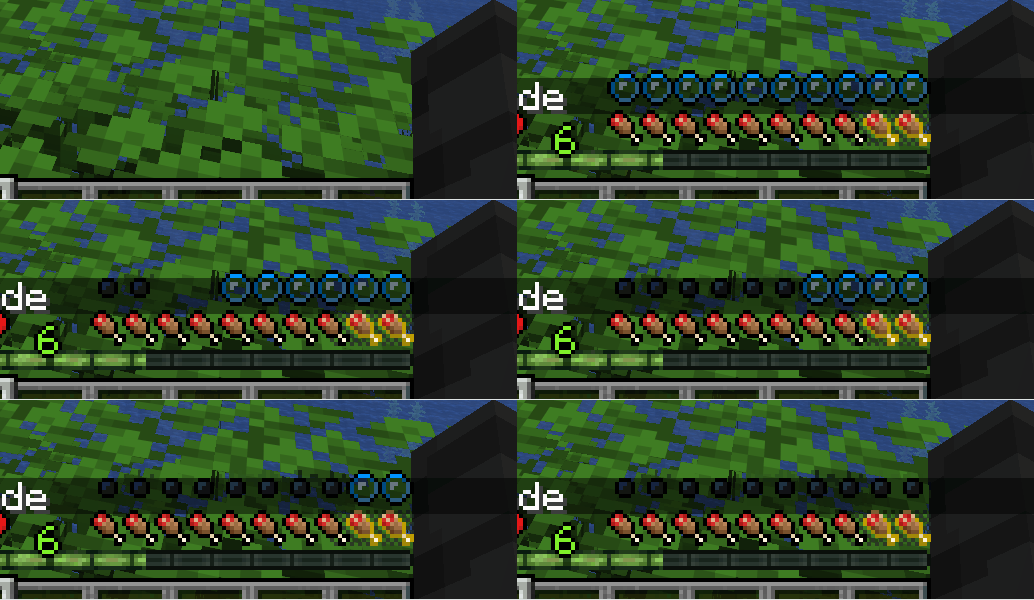 |
Small Air value changes:
| Vanilla | Smoothed |
|---|---|
 |
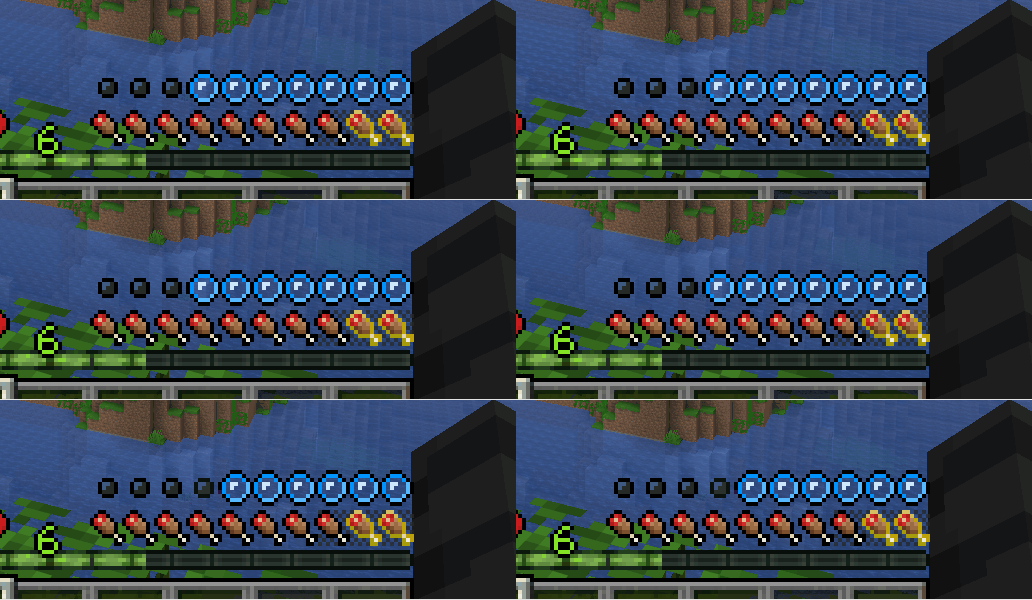 |
Configuration
If Mod Menu and Cloth Config are installed, you can change options from the Mod Menu config screen. Changes apply after saving.
For manual configuration, edit this file after the game creates it:
.minecraft/config/mind-your-bubbles.json
Example config:
{
  "visibilityMode": "VANILLA",
  "smoothAirBarAnimation": true
}
Restart the game after editing the config file manually.
Requirements
- Minecraft 1.21.11
- Fabric Loader 0.19.3 or newer
- Java 21 or newer
Optional for the in-game config screen:
- Mod Menu
- Cloth Config API
Compatibility
Tested compatible with the following Minecraft 1.21.11 Fabric mods:
- AppleSkin
3.0.8+mc1.21.11 - Leave My Bars Alone
21.11.0 - Raised
5.1.2
License
This project is licensed under CC0-1.0.
Verfügbare Versionen
Mind Your Bubbles auf dem Server installieren
Server bestellen
Bestelle einen Minecraft Java Server mit mindestens 3 GB RAM (4 GB empfohlen).
fabric Loader setzen
Wähle im Panel unter "Egg" den fabric-Loader und die passende Minecraft-Version (1.21.11).
Mod installieren
Öffne den Mod-Browser im Dashboard und suche nach "Mind Your Bubbles". Klicke "Installieren" – fertig! Alternativ: Lade die .jar via SFTP in den /mods Ordner.
Kompatibilität
Mod-Loader
Minecraft-Versionen
1.21.11
Server-seitig
✗ Nicht unterstütztEmpfohlener RAM
4 GB(min. 3 GB)Häufige Fragen
Mind Your Bubbles Server crasht beim Start – was tun?
Häufigste Ursache: falsche fabric-Version oder zu wenig RAM. Prüfe im Server-Log (latest.log), ob ein "OutOfMemoryError" oder "Mixin"-Fehler auftritt. Bei Mado Hosting: Stelle sicher, dass mindestens 3 GB RAM zugewiesen sind und der Loader zur Mod-Version passt (1.21.11). Über das Panel kannst du den Loader mit einem Klick wechseln.
Ist Mind Your Bubbles mit fabric kompatibel?
Mind Your Bubbles unterstützt offiziell fabric für Minecraft 1.21.11. Im Mado Dashboard werden inkompatible Loader-Kombinationen automatisch erkannt.
Server laggt mit Mind Your Bubbles – wie optimiere ich die Performance?
Empfohlener RAM: 4 GB (+1 GB pro 8 Spieler). Prüfe mit /spark profiler, ob Mind Your Bubbles den meisten Tick-Time verbraucht. Häufige Fixes: Server-View-Distance auf 8-10 reduzieren, bei Forge "performant" oder "starlight" als Zusatz-Mod installieren. Bei Mado Hosting läuft dein Server auf NVMe-SSDs mit dedizierten CPU-Kernen für minimale Latenz.
Ähnliche Mods

![[ETF] Entity Texture Features](https://cdn.modrinth.com/data/BVzZfTc1/af683d206d50b05258d865b0d6e4aa2f2cee12f2_96.webp)
![[EMF] Entity Model Features](https://cdn.modrinth.com/data/4I1XuqiY/6e5bbd0d06b1741bfdab6c0cfab6de8fdaf0064c_96.webp)



Modded Server mieten
Installiere Mind Your Bubbles mit nur einem Klick auf deinem Server.