
Mixmetica
A simple mixin mod that adds Arcmetica support directly into OptiFine. No more need for DNS rules.
Screenshots
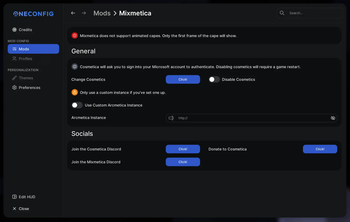
Über diese Mod
If you would like to support me, please consider donating to my Ko-Fi!


Mixmetica
A simple mixin mod that adds Arcmetica support directly into OptiFine. No more need for DNS rules.
Capes are temporarily not supported.
Get cosmetics from Cosmetica (log in using Microsoft)
Requires OptiFine to work. Recommended versions:
Discords
Cosmetica Discord - https://discord.gg/aQh5SJEUBm
My Discord - https://discord.gg/rejfv9kFJj
Have an issue?
Mixmetica is an extremely simple mod that modifies OptiFine to redirect their cosmetic URLs to Arcmetica's. If you are experiencing an issue, it is most likely an issue with Cosmetica, and you should report it to them. There is also a possibility it is an OptiFine issue, in which case there is nothing you can do as OptiFine won't fix it and I don't plan on modifying OptiFine any further than this. If you are able to confirm it is a Mixmetica specific issue, or just not sure what the issue is at all, feel free to report it in my Discord server. Both mine and Cosmetica's discord links can be found above.
Notes
This mod uses OneConfig for its config. OneConfig will automatically be downloaded on launch if it is not already installed.
Modpack?
If you want to use my mods in a Modpack, I ask that the modpack is only available on Modrinth. Feel free to reach out to me if you would like to discuss further.
Verfügbare Versionen
Mixmetica auf deinem Client installieren
Mod-Loader lokal installieren
Installiere forge für deine lokale Minecraft-Version.
Passende Datei herunterladen
Wähle die Mixmetica-Datei für forge und Minecraft 1.12.2.
Mod installieren
Lege die .jar-Datei in deinem lokalen .minecraft/mods-Ordner ab und starte Minecraft neu. Eine Installation auf dem Server ist nicht nötig.
Kompatibilität
Mod-Loader
Minecraft-Versionen
1.12.2, 1.8.9
Server-seitig
✗ Nicht unterstütztEmpfohlener RAM
4 GB(min. 3 GB)Häufige Fragen
Muss Mixmetica auf dem Minecraft Server installiert werden?
Nein. Modrinth kennzeichnet Mixmetica serverseitig als nicht unterstützt. Installiere die Mod nur im lokalen Minecraft-Mods-Ordner. Dein Server kann unverändert bleiben, sofern die Mod-Seite keine zusätzliche Abhängigkeit nennt.
Welche Version und welchen Loader braucht Mixmetica?
Nutze eine Datei für forge und exakt deine Minecraft-Version. Unterstützte Versionen sind unter anderem 1.12.2, 1.8.9. Loader-Dateien sind nicht untereinander austauschbar.
Mixmetica funktioniert nicht – was kann ich prüfen?
Prüfe zuerst Minecraft-Version, Loader-Version und erforderliche Abhängigkeiten. Lege die .jar-Datei im lokalen .minecraft/mods-Ordner ab und entferne ältere Duplikate. Da die Mod clientseitig ist, löst mehr Server-RAM dieses Problem nicht.
Ähnliche Mods





Minecraft Server für deine Gruppe
Mixmetica bleibt auf deinem Client. Hoste dazu eine kompatible Welt für deine Mitspieler.
Details
- Lizenz
- GNU Lesser General Public License v3.0 only
- Server-seitig
- Nicht unterstützt