
Mob Variants
Adds several variants of existing mobs to the game.
Screenshots
Über diese Mod
The younger sister to my Upgraded Mobs datapack, Mob Variants subtly freshens up your game by adding a few twists on the classic mobs we know and love.
Mob Variants adds a few variant spawns to zombies, piglins, hoglins, slimes, magma cubes, phantoms, and witches for you to come across in your world.
Details
All of the variants in this project are detailed below.
Zombie Horsemen
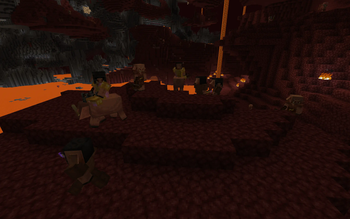
Some zombies have a chance of spawning atop a zombie horse; this is the only way that zombie horses can spawn, as they don't spawn in vanilla Minecraft.Of these horsemen, some will spawn as knights that wield enchanted iron equipment, guarded by several sword-wielding zombies that will defend their master at any cost. This horse is tamed, and is the only way to acquire a zombie horse that you can ride.
Piglin Jockeys
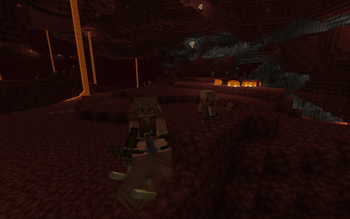
Some piglins will spawn riding hoglins. Much worse than spider jockeys!Of these piglin riders, some will spawn as wither hunters wearing a wither skeleton skull and enchanted golden equipment. These hunters are accompanied by three unmounted minions who are sure to attack you if you aren't wearing any golden armor.
Hoglins
In the Nether, sometimes the natural order of things can go... wrong. Natural hoglin spawns will sometimes be replaced with packs of feral zoglins that slaughter every mob they come across. Watch out!Slimes, Magma Cubes, and Phantoms
All slimes, magma cubes, and phantoms have a chance of being much larger than normally possible. Larger mobs like these have more HP and deal more damage, so be careful!Necromancer Witches
Some witches have delved into the dark arts, and will have particles of Unluck constantly surrounding them. Instead of potions, these necromancers will constantly summon undead to do the dirty work for them.Configuration
Don't like some of the variants listed above? While there is no config file, you can open up the datapack ZIP to edit things yourself:
- If you add a
#symbol in front of a command in anmcfunctionfile, that line will be commented out and won't be ran. - This datapack includes a list of predicates for random probabilities that determine the chance of a variant being spawned. If you want to change a probability, you can replace the associated predicate with a different one, or make your own.
- To prevent a mob from having a chance of being replaced, give it the
mobvariants.blacklisttag.
If you want to uninstall this datapack, you can simply remove it from your world with no issues. However, mob variants that have already been summoned by this datapack will remain in the world until they despawn.
Compatibility
This datapack is compatible with all of my other projects. In particular, many of the variants here use the upgradedmobs.blacklist tag to prevent Mob Variants and Upgraded Mobs from interfering with each other.
Again, remember to give the mobvariants.blacklist tag to any mob that you don't want to be affected by this datapack.
Verfügbare Versionen
Mob Variants auf dem Server installieren
Server bestellen
Bestelle einen Minecraft Java Server mit mindestens 3 GB RAM (4 GB empfohlen).
datapack Loader setzen
Wähle im Panel unter "Egg" den datapack-Loader und die passende Minecraft-Version (1.20.4).
Mod installieren
Öffne den Mod-Browser im Dashboard und suche nach "Mob Variants". Klicke "Installieren" – fertig! Alternativ: Lade die .jar via SFTP in den /mods Ordner.
Kompatibilität
Mod-Loader
Minecraft-Versionen
1.20.4, 1.20.3, 1.20.2 (+12 weitere)
Server-seitig
✓ ErforderlichEmpfohlener RAM
4 GB(min. 3 GB)Häufige Fragen
Mob Variants Server crasht beim Start – was tun?
Häufigste Ursache: falsche datapack-Version oder zu wenig RAM. Prüfe im Server-Log (latest.log), ob ein "OutOfMemoryError" oder "Mixin"-Fehler auftritt. Bei Mado Hosting: Stelle sicher, dass mindestens 3 GB RAM zugewiesen sind und der Loader zur Mod-Version passt (1.20.4). Über das Panel kannst du den Loader mit einem Klick wechseln.
Ist Mob Variants mit datapack und fabric und forge und neoforge und quilt kompatibel?
Mob Variants unterstützt offiziell datapack, fabric, forge, neoforge, quilt für Minecraft 1.20.4, 1.20.3, 1.20.2. Achtung: Forge- und Fabric-Mods sind NICHT untereinander kompatibel – wähle einen Loader und bleibe dabei. Im Mado Dashboard werden inkompatible Loader-Kombinationen automatisch erkannt.
Server laggt mit Mob Variants – wie optimiere ich die Performance?
Empfohlener RAM: 4 GB (+1 GB pro 8 Spieler). Prüfe mit /spark profiler, ob Mob Variants den meisten Tick-Time verbraucht. Häufige Fixes: Server-View-Distance auf 8-10 reduzieren, bei Forge "performant" oder "starlight" als Zusatz-Mod installieren. Bei Mado Hosting läuft dein Server auf NVMe-SSDs mit dedizierten CPU-Kernen für minimale Latenz.
Ähnliche Mods
![[EMF] Entity Model Features](https://cdn.modrinth.com/data/4I1XuqiY/6e5bbd0d06b1741bfdab6c0cfab6de8fdaf0064c_96.webp)


Modded Server mieten
Installiere Mob Variants mit nur einem Klick auf deinem Server.
Details
- Lizenz
- Creative Commons Attribution Non Commercial Share Alike 4.0 International
- Server-seitig
- Erforderlich