
Mod for AL-TeamChat
The Mod for the TeamChat Plugin, for a better overlay
Screenshots
Über diese Mod
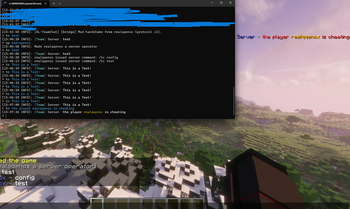
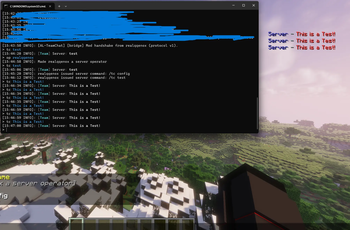
The optional client-side companion for the TeamChat plugin — displays your team chat in a clean, customizable overlay on the side of your screen.
⚠️ Requires the TeamChat plugin on the server. Without it, this mod has nothing to display. Players still need the teamchat.use permission to see the team chat.
You find the TeamChat plugin here
✨ Features
- Custom chat overlay — shows the team chat in a sleek panel instead of mixing it into the regular chat
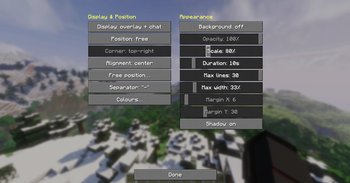
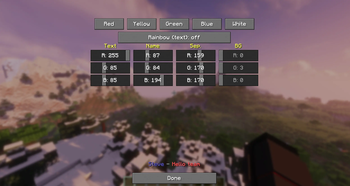
- Fully customizable — adjust position, size, colors, and transparency to fit your style
- Lightweight & clean — built with Fabric, no clutter
- Seamless — works automatically once connected to a server running the TeamChat plugin
⚙️ Configuration
You can open the settings in two ways:
- Command: /tcmod config
- Mod Menu: open the mod's settings directly through Mod Menu
📦 Requirements
- Fabric Loader + Fabric API
- The TeamChat plugin running on the server
- Minecraft 1.21.x
- (Recommended) Mod Menu for easy in-game configuration
🔑 Note
This mod only displays team chat data that the server sends to players who have permission. It cannot show messages you're not allowed to see — access is controlled entirely by the server.
If you find bugs or have suggestions, you can find our Discord here:
Verfügbare Versionen
Mod for AL-TeamChat auf dem Server installieren
Server bestellen
Bestelle einen Minecraft Java Server mit mindestens 3 GB RAM (4 GB empfohlen).
fabric Loader setzen
Wähle im Panel unter "Egg" den fabric-Loader und die passende Minecraft-Version (1.21.11).
Mod installieren
Öffne den Mod-Browser im Dashboard und suche nach "Mod for AL-TeamChat". Klicke "Installieren" – fertig! Alternativ: Lade die .jar via SFTP in den /mods Ordner.
Kompatibilität
Mod-Loader
Minecraft-Versionen
1.21.11
Server-seitig
✗ Nicht unterstütztEmpfohlener RAM
4 GB(min. 3 GB)Häufige Fragen
Mod for AL-TeamChat Server crasht beim Start – was tun?
Häufigste Ursache: falsche fabric-Version oder zu wenig RAM. Prüfe im Server-Log (latest.log), ob ein "OutOfMemoryError" oder "Mixin"-Fehler auftritt. Bei Mado Hosting: Stelle sicher, dass mindestens 3 GB RAM zugewiesen sind und der Loader zur Mod-Version passt (1.21.11). Über das Panel kannst du den Loader mit einem Klick wechseln.
Ist Mod for AL-TeamChat mit fabric kompatibel?
Mod for AL-TeamChat unterstützt offiziell fabric für Minecraft 1.21.11. Im Mado Dashboard werden inkompatible Loader-Kombinationen automatisch erkannt.
Server laggt mit Mod for AL-TeamChat – wie optimiere ich die Performance?
Empfohlener RAM: 4 GB (+1 GB pro 8 Spieler). Prüfe mit /spark profiler, ob Mod for AL-TeamChat den meisten Tick-Time verbraucht. Häufige Fixes: Server-View-Distance auf 8-10 reduzieren, bei Forge "performant" oder "starlight" als Zusatz-Mod installieren. Bei Mado Hosting läuft dein Server auf NVMe-SSDs mit dedizierten CPU-Kernen für minimale Latenz.
Ähnliche Mods






Modded Server mieten
Installiere Mod for AL-TeamChat mit nur einem Klick auf deinem Server.