
Modern World Creation
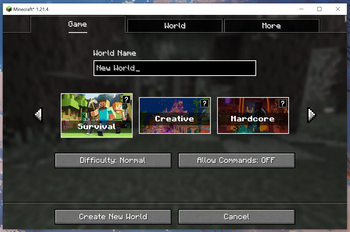
Gives the Create World screen a makeover!
Screenshots
Über diese Mod



About
Modern World Creation replaces Vanilla's Create World screen with a more modern looking one!
It features smooth hover animations for the game mode buttons and is fully controllable by using the arrow and tab keys to make it as accessible as possible.
For support, tips, and to connect with other users, join the official Discord server.
Settings
Modern World Creation lets you customize some visual aspects of the Create World screen.
The config file is located at /config/modernworldcreation/config.txt.
A game restart is needed after changing things in the config!
Game Mode Info
The little info thingy in the top-right corner of the game mode buttons can be disabled by setting show_gamemode_info to false.
Button Border Thickness
The border of the game mode buttons is too t h i c c ?! Well, I'm a bit disappointed tbh, but you can change it by editing the button_border_thickness value.
Button Border HEX Color
Want a different color for the game mode button borders? Just change the button_border_hex_color value to the HEX color you like!
Copyright
Modern World Creation Copyright © 2021-2024 Keksuccino.
Modern World Creations is licensed under DSMSLv2 (DON'T SNATCH MA STUFF LICENSE V2.0).
See LICENSE.md for more information about the license.
Special Thanks
This mod was made possible by u/HobbylosUwU and their great menu concept.
Server Needed?
Looking to play Minecraft with friends but setting up a server is just too time-consuming?
No worries! Simply rent a pre-configured server and start playing in a snap.
Just click the image below and use code keksuccino to enjoy a 25% discount on your first month!
Verfügbare Versionen
Modern World Creation auf deinem Client installieren
Mod-Loader lokal installieren
Installiere fabric für deine lokale Minecraft-Version.
Passende Datei herunterladen
Wähle die Modern World Creation-Datei für fabric und Minecraft 1.21.4.
Mod installieren
Lege die .jar-Datei in deinem lokalen .minecraft/mods-Ordner ab und starte Minecraft neu. Eine Installation auf dem Server ist nicht nötig.
Kompatibilität
Mod-Loader
Minecraft-Versionen
1.21.4, 1.21.1, 1.20.1 (+9 weitere)
Server-seitig
✗ Nicht unterstütztEmpfohlener RAM
4 GB(min. 3 GB)Häufige Fragen
Muss Modern World Creation auf dem Minecraft Server installiert werden?
Nein. Modrinth kennzeichnet Modern World Creation serverseitig als nicht unterstützt. Installiere die Mod nur im lokalen Minecraft-Mods-Ordner. Dein Server kann unverändert bleiben, sofern die Mod-Seite keine zusätzliche Abhängigkeit nennt.
Welche Version und welchen Loader braucht Modern World Creation?
Nutze eine Datei für fabric, forge, neoforge und exakt deine Minecraft-Version. Unterstützte Versionen sind unter anderem 1.21.4, 1.21.1, 1.20.1. Loader-Dateien sind nicht untereinander austauschbar.
Modern World Creation funktioniert nicht – was kann ich prüfen?
Prüfe zuerst Minecraft-Version, Loader-Version und erforderliche Abhängigkeiten. Lege die .jar-Datei im lokalen .minecraft/mods-Ordner ab und entferne ältere Duplikate. Da die Mod clientseitig ist, löst mehr Server-RAM dieses Problem nicht.
Ähnliche Mods




![[ETF] Entity Texture Features](https://cdn.modrinth.com/data/BVzZfTc1/af683d206d50b05258d865b0d6e4aa2f2cee12f2_96.webp)

Minecraft Server für deine Gruppe
Modern World Creation bleibt auf deinem Client. Hoste dazu eine kompatible Welt für deine Mitspieler.