
Momo's Mod
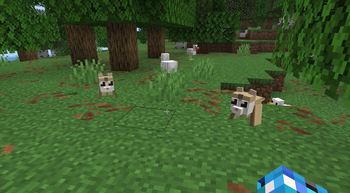
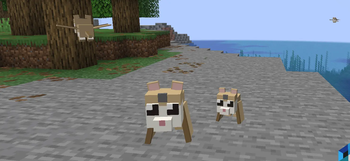
Adds Flying Lemurs to MC! Momo's Mod!
Screenshots
Über diese Mod
Adds Flying Lemurs to MC!
Tame them, equip armor with colored gems, and explore with your loyal gliding companion.
How to Use Momo's Mod
Finding Lemurs
Flying Lemurs spawn naturally in jungles, mountains, and occasionally across the Overworld

Use a Spawn Egg (Creative tab) to spawn one manually
Taming
Feed a wild Flying Lemur its favorite food to tame it

Once tamed, it will follow you and roam nearby when you're standing still
Armor & Gems
Craft lemur armor using phantom membrane, feathers, and the corresponding material (leather, iron, gold, diamond)

Equip armor by right-clicking the lemur with the armor item

A colored gem appears on the lemur's forehead matching the armor type

Sneak + left-click an armored lemur to remove its armor

Armor tiers: Leather → Iron → Gold → Diamond → Netherite (via smithing table)

Netherite armor gives the strongest regeneration
Regeneration
Armored lemurs passively regenerate health over time

Higher-tier armor = faster regeneration (Netherite is fastest)
Commands
/momo here
— Teleports all your tamed lemurs in the current dimension to your location
Flying
Lemurs glide through the air with their wing membranes

Tamed lemurs will fly to keep up with you
Verfügbare Versionen
Momo's Mod auf dem Server installieren
Server bestellen
Bestelle einen Minecraft Java Server mit mindestens 3 GB RAM (4 GB empfohlen).
fabric Loader setzen
Wähle im Panel unter "Egg" den fabric-Loader und die passende Minecraft-Version (26.2).
Mod installieren
Öffne den Mod-Browser im Dashboard und suche nach "Momo's Mod". Klicke "Installieren" – fertig! Alternativ: Lade die .jar via SFTP in den /mods Ordner.
Kompatibilität
Mod-Loader
Minecraft-Versionen
26.2
Server-seitig
✓ ErforderlichEmpfohlener RAM
4 GB(min. 3 GB)Häufige Fragen
Momo's Mod Server crasht beim Start – was tun?
Häufigste Ursache: falsche fabric-Version oder zu wenig RAM. Prüfe im Server-Log (latest.log), ob ein "OutOfMemoryError" oder "Mixin"-Fehler auftritt. Bei Mado Hosting: Stelle sicher, dass mindestens 3 GB RAM zugewiesen sind und der Loader zur Mod-Version passt (26.2). Über das Panel kannst du den Loader mit einem Klick wechseln.
Ist Momo's Mod mit fabric kompatibel?
Momo's Mod unterstützt offiziell fabric für Minecraft 26.2. Im Mado Dashboard werden inkompatible Loader-Kombinationen automatisch erkannt.
Server laggt mit Momo's Mod – wie optimiere ich die Performance?
Empfohlener RAM: 4 GB (+1 GB pro 8 Spieler). Prüfe mit /spark profiler, ob Momo's Mod den meisten Tick-Time verbraucht. Häufige Fixes: Server-View-Distance auf 8-10 reduzieren, bei Forge "performant" oder "starlight" als Zusatz-Mod installieren. Bei Mado Hosting läuft dein Server auf NVMe-SSDs mit dedizierten CPU-Kernen für minimale Latenz.
Ähnliche Mods
![[EMF] Entity Model Features](https://cdn.modrinth.com/data/4I1XuqiY/6e5bbd0d06b1741bfdab6c0cfab6de8fdaf0064c_96.webp)


Modded Server mieten
Installiere Momo's Mod mit nur einem Klick auf deinem Server.