
MoonClient
Moon Client is now a feature-complete, stable, and highly polished platform ready for both casual play and high-stakes PvP!
Screenshots
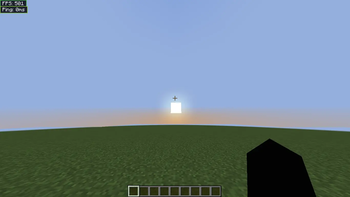
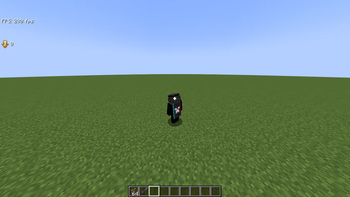
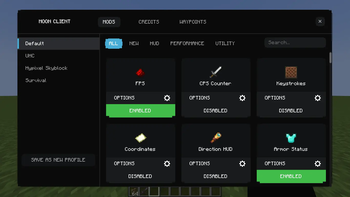
Über diese Mod
The Moon Client is an advanced Fabric 1.21.11 client that combines top-tier aesthetic quality with best-in-class performance features. The heart of the project is its Smoothest UI that offers double layer mod menu as well as full interactive HUD editor complete with drag-and-drop placement and module label customization.
The client includes over 40 integrated mods divided into four groups: Performance, Visual, Utility, and Information. Performance in combat gets a boost through custom crosshair pixel editor with coloring according to reach distance and the amazing 360° Freelook mod built around the body of the player. Exploring the world will be easier than ever with the advanced 3D Waypoints functionality that includes beacon beams, distance labels, filter by dimension feature, and adjustable tiers of the Zoom mod.
Real-life information will be displayed using information HUD mods dedicated to tracking FPS, CPS, coordinates, keystrokes, and armor status. Visually, the client features such premium features as 3D item physics, HitColors customization, and enchantment glint effect refinement. Technical features include JSON configuration system, entity culling optimization, and Mixins with minimum latency.
Verfügbare Versionen
MoonClient auf deinem Client installieren
Mod-Loader lokal installieren
Installiere fabric für deine lokale Minecraft-Version.
Passende Datei herunterladen
Wähle die MoonClient-Datei für fabric und Minecraft 1.21.11.
Mod installieren
Lege die .jar-Datei in deinem lokalen .minecraft/mods-Ordner ab und starte Minecraft neu. Eine Installation auf dem Server ist nicht nötig.
Kompatibilität
Mod-Loader
Minecraft-Versionen
1.21.11, 1.21.8, 1.21.4 (+3 weitere)
Server-seitig
✗ Nicht unterstütztEmpfohlener RAM
4 GB(min. 3 GB)Häufige Fragen
Muss MoonClient auf dem Minecraft Server installiert werden?
Nein. Modrinth kennzeichnet MoonClient serverseitig als nicht unterstützt. Installiere die Mod nur im lokalen Minecraft-Mods-Ordner. Dein Server kann unverändert bleiben, sofern die Mod-Seite keine zusätzliche Abhängigkeit nennt.
Welche Version und welchen Loader braucht MoonClient?
Nutze eine Datei für fabric, legacy-fabric und exakt deine Minecraft-Version. Unterstützte Versionen sind unter anderem 1.21.11, 1.21.8, 1.21.4. Loader-Dateien sind nicht untereinander austauschbar.
MoonClient funktioniert nicht – was kann ich prüfen?
Prüfe zuerst Minecraft-Version, Loader-Version und erforderliche Abhängigkeiten. Lege die .jar-Datei im lokalen .minecraft/mods-Ordner ab und entferne ältere Duplikate. Da die Mod clientseitig ist, löst mehr Server-RAM dieses Problem nicht.
Ähnliche Mods


Minecraft Server für deine Gruppe
MoonClient bleibt auf deinem Client. Hoste dazu eine kompatible Welt für deine Mitspieler.