Mousie Builder Toolkit
Mousie Builder Toolkit adds a set of powerful yet easy-to-use tools that make building easier and give you the freedom to create without the usual limitations.
Screenshots
Über diese Mod
Mousie Builder Toolkit is a Fabric mod designed for builders who enjoy precise, flexible, and slightly impossible construction.
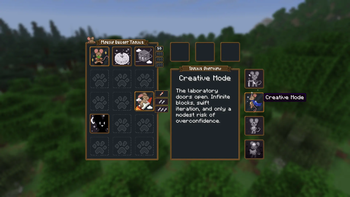
Hold Left Alt (default keybind: Open Toolkit) to open Mousie’s menu, then hover over each button for a short description. The mod introduces tools that extend vanilla Minecraft building rules, allowing block placement and editing beyond normal limitations.
The mod works in both single-player and multiplayer. On servers, it must be installed on both client and server, and players require operator permissions to access the full toolkit. Without OP, the menu can still be opened, but tools remain locked.
Current Tools 
- Still Paws – Prevents block updates, physics, fluid ticks, growth ticks, and scheduled block reactions.
- Cheese Logic – Allows block placement without normal support or placement restrictions.
- Extend Tail – Extends block interaction range with selectable distances.
- Ruffled Fur – Adjusts flight speed in Creative and Spectator modes.
- Moon Sight – Toggles Night Vision and detects existing effects from potions or commands.
- Gamemode Buttons – Quickly switch between Survival, Creative, Spectator, and Adventure.
Spoiler
More tools and buttons will be added in future updates. Mousie is still conducting experiments that may or may not be safe for block physics.
⚙ Controls:
The menu key can be changed in Minecraft controls:
Options → Controls → Key Binds → Mousie Builder Toolkit → Open Toolkit.
If Mod Menu is installed, keybinds can also be configured through the mod’s settings screen.
License 
This mod is provided for free. It may be used in single-player and multiplayer servers, including modpacks, as long as it is not sold or redistributed as a standalone file.
📬 Feedback
Found a bug or have an idea for a new tool? I'd love to hear your feedback! Please send bug reports and feature suggestions to [email protected]
Verfügbare Versionen
Mousie Builder Toolkit auf dem Server installieren
Server bestellen
Bestelle einen Minecraft Java Server mit mindestens 3 GB RAM (4 GB empfohlen).
fabric Loader setzen
Wähle im Panel unter "Egg" den fabric-Loader und die passende Minecraft-Version (1.21.11).
Mod installieren
Öffne den Mod-Browser im Dashboard und suche nach "Mousie Builder Toolkit". Klicke "Installieren" – fertig! Alternativ: Lade die .jar via SFTP in den /mods Ordner.
Kompatibilität
Mod-Loader
Minecraft-Versionen
1.21.11
Server-seitig
✓ ErforderlichEmpfohlener RAM
4 GB(min. 3 GB)Häufige Fragen
Mousie Builder Toolkit Server crasht beim Start – was tun?
Häufigste Ursache: falsche fabric-Version oder zu wenig RAM. Prüfe im Server-Log (latest.log), ob ein "OutOfMemoryError" oder "Mixin"-Fehler auftritt. Bei Mado Hosting: Stelle sicher, dass mindestens 3 GB RAM zugewiesen sind und der Loader zur Mod-Version passt (1.21.11). Über das Panel kannst du den Loader mit einem Klick wechseln.
Ist Mousie Builder Toolkit mit fabric kompatibel?
Mousie Builder Toolkit unterstützt offiziell fabric für Minecraft 1.21.11. Im Mado Dashboard werden inkompatible Loader-Kombinationen automatisch erkannt.
Server laggt mit Mousie Builder Toolkit – wie optimiere ich die Performance?
Empfohlener RAM: 4 GB (+1 GB pro 8 Spieler). Prüfe mit /spark profiler, ob Mousie Builder Toolkit den meisten Tick-Time verbraucht. Häufige Fixes: Server-View-Distance auf 8-10 reduzieren, bei Forge "performant" oder "starlight" als Zusatz-Mod installieren. Bei Mado Hosting läuft dein Server auf NVMe-SSDs mit dedizierten CPU-Kernen für minimale Latenz.
Ähnliche Mods






Modded Server mieten
Installiere Mousie Builder Toolkit mit nur einem Klick auf deinem Server.