Modrinth · Fabric · Client-Mod
Music Control
Music Control ist eine clientseitige Mod. Du installierst sie auf deinem Rechner, auf dem Server ist sie nicht nötig.
Take control of Minecraft music!
- Downloads
- 453.6K
- Autor
- Pardys
- Loader
- Fabric
- Minecraft
- 1.18 – 1.21.9
- Aktualisiert
- –
Screenshots
So sieht Music Control aus


Bilder: Music Control auf Modrinth, vom Projektteam veröffentlicht.
Einrichtung
Music Control auf deinem Client installieren
Clientseitige Mods laufen nur auf deinem Rechner. Mehr Server-RAM ändert an ihrer Leistung nichts.
- 01
Loader lokal installieren
Installiere Fabric für deine Minecraft-Version in deinem Launcher.
- 02
Datei herunterladen
Lade die Music Control-Datei für deinen Loader und exakt deine Minecraft-Version herunter, zum Beispiel 1.21.9.
- 03
In den Mods-Ordner legen
Lege die .jar-Datei in den lokalen Ordner .minecraft/mods und entferne ältere Duplikate.
- 04
Starten
Starte Minecraft mit dem Loader-Profil. Auf dem Server musst du nichts ändern.
- Auf dem Server
- Nicht nötig
- Auf dem Client
- Erforderlich
- Loader
- Fabric
- Minecraft
- 1.21.9, 1.21.8, 1.21.7 +15 weitere
- Lizenz
- MIT License
Versionen
Veröffentlichte Versionen
Nimm die Datei, die zu Loader und Minecraft-Version deines Servers passt. Server und Spieler brauchen dieselbe Version.
Music Control · Modrinth- Music Control 1.9.2+1.21.96. Oktober 2025Minecraft 1.21.9 · Fabric
- Music Control 1.9.2+1.21.629. Juni 2025Minecraft 1.21.6, 1.21.7, 1.21.8 · Fabric
- Music Control 1.9.1+1.21.527. April 2025Minecraft 1.21.5 · Fabric
- Music Control 1.9+1.21.423. Februar 2025Minecraft 1.21.4 · Fabric
- Music Control 1.8.3+1.21.322. November 2024Minecraft 1.21.3 · Fabric
Originalbeschreibung des Projektautors



NO PORT TO FORGE PLANNED! (but feel free to port it by yourself and link it)
The mod is fully configurable to enable only changes that you like
Description
This mod allows you to take full control of Minecraft music. If you ever felt like you had to wait too much time between music, or if you ever wanted to skip a music, this mod is made for you.
And it doesn't stop here! You can switch music player mode to play music as before, discs only, resource pack/modded music only, or any music of the game. You may also replay a music, display its name, and even change music volume directly with keybinds.
Last but not least, you can completely customize which music plays when with a new GUI. In this music panel, you can select any music or sound event to play it. You can also configure for each music, in which sound events it can be played, and vice versa. New events are added for each biomes, dimensions, and even some miscellaneous ones.
This is a short description, full description below.
FAQ
Do I need it on my server? No. This mod is client side, so you shouldn't put it on your server
Can I include it in my modpack? Yes, you are free to include this mod into your modpack
For any other things: Feel free to share your experience, problems, enhancement ideas in the Discord server, or directly creating issues on the GitHub
Full description
Commands
Keybinding
Music panel: Open the music panel. M key
Previous/next music: Play the previous/next music. LEFT/RIGHT ARROW keys
Volume up/down: Increase/Decrease music category volume. UP/DOWN ARROW keys
Pause/resume music: Pause or resume music. RIGHT SHIFT key
Previous/next music category: Change the current music category and play a music from this category. PAGE UP/DOWN keys
Display music: Display the name of the music currently playing. RIGHT CTRL key
Loop: Enable/Disable loop over the same music. unassigned key
Note that you can change the keybinds at any moment in Minecraft control options.
Resourcepacks
If you want Minecraft to play other custom music, you can do this via resource packs. For this, nothing hard: just follow the instructions described there.
An example resourcepack can be found here.
Music category
Default music player mode is vanilla, which depends on events triggered by biome or location. You can change mode with keybinds and also configure the mod to be by default on another category when launching the game.
- default: Minecraft default behavior, playing a music depending on sound events like biomes or under water
- disc: Minecraft music discs, also detecting custom discs from mods
- all: any music playable in Minecraft, including resource packs and mods' ones
- namespace: for each mod and resource pack adding custom music to the game, there will be a new category created with their own music
Music panel
Play
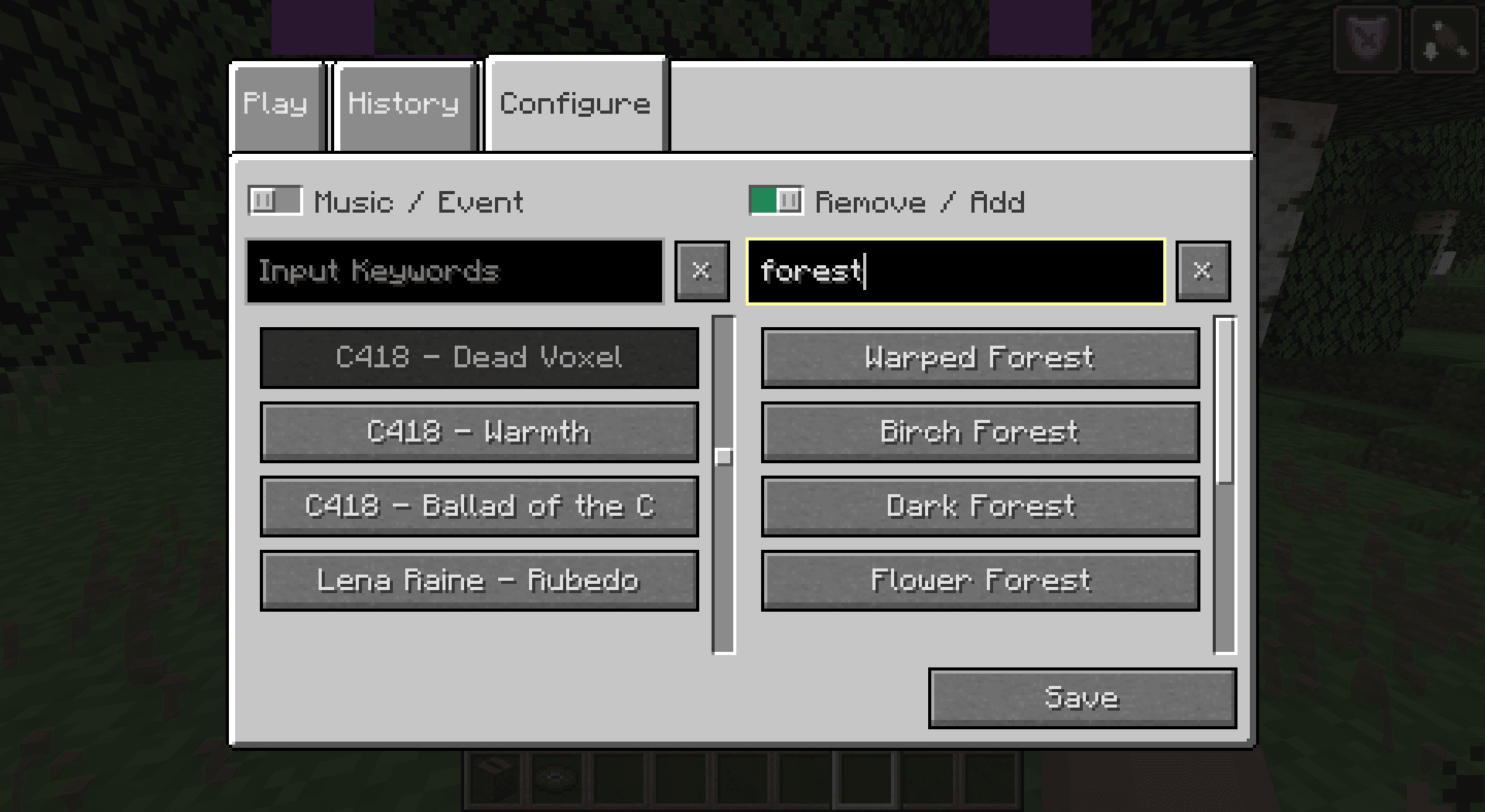
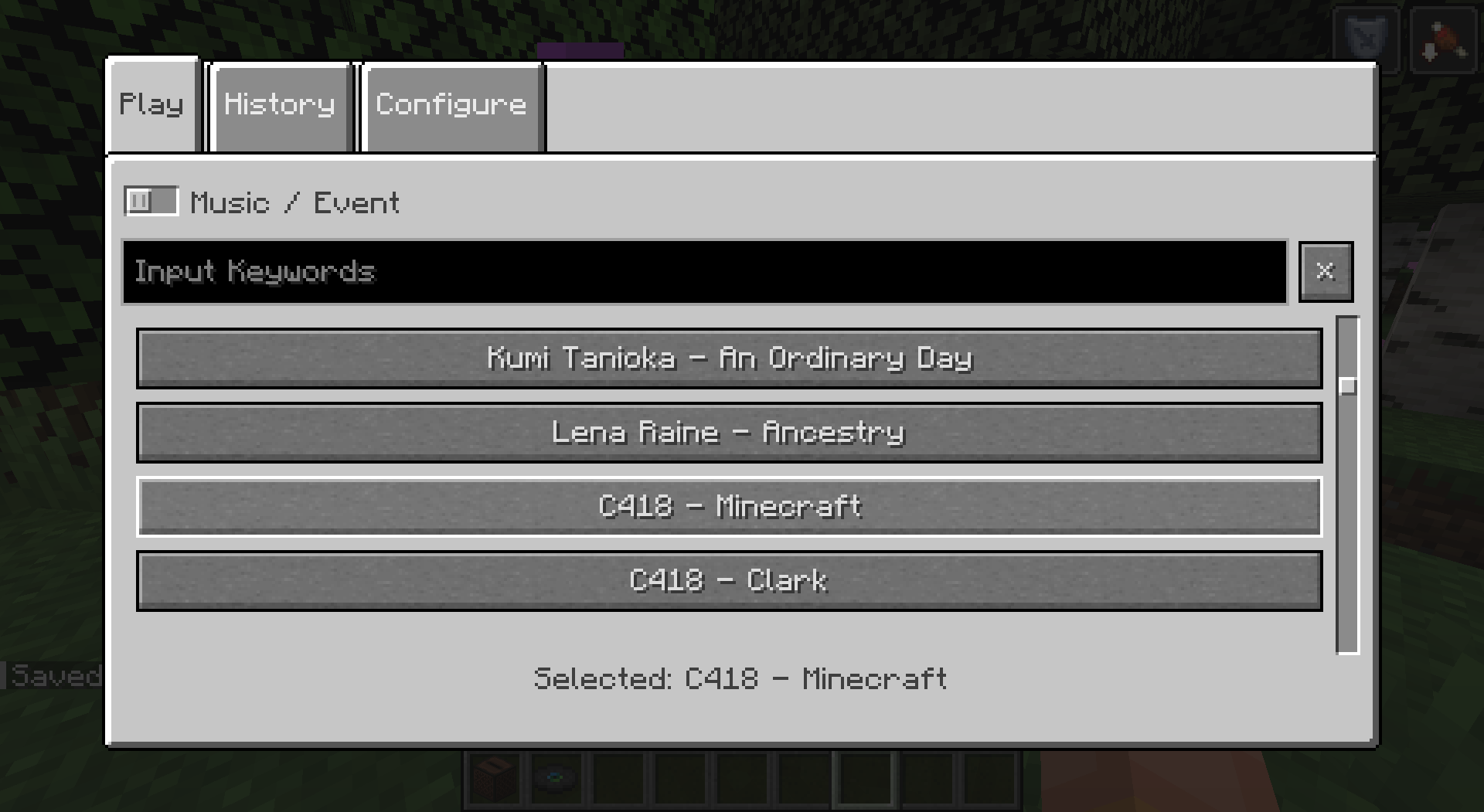
In the Play tab, you can select any music or sound event and it will be played when closing the panel. Sound events may contain several music, so selecting a sound event will randomly pick one in its list.
History
You can keep track of the last music that were played in this tab. Music in history won't be picked again randomly, unless every music of the current sound event are in, or if you select one manually. Number of music to be kept in history is configurable.
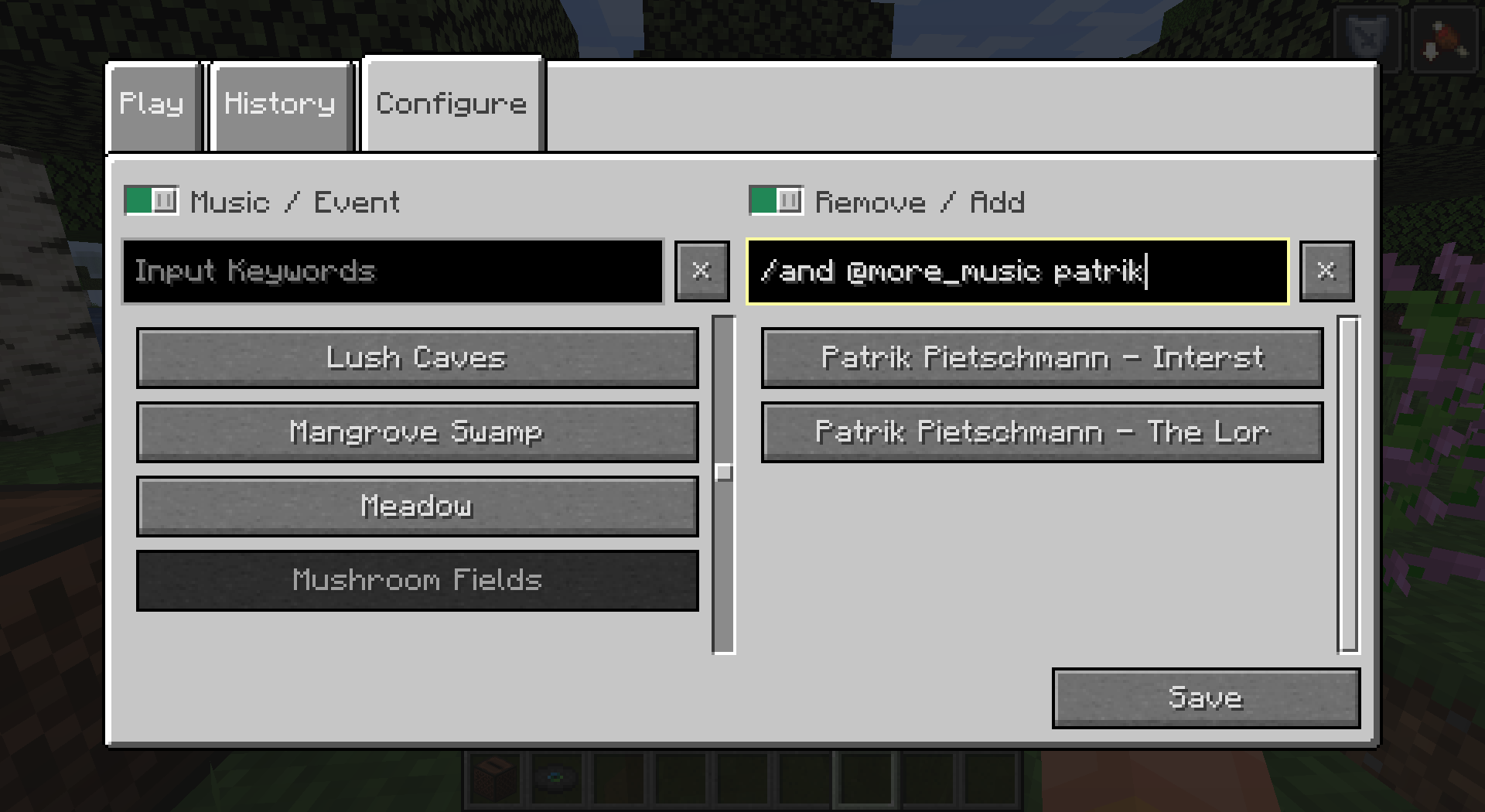
Configure
Overview
You can completely customize which music plays when. Indeed, you can configure for each music, in which sound events it can be played, or for each sound event, what music it can play. Once again, this includes any custom music/sound event added to the game. Sound events can also contain other sound event, to ease the configuration.
For your comfort, filters were added to navigate easily on the menu. Just fill in the text area to filter music/events containing what you typed in their name. Some special character allow you an even more advanced filtering (see the tooltip).
Events
For more customization, I added new sound events for each biomes in the game. This includes biomes from the End dimension. By default, they remain empty but it's up to you to configure them how you like.
Dimension sound events were added to replace the common "Game" event that would play in the Overworld (and in the Nether if there was biomes without sound events). They have a specific behavior to replace the "Game" behavior. You can choose if you want them to play on fallback (similarly to default "Game" event, when a biome has no music), half the time, proportionnally to the number of music the dimension/biome event contain, or never (this allows biomes without music to not play music at all for a creepy atmosphere).
Miscellaneous sound events were also added for things like "Raining", "Thundering" or "Night" for example. They have a specific behavior as they can happen more often than the biome ones. You can choose if you want them to play always when they can, half the time, or proportionnally to the number of music the misc/biome event contain.
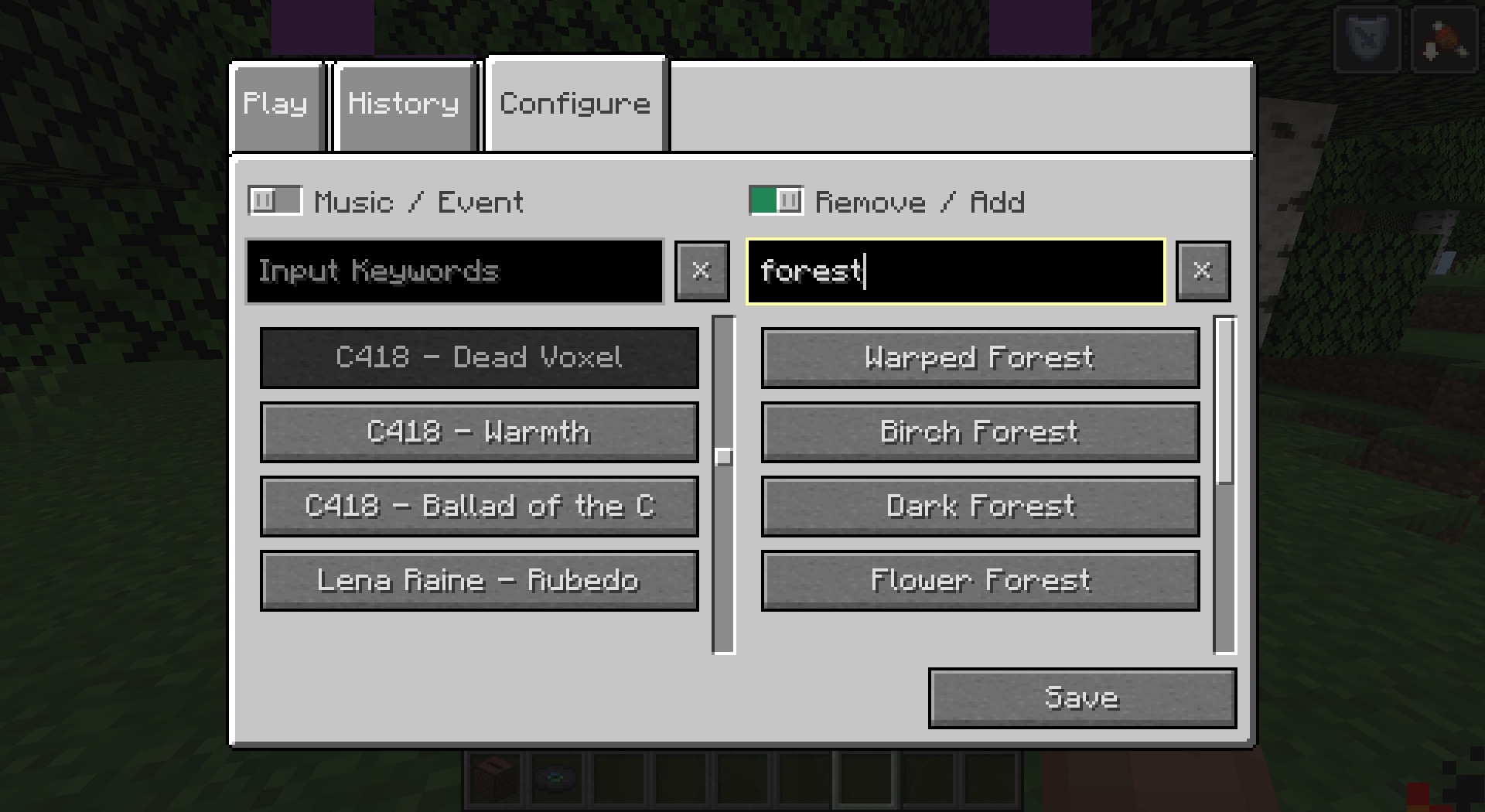
Fun bonus: music discs have their own sound event. This means you can add more than one music to a music disc, so it will play a random music when used.
Muss Music Control auf dem Minecraft Server installiert werden?
Nein. Modrinth kennzeichnet Music Control serverseitig als nicht unterstützt. Installiere die Mod nur im lokalen Mods-Ordner. Dein Server kann unverändert bleiben, sofern die Projektseite keine zusätzliche Abhängigkeit nennt.
Welche Version und welchen Loader braucht Music Control?
Nutze eine Datei für Fabric und exakt deine Minecraft-Version. Unterstützt werden unter anderem 1.21.9, 1.21.8, 1.21.7. Dateien für verschiedene Loader sind nicht austauschbar.
Music Control funktioniert nicht – was kann ich prüfen?
Prüfe zuerst Minecraft-Version, Loader-Version und erforderliche Abhängigkeiten. Da die Mod clientseitig ist, löst mehr Server-RAM das Problem nicht.
Ähnliche Mods
Beliebte Mods aus derselben Kategorie
 Server-fähig

FerriteCore
von malte0811
Memory usage optimizations
 Nur Client

Mod Menu
von Prospector
Adds a mod menu to view the list of mods you have installed.
 Server-fähig

YetAnotherConfigLib (YACL)
von isxander
A builder-based configuration library for Minecraft!
 Server-fähig

Xaero's Minimap
von thexaero
Displays a map of the nearby world terrain, players, mobs, entities in the corner of your screen. Lets you create waypoints which help you find the locations you've marked.
Mods für deinen eigenen Server gesucht?
Im Katalog findest du Mods, die auf Minecraft Servern laufen.