Neo Language Reload
Neoforge Port of Language Reload
Screenshots
Über diese Mod
Description
This is an unofficial Neoforge port of Language Reload, dedicated to maintaining all the features of the original mod and ensuring compatibility.
Language Reload is a Fabric mod that adds quality of life changes related to languages.
Features
- Fast language switching without resource pack reloading
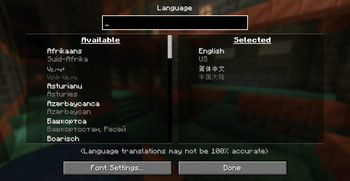
- A search box in the language menu
- Multiple language selection (Each translation in a language overrides translations from languages below.)
- Multilingual item search (Enables searching in any of selected languages in the creative inventory and the recipe book. This feature can be disabled in the mod options accessible via Mod Menu or directly in the mod config file.)
- Automatic language detection if there is no "lang:" in options.txt
- Reloading languages with F3 + J and cycling them with Shift + F3 + J
Development
I will try to keep it synchronized with the original mod version, so please be patient.
Compatibility
Modern UI
Open the Modern UI configuration screen and disable the Use Text Component Cache option in the Text Layout section.
Verfügbare Versionen
Neo Language Reload auf deinem Client installieren
Mod-Loader lokal installieren
Installiere neoforge für deine lokale Minecraft-Version.
Passende Datei herunterladen
Wähle die Neo Language Reload-Datei für neoforge und Minecraft 26.2.
Mod installieren
Lege die .jar-Datei in deinem lokalen .minecraft/mods-Ordner ab und starte Minecraft neu. Eine Installation auf dem Server ist nicht nötig.
Kompatibilität
Mod-Loader
Minecraft-Versionen
26.2, 26.1, 1.21.11 (+6 weitere)
Server-seitig
✗ Nicht unterstütztEmpfohlener RAM
4 GB(min. 3 GB)Häufige Fragen
Muss Neo Language Reload auf dem Minecraft Server installiert werden?
Nein. Modrinth kennzeichnet Neo Language Reload serverseitig als nicht unterstützt. Installiere die Mod nur im lokalen Minecraft-Mods-Ordner. Dein Server kann unverändert bleiben, sofern die Mod-Seite keine zusätzliche Abhängigkeit nennt.
Welche Version und welchen Loader braucht Neo Language Reload?
Nutze eine Datei für neoforge und exakt deine Minecraft-Version. Unterstützte Versionen sind unter anderem 26.2, 26.1, 1.21.11. Loader-Dateien sind nicht untereinander austauschbar.
Neo Language Reload funktioniert nicht – was kann ich prüfen?
Prüfe zuerst Minecraft-Version, Loader-Version und erforderliche Abhängigkeiten. Lege die .jar-Datei im lokalen .minecraft/mods-Ordner ab und entferne ältere Duplikate. Da die Mod clientseitig ist, löst mehr Server-RAM dieses Problem nicht.
Ähnliche Mods


Minecraft Server für deine Gruppe
Neo Language Reload bleibt auf deinem Client. Hoste dazu eine kompatible Welt für deine Mitspieler.