
Noctara Holograms
Noctara Holograms is a Fabric 1.20.1 hologram mod made by vxrcy for Noctara SMP.
Screenshots
Über diese Mod
Noctara Holograms
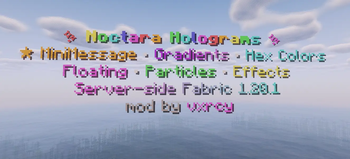
Noctara Holograms is a Fabric 1.20.1 hologram mod made by vxrcy for Noctara SMP. It adds editable floating holograms, item holograms, scoreboard leaderboards, particles, floating animation, typewriter text effects, text display controls, and style syncing for server owners.
Requires Fabric 1.20.1 and Java 17.
Features
Create floating holograms with multiple editable lines
Create item holograms
Create scoreboard leaderboard holograms
Edit, insert, remove, and list hologram lines
Armor stand and text display render modes
Floating/bobbing animation
Typewriter text reveal animation
Particle effects and particle presets
Per-line X/Y/Z offsets
Text display scale, alignment, rotation, billboard, and background controls
Copy/sync hologram styling without copying text
Placeholder support
Server-side management commands
Main Commands
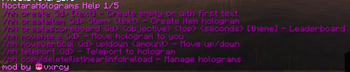
/nh help [page]
Shows the command help menu.
/nh create
Creates a hologram. If no text is provided, it creates an empty hologram so you can add lines one at a time.
/nh createitem
Creates a hologram with an item display.
/nh createscoreboard
Creates a scoreboard leaderboard hologram.
/nh delete
Deletes a hologram.
/nh copy
Duplicates a hologram.
/nh list [page]
Lists all holograms.
/nh near [page]
Lists nearby holograms.
/nh info
Shows info about a hologram.
/nh reload
Reloads holograms from config.
Line Editing
/nh lines
Shows numbered lines for editing.
/nh addline
Adds a new line.
/nh edit
Changes the text on a specific line.
/nh setline
Same as edit.
/nh insertline
Inserts a line at a specific position.
/nh removeline
Removes a line.
/nh lineoffset
Moves one line independently.
/nh lineoffset
Resets a line offset.
/nh lineoffset
Shows line offsets.
Animations
/nh float
Turns floating animation on/off.
/nh float
Changes float speed.
/nh float
Changes float height.
/nh float
Offsets the float timing.
/nh float
Changes float motion style.
/nh float
Shows float settings.
/nh typewriter
Turns the typewriter reveal loop on/off.
/nh typewriter
Shows typewriter settings.
/nh animateline
Cycles one line through text frames.
Particles
/nh particles
Turns particles on/off.
/nh particles
Sets particle type.
/nh particles
Sets particle count.
/nh particles
Sets how often particles spawn.
/nh particles
Sets particle speed.
/nh particles
Moves particle position.
/nh particles
Sets particle shape.
/nh particles
Sets particle radius.
/nh particles
Sets particle height.
/nh particles
Sets dust particle color.
/nh particles
Applies a particle preset or disables particles.
/nh particles
Shows particle settings.
Text Display Controls
/nh rendermode
Switches render style.
/nh rendermode
Shows render mode.
/nh scale
Changes text display size.
/nh scale
Shows scale.
/nh align
Sets text alignment.
/nh billboard
Changes how text display faces players.
/nh rotation
Sets text display rotation.
/nh rotation
Matches the hologram rotation to where you are looking.
/nh rotation
Shows rotation.
/nh background
Toggles text display background.
/nh background
Sets background opacity.
/nh background
Sets background color.
/nh background
Toggles text shadow.
/nh background
Toggles see-through rendering.
/nh background
Shows background settings.
Movement
/nh movehere
Moves a hologram to your position.
/nh movevertical
Moves a hologram up or down.
/nh teleport
Teleports you to a hologram.
/nh viewdistance
Sets hologram view distance. Use 0 to disable.
Style Copying
/nh copystyle
Copies style/settings from one hologram to another without copying text.
/nh style copy
Same as copystyle.
/nh sync
Copies full style by default without changing text.
/nh sync
Copies only one style section.
Lighting
/nh backlight
Adds or removes a light column behind a hologram.
Placeholders
Supported placeholders include:
%server:online%
%server:max%
%server:tps%
%server:uptime%
%server:memory%
%server:time%
%world:time%
%player:name%
%player:ping%
Also supports older placeholders:
%players%
%maxplayers%
%tps%
%uptime%
%memory%
%server_time%
Permissions
NoctaraHolograms commands require operator permission level 2 or higher.
That means anyone with normal Minecraft OP level 2, 3, or 4 can use the commands. Regular players without OP cannot create, edit, move, delete, or manage holograms.
Formatting
Supports common color and style formatting, including legacy & codes, hex colors, and MiniMessage-style tags such as:
gradient:#a600ff:#d078ffPurple Gradient
Multiple formatting sections can be used on the same line.
Credits
Made by vxrcy for Noctara SMP.
Verfügbare Versionen
Noctara Holograms auf dem Server installieren
Server bestellen
Bestelle einen Minecraft Java Server mit mindestens 3 GB RAM (4 GB empfohlen).
fabric Loader setzen
Wähle im Panel unter "Egg" den fabric-Loader und die passende Minecraft-Version (1.20.1).
Mod installieren
Öffne den Mod-Browser im Dashboard und suche nach "Noctara Holograms". Klicke "Installieren" – fertig! Alternativ: Lade die .jar via SFTP in den /mods Ordner.
Kompatibilität
Mod-Loader
Minecraft-Versionen
1.20.1
Server-seitig
✓ ErforderlichEmpfohlener RAM
4 GB(min. 3 GB)Häufige Fragen
Noctara Holograms Server crasht beim Start – was tun?
Häufigste Ursache: falsche fabric-Version oder zu wenig RAM. Prüfe im Server-Log (latest.log), ob ein "OutOfMemoryError" oder "Mixin"-Fehler auftritt. Bei Mado Hosting: Stelle sicher, dass mindestens 3 GB RAM zugewiesen sind und der Loader zur Mod-Version passt (1.20.1). Über das Panel kannst du den Loader mit einem Klick wechseln.
Ist Noctara Holograms mit fabric kompatibel?
Noctara Holograms unterstützt offiziell fabric für Minecraft 1.20.1. Im Mado Dashboard werden inkompatible Loader-Kombinationen automatisch erkannt.
Server laggt mit Noctara Holograms – wie optimiere ich die Performance?
Empfohlener RAM: 4 GB (+1 GB pro 8 Spieler). Prüfe mit /spark profiler, ob Noctara Holograms den meisten Tick-Time verbraucht. Häufige Fixes: Server-View-Distance auf 8-10 reduzieren, bei Forge "performant" oder "starlight" als Zusatz-Mod installieren. Bei Mado Hosting läuft dein Server auf NVMe-SSDs mit dedizierten CPU-Kernen für minimale Latenz.
Ähnliche Mods

![[ETF] Entity Texture Features](https://cdn.modrinth.com/data/BVzZfTc1/af683d206d50b05258d865b0d6e4aa2f2cee12f2_96.webp)
![[EMF] Entity Model Features](https://cdn.modrinth.com/data/4I1XuqiY/6e5bbd0d06b1741bfdab6c0cfab6de8fdaf0064c_96.webp)



Modded Server mieten
Installiere Noctara Holograms mit nur einem Klick auf deinem Server.