
Create: Northstar - Redux
Space exploration addon for Create.
Screenshots
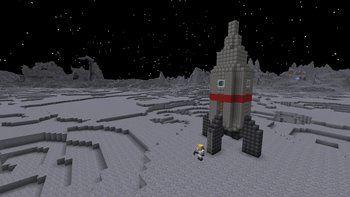

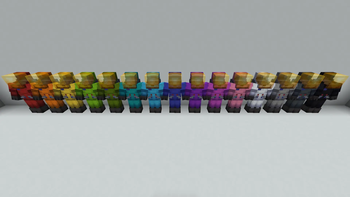
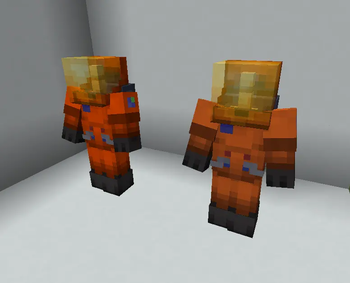
Über diese Mod
🚀 Northstar Redux
Using Northstar you can build a rocket and expand your Create factory to different planets!
Build and superglue your own rocket and fly to different planets and moons, currently including Mars, Earth (you should already be there), the Moon, Venus and much more to come.
Explore abandoned bases on different planets and build your own.
📜 Differences with Northstar:
- Support for ⚙️ Create 6.0 and 🦊 NeoForge 1.21.1.
- Ponders and improved tooltips.
- Added a new material, Titanium to replace iron sheets, plates and pillars.
- Reworked progression, recipes and textures to better fit the Create/Minecraft themes.
- Bugfixes ranging from small rendering issues to complete crashes for a smoother experience.
- Direct compatibility with Create, Create Copycats+, Create Crafts & Additions, Create Diesel Generators, Create The Factory Must Grow, Sable and Valkyrien Skies 2.
- Improved indirect compatibility with other mods/addons through tags.
- Community provided translations, currently including Brazilian Portuguese, Chinese, Japanese, Russian and Turkish
- And much more to come!
💡 Issues/Suggestions/Planned features:
Everything happens on Discord or GitHub! Check the readme and the issues/pull requests.
📖 Guide:
For beginners, JEI is recommended. Start by crafting and pondering about the rocket station. You should be able to find all the information you need in game using Ponder, JEI and the item tooltips. If not, you can always ask for help on our Discord.
For modders/modpack/datapack creators wishing to create new planets, fuels or just add compatibility with Northstar, please check out the wiki.
❗ Disclaimer:
Northstar Redux is a port and a continuation of Northstar for newer versions of Create.
This is mod is still in early stages of development. Please report any issues you find on GitHub. Suggestions are also welcome.
❤️ Supporters
Special thanks to supporters: Atomical Kitty · Brotality · LDLwarrior2 · lolsaw14 · PIXEL2905
Verfügbare Versionen
Create: Northstar - Redux auf dem Server installieren
Server bestellen
Bestelle einen Minecraft Java Server mit mindestens 4 GB RAM (6 GB empfohlen).
forge Loader setzen
Wähle im Panel unter "Egg" den forge-Loader und die passende Minecraft-Version (1.21.1).
Mod installieren
Öffne den Mod-Browser im Dashboard und suche nach "Create: Northstar - Redux". Klicke "Installieren" – fertig! Alternativ: Lade die .jar via SFTP in den /mods Ordner.
Kompatibilität
Mod-Loader
Minecraft-Versionen
1.21.1, 1.20.1
Server-seitig
✓ ErforderlichEmpfohlener RAM
6 GB(min. 4 GB)Häufige Fragen
Create: Northstar - Redux Server crasht beim Start – was tun?
Häufigste Ursache: falsche forge-Version oder zu wenig RAM. Prüfe im Server-Log (latest.log), ob ein "OutOfMemoryError" oder "Mixin"-Fehler auftritt. Bei Mado Hosting: Stelle sicher, dass mindestens 4 GB RAM zugewiesen sind und der Loader zur Mod-Version passt (1.21.1). Über das Panel kannst du den Loader mit einem Klick wechseln.
Ist Create: Northstar - Redux mit forge und neoforge kompatibel?
Create: Northstar - Redux unterstützt offiziell forge, neoforge für Minecraft 1.21.1, 1.20.1. Im Mado Dashboard werden inkompatible Loader-Kombinationen automatisch erkannt.
Server laggt mit Create: Northstar - Redux – wie optimiere ich die Performance?
Empfohlener RAM: 6 GB (+1 GB pro 5 Spieler). Prüfe mit /spark profiler, ob Create: Northstar - Redux den meisten Tick-Time verbraucht. Häufige Fixes: Server-View-Distance auf 8-10 reduzieren, bei Forge "performant" oder "starlight" als Zusatz-Mod installieren. Bei Mado Hosting läuft dein Server auf NVMe-SSDs mit dedizierten CPU-Kernen für minimale Latenz.
Ähnliche Mods




Modded Server mieten
Installiere Create: Northstar - Redux mit nur einem Klick auf deinem Server.