

Modrinth · Fabric · Client-Mod
NotchArrowUtils
NotchArrowUtils ist eine clientseitige Mod. Du installierst sie auf deinem Rechner, auf dem Server ist sie nicht nötig.
An All-In-One Fabric Utility mod for the latest Minecraft versions.
- Downloads
- 1.6K
- Autor
- NotchArrow
- Loader
- Fabric
- Minecraft
- 1.20.4 – 1.21.9
- Aktualisiert
- –
Screenshots
So sieht NotchArrowUtils aus

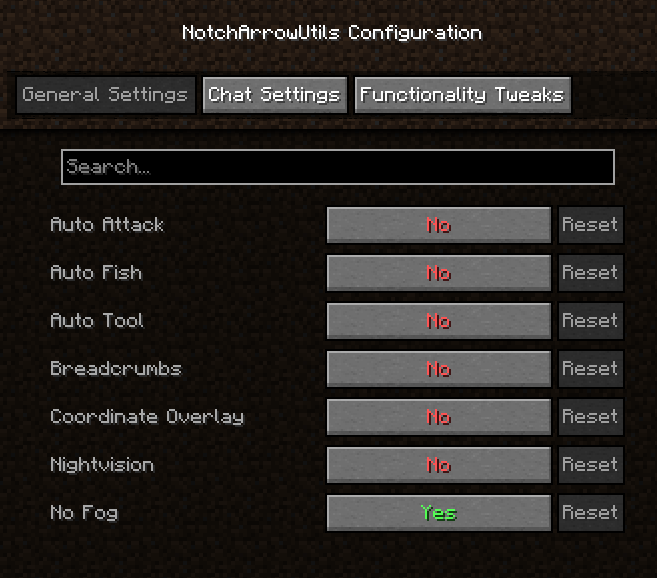
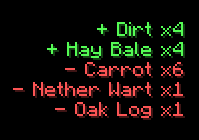
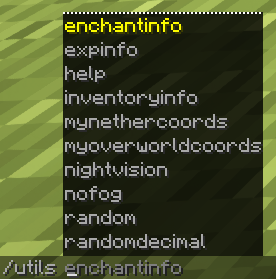
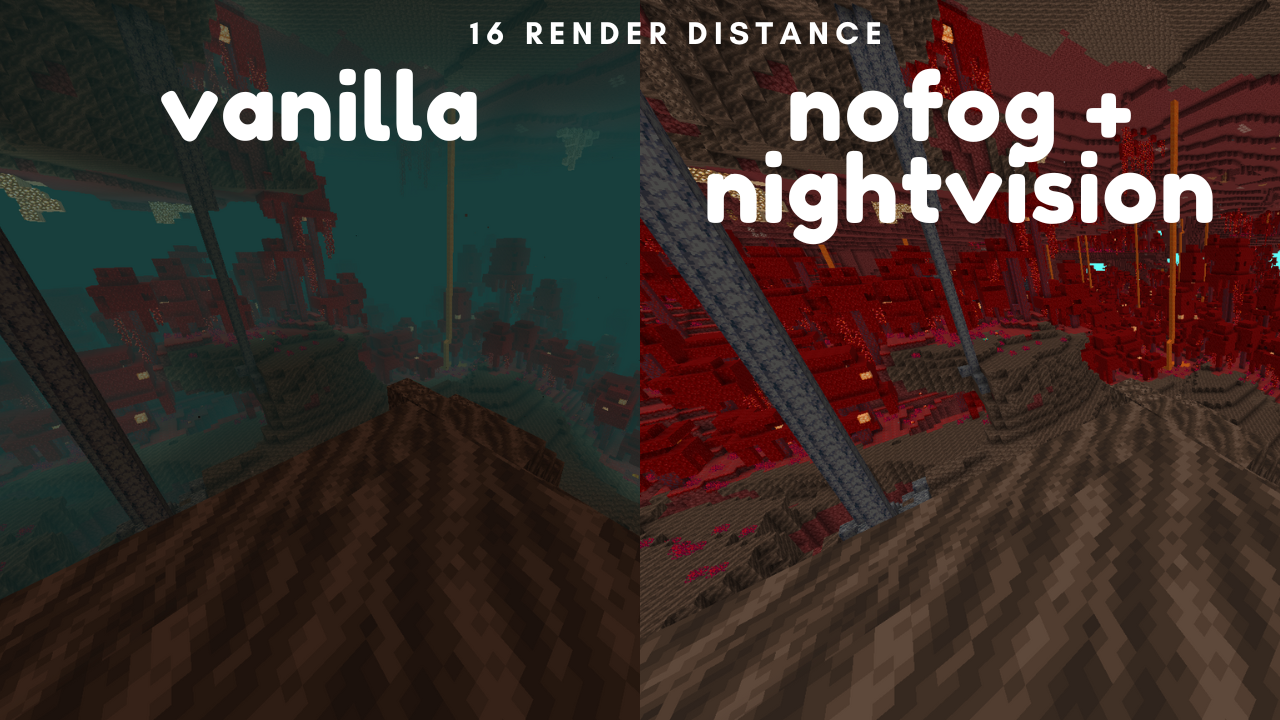
Bilder: NotchArrowUtils auf Modrinth, vom Projektteam veröffentlicht.
Einrichtung
NotchArrowUtils auf deinem Client installieren
Clientseitige Mods laufen nur auf deinem Rechner. Mehr Server-RAM ändert an ihrer Leistung nichts.
- 01
Loader lokal installieren
Installiere Fabric für deine Minecraft-Version in deinem Launcher.
- 02
Datei herunterladen
Lade die NotchArrowUtils-Datei für deinen Loader und exakt deine Minecraft-Version herunter, zum Beispiel 1.21.9.
- 03
In den Mods-Ordner legen
Lege die .jar-Datei in den lokalen Ordner .minecraft/mods und entferne ältere Duplikate.
- 04
Starten
Starte Minecraft mit dem Loader-Profil. Auf dem Server musst du nichts ändern.
- Auf dem Server
- Nicht nötig
- Auf dem Client
- Erforderlich
- Loader
- Fabric
- Minecraft
- 1.21.9, 1.21.8, 1.21.7 +6 weitere
- Lizenz
- MIT License
Versionen
Veröffentlichte Versionen
Nimm die Datei, die zu Loader und Minecraft-Version deines Servers passt. Server und Spieler brauchen dieselbe Version.
NotchArrowUtils · Modrinth- NotchArrowUtils 2.8.1+mc1.21.1122. Februar 2026Minecraft 1.21.10, 1.21.11, 1.21.9 · Fabric
- NotchArrowUtils 2.8.0+mc1.21.823. Juli 2025Minecraft 1.21.7, 1.21.8 · Fabric
- NotchArrowUtils 2.8.0+mc1.21.622. Juni 2025Minecraft 1.21.6 · Fabric
- NotchArrowUtils 2.8.0+mc1.21.512. Juni 2025Minecraft 1.21.5 · Fabric
- NotchArrowUtils 2.8.02. Juni 2025Minecraft 1.21.4 · Fabric
Originalbeschreibung des Projektautors

Information
Highlighted Features:
- Auto Clicker
- Auto Elytra
- Auto Fish
- Auto Replant
- Auto Sprint
- Auto Tool
- Calculator
- Constant Music
- Hotbar Cycling & Refilling
- Information Overlay
- Nightvision
- No Fog
- Notes
- Zoom
A comprehensive list of features can be found below.
Mod Menu & Cloth Config are highly recommended for configuration, but many things can be done through commands.
This mod is entirely clientside meaning it can be used on any server, but some features may flag anticheat or be bannable. Use at your own risk.
Give requests and feedback in my Discord!
All Commands/Features
Everything is disabled by default. Pick exactly what you want to use!
Automation Commands
| Command | Description |
|---|---|
/utils autoattack |
Toggles automatic attacking on mobs you are looking at. |
/utils autoelytra |
Toggles swapping elytra and chestplate when you want to fly and when you land. |
/utils autofish |
Starts autofishing after casting into water. |
/utils autorefill |
Refills the hotbar when running out of an item. |
/utils autoreplant |
Automatically replants crops when right-clicking with seeds. |
/utils autorocket |
Uses firework rockets with elytra automatically. |
/utils autosprint |
Enables sprinting when moving forward. |
/utils autotool |
Switches to the best tool when breaking a block. |
/utils fastplace |
Enables fast block placing (1 per tick). |
Utility Commands
| Command | Description |
|---|---|
/utils afkoptimize |
Mutes sound & reduces FPS for AFK farming. |
/utils breadcrumbs |
Leaves a particle trail to help you find your way back. |
/utils cameralock |
Locks/unlocks camera position, useful with /utils travelangle. |
/utils coordinateoverlay |
Displays coordinates above the hotbar. |
/utils deathlocation |
Shows your most recent death location. |
/utils nightvision |
Enables client-side night vision. |
/utils nofog |
Disables fog effects. |
/utils notes |
Opens a Book & Quill GUI for storing notes. |
/utils stormpause |
Pauses singleplayer when it starts storming. |
Information Commands
| Command | Description |
|---|---|
/utils clock |
Shows current in-game day & time in 24-hour format. |
/utils durabilitywarnings |
Toggles tool/armor durability warnings. |
/utils enchantinfo (enchantment) |
Provides detailed information about the specified enchantment. |
/utils expinfo |
Displays experience level information. |
/utils inventory info |
Lists items in your inventory by quantity (descending). |
/utils jobblocks |
Lists all villager profession blocks and their matching jobs. |
/utils overlay |
Toggles the main information overlay. |
/utils pickupnotifier |
Toggles notifications for item pickups and drops. |
/utils statistics |
Displays session stats in the pause menu (Singleplayer only). |
Fun Commands
| Command | Description |
|---|---|
/utils coinflip |
Returns Heads! or Tails! at 50/50 odds. |
/utils constantmusic |
Removes the pauses between Minecraft music. |
/utils jukebox (disc) |
Plays the specified disc. Use /utils jukebox stop to stop playback. |
/utils projectiletrails |
Toggles particle trails following projectiles. |
/utils smoothcamera |
Toggles smooth camera movements, like using a spyglass or zooming. |
Math Commands
| Command | Description |
|---|---|
/utils calculate (expression) |
Evaluates a math expression using exp4j. |
/utils calculatorvariables |
Lists built-in and custom calculator variables. |
/utils mynethercoords |
Converts Overworld coordinates to Nether by dividing by 8. |
/utils myoverworldcoords |
Converts Nether coordinates to Overworld by multiplying by 8. |
/utils randomdecimal (min) (max) (places) |
Generates a random float within range. |
/utils randomnumber (min) (max) |
Generates a random integer within range. |
/utils travelangle (x) (z) |
Calculates optimal travel angle and adjusts camera. |
Misc Commands
| Command | Description |
|---|---|
/utils help |
Links to Modrinth. |
Features Without Commands
| Feature | Description | Type |
|---|---|---|
| Hotbar Cycling | Changes the active row of the inventory. | Keybind(s) |
| Secondary Hotbar Keybinds | A second set of hotkeys for the hotbar. | Keybind(s) |
| World Icon Updater | Take a screenshot that is saved as the world icon. | Keybind |
| Zoom | Zooms in the camera. | Keybind |
Muss NotchArrowUtils auf dem Minecraft Server installiert werden?
Nein. Modrinth kennzeichnet NotchArrowUtils serverseitig als nicht unterstützt. Installiere die Mod nur im lokalen Mods-Ordner. Dein Server kann unverändert bleiben, sofern die Projektseite keine zusätzliche Abhängigkeit nennt.
Welche Version und welchen Loader braucht NotchArrowUtils?
Nutze eine Datei für Fabric und exakt deine Minecraft-Version. Unterstützt werden unter anderem 1.21.9, 1.21.8, 1.21.7. Dateien für verschiedene Loader sind nicht austauschbar.
NotchArrowUtils funktioniert nicht – was kann ich prüfen?
Prüfe zuerst Minecraft-Version, Loader-Version und erforderliche Abhängigkeiten. Da die Mod clientseitig ist, löst mehr Server-RAM das Problem nicht.
Ähnliche Mods
Beliebte Mods aus derselben Kategorie
 Server-fähig

VeinMiner
von Miraculixx
Mine the whole vein on mining a single ore/block. Make the tedious mining experience to something satisfying and fun! FTB Ultimine alternative
 Server-fähig

Geckolib
von Gecko
A 3D animation library for entities, blocks, items, armor, and more!
 Nur Client

VeinMiner Hotkey
von Miraculixx
Veinminer Addon - Use a hotkey to veinmine with a dynamic crosshair & block highlighting
 Server-fähig

Fzzy Config
von fzzyhmstrs
Config API with automatic GUIs, powerful validation options, server-client sync, and more!
Mods für deinen eigenen Server gesucht?
Im Katalog findest du Mods, die auf Minecraft Servern laufen.