
Nuit
Allows resource packs to define custom skyboxes. Formerly FabricSkyboxes
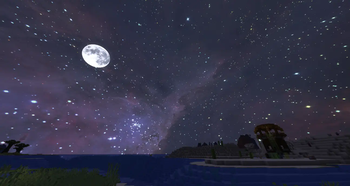
Screenshots
Über diese Mod
Formerly known as FabricSkyBoxes, Nuit is a powerful and flexible custom skybox engine for Minecraft.
It goes far beyond OptiFine’s skybox system, offering rich features like keyframe-based transitions, rotation, custom weather rendering, and full support for both Fabric and NeoForge.
Design immersive skies with dynamic day/night cycles, custom fog, sunrise/sunset glow, weather-aware rendering, and more, all backed by a robust JSON skybox format.
Nuit is currently in beta. Some features may evolve over time. Feedback is welcome.
View the Wiki and Format Documentation
Source Code on GitHub
Showcase


Features
- Fabric and NeoForge support
- Keyframeable fade and rotation transitions
- Custom sunrise, sunset, night, and weather rendering
- Fog customization per skybox
- Modular JSON-based skybox format
- Animated textures with optional frame interpolation
- Optimized texture loading and runtime performance
Skybox Format
Nuit uses a custom JSON-based format designed for flexibility and future-proofing.
You can create highly detailed and dynamic skyboxes with precise control over how and when they render.
Learn how to create your own skyboxes in the Wiki Format Documentation.
Frequently Asked Questions
Can I use OptiFine/MCPatcher skybox packs?
Nuit does not support those formats natively. Use Nuit Interop to load compatible OptiFine/MCPatcher custom sky resource packs through Nuit.
Is it modpack friendly?
Yes. Nuit is licensed under MIT and fully modpack-compatible.
What happened to FabricSkyBoxes?
FabricSkyBoxes has been rebranded to Nuit to reflect its expanded scope beyond Fabric.
Credits
- Nuit logo by UsernameGeri
- Logo render uses Minecraft World | high quality | free by SOLDMARS, licensed under Creative Commons Attribution
Community & Support
- Feature suggestions & issue tracker
- Discord for help, discussion, and previews
Breathe new life into your Minecraft skies with Nuit.
Verfügbare Versionen
Nuit auf deinem Client installieren
Mod-Loader lokal installieren
Installiere fabric für deine lokale Minecraft-Version.
Passende Datei herunterladen
Wähle die Nuit-Datei für fabric und Minecraft 26.3.
Mod installieren
Lege die .jar-Datei in deinem lokalen .minecraft/mods-Ordner ab und starte Minecraft neu. Eine Installation auf dem Server ist nicht nötig.
Kompatibilität
Mod-Loader
Minecraft-Versionen
26.3, 26.2, 26.1.2 (+28 weitere)
Server-seitig
✗ Nicht unterstütztEmpfohlener RAM
4 GB(min. 3 GB)Häufige Fragen
Muss Nuit auf dem Minecraft Server installiert werden?
Nein. Modrinth kennzeichnet Nuit serverseitig als nicht unterstützt. Installiere die Mod nur im lokalen Minecraft-Mods-Ordner. Dein Server kann unverändert bleiben, sofern die Mod-Seite keine zusätzliche Abhängigkeit nennt.
Welche Version und welchen Loader braucht Nuit?
Nutze eine Datei für fabric, neoforge, quilt und exakt deine Minecraft-Version. Unterstützte Versionen sind unter anderem 26.3, 26.2, 26.1.2. Loader-Dateien sind nicht untereinander austauschbar.
Nuit funktioniert nicht – was kann ich prüfen?
Prüfe zuerst Minecraft-Version, Loader-Version und erforderliche Abhängigkeiten. Lege die .jar-Datei im lokalen .minecraft/mods-Ordner ab und entferne ältere Duplikate. Da die Mod clientseitig ist, löst mehr Server-RAM dieses Problem nicht.
Ähnliche Mods




![[ETF] Entity Texture Features](https://cdn.modrinth.com/data/BVzZfTc1/af683d206d50b05258d865b0d6e4aa2f2cee12f2_96.webp)

Minecraft Server für deine Gruppe
Nuit bleibt auf deinem Client. Hoste dazu eine kompatible Welt für deine Mitspieler.