
Sodium/Rubidium Occlusion Culling Fix
Fix MC-70850, an invisible chunks issue brought back to MC1.18+ by Sodium.
Screenshots
Über diese Mod
Sodium/Rubidium Occlusion Culling Fix
🎉 The issue has been fixed officially in Sodium 0.5.0. You will no longer need this mod.
This is a mod which "fixes" MC-70850 for MC1.18+ by disabling Occlusion Culling properly fixing it.
It should have been already fixed since it is resolved by Mojang in 1.17. However, Sodium/Rubidium brought it back so we need to fix it again.
⚠️ Keep in mind that the fix is somehow breaking and will impact FPS. If you encounter performance issues, try removing this fix mod before blaming Sodium.
Relations
Forge
Requires Rubidium: The issue does not exist without Rubidium. In that case, you won't need the mod.
Fabric
Requires Sodium: The issue does not exist without Sodium. In that case, you won't need the mod.
Effect
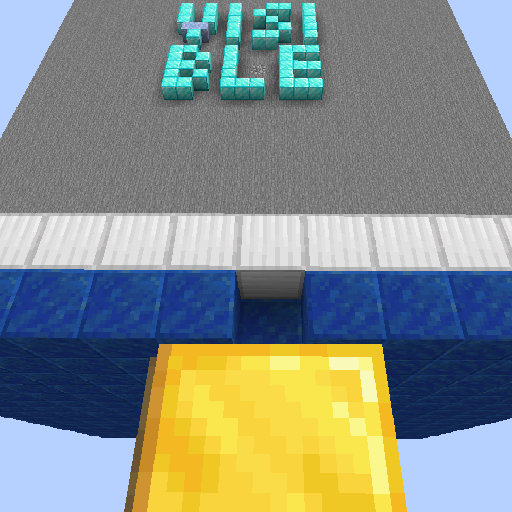
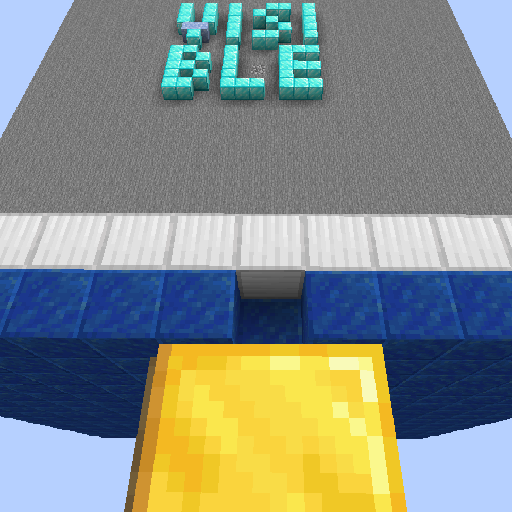
The chunk with letters "VISIBLE" in it was hidden in vanilla because of MC-70850. Mojang fixed that in 1.17, Sodium brought it back, and this mod fixed that again. You can get the test save for the bug on Mojira.
Side Effects
Though being an almost-proper fix, this fix does not completely match the intention of the original code. This might result in minor performance loss. However, we did not find significant performance drops.
Related Information
This fixes MC-70850 only. Another issue, MC-63020 causes a similar issue, and was fixed in 1.16.
Incompatibilities
Not found so far.
Plans
New features will not be added to the mod in order to keep the name descriptive. Please use Github Issue Tracker to report bugs.
This mod will not be backported.
- If you play 1.15/1.16 Forge and is having the issue, fix it with this mod.
- If you are the lucky one who is playing MC1.12.2, use EigenCraft Unofficial Patches instead.
Verfügbare Versionen
Sodium/Rubidium Occlusion Culling Fix auf deinem Client installieren
Mod-Loader lokal installieren
Installiere fabric für deine lokale Minecraft-Version.
Passende Datei herunterladen
Wähle die Sodium/Rubidium Occlusion Culling Fix-Datei für fabric und Minecraft 1.20.1.
Mod installieren
Lege die .jar-Datei in deinem lokalen .minecraft/mods-Ordner ab und starte Minecraft neu. Eine Installation auf dem Server ist nicht nötig.
Kompatibilität
Mod-Loader
Minecraft-Versionen
1.20.1, 1.20, 1.19.4 (+7 weitere)
Server-seitig
✗ Nicht unterstütztEmpfohlener RAM
4 GB(min. 3 GB)Häufige Fragen
Muss Sodium/Rubidium Occlusion Culling Fix auf dem Minecraft Server installiert werden?
Nein. Modrinth kennzeichnet Sodium/Rubidium Occlusion Culling Fix serverseitig als nicht unterstützt. Installiere die Mod nur im lokalen Minecraft-Mods-Ordner. Dein Server kann unverändert bleiben, sofern die Mod-Seite keine zusätzliche Abhängigkeit nennt.
Welche Version und welchen Loader braucht Sodium/Rubidium Occlusion Culling Fix?
Nutze eine Datei für fabric, forge und exakt deine Minecraft-Version. Unterstützte Versionen sind unter anderem 1.20.1, 1.20, 1.19.4. Loader-Dateien sind nicht untereinander austauschbar.
Sodium/Rubidium Occlusion Culling Fix funktioniert nicht – was kann ich prüfen?
Prüfe zuerst Minecraft-Version, Loader-Version und erforderliche Abhängigkeiten. Lege die .jar-Datei im lokalen .minecraft/mods-Ordner ab und entferne ältere Duplikate. Da die Mod clientseitig ist, löst mehr Server-RAM dieses Problem nicht.
Ähnliche Mods


Minecraft Server für deine Gruppe
Sodium/Rubidium Occlusion Culling Fix bleibt auf deinem Client. Hoste dazu eine kompatible Welt für deine Mitspieler.