
Modrinth · Fabric
Orbital+ auf deinem Minecraft Server
Orbital+ läuft auf Minecraft Servern mit Fabric. Bestell deinen Server, stell den Loader im Panel ein und installiere die Mod mit einem Klick im Mod-Browser.
Orbital+ is a feature-expanded orbital systems inspired by the Unstable SMP and other designs, focused on modularity and extended control.
- Downloads
- 108.5K
- Autor
- Jhiro
- Loader
- Fabric
- Minecraft
- 1.21.10 – 26.3
- Aktualisiert
- –
Screenshots
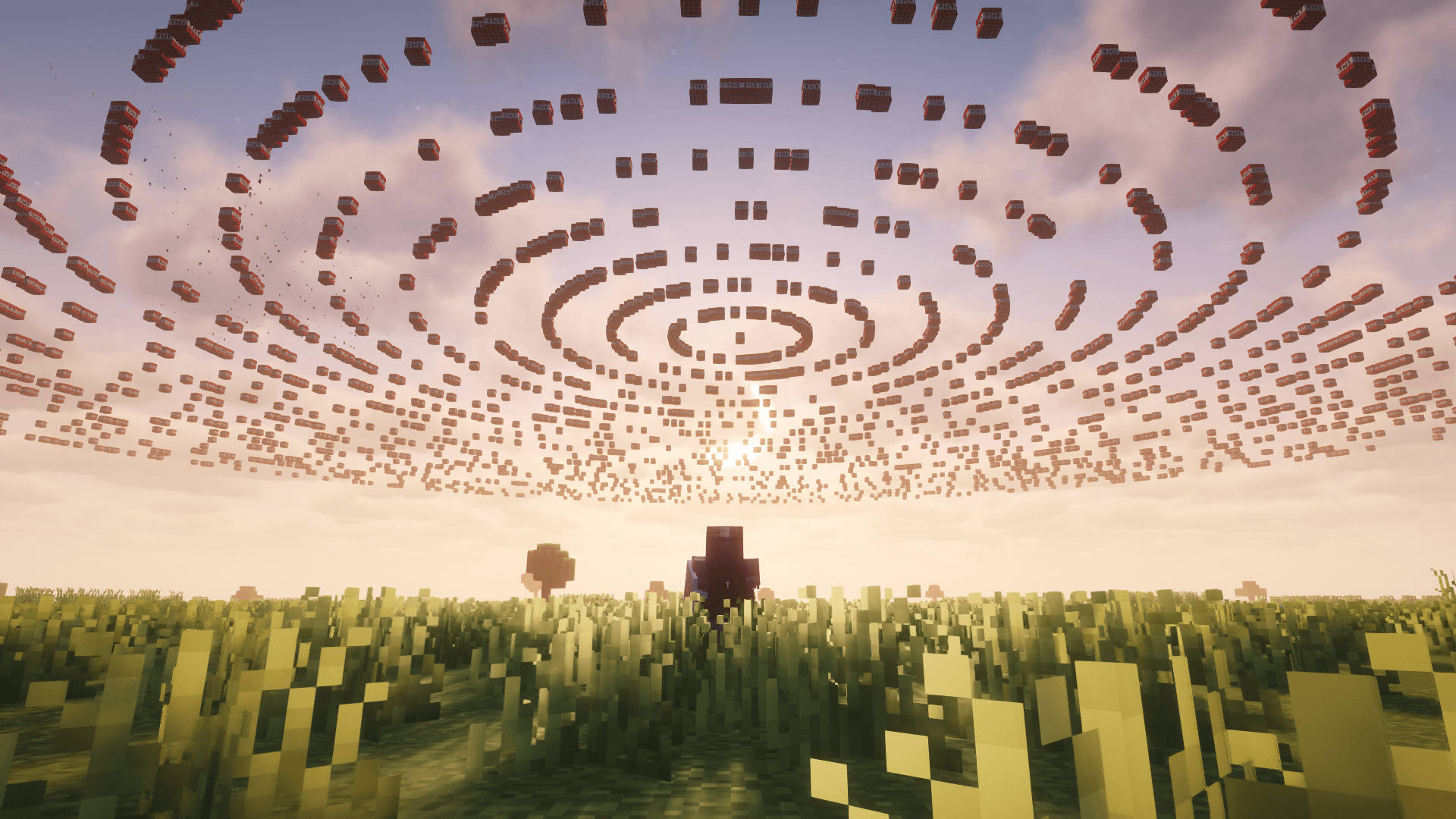
So sieht Orbital+ aus


Bilder: Orbital+ auf Modrinth, vom Projektteam veröffentlicht.
Einrichtung
Orbital+ auf dem Server installieren
Server und Spieler brauchen denselben Loader und dieselbe Minecraft-Version. Sichere die Welt, bevor du Mods hinzufügst oder aktualisierst.
- 01
Konfigurieren
4 GB RAM sind vorausgewählt. Laufzeit und Add-ons wählst du selbst, bezahlt wird per Kreditkarte oder PayPal.
- 02
Loader einstellen
Stell im Panel die Serversoftware auf Fabric und wähl die passende Minecraft-Version, zum Beispiel 26.3.
- 03
Mod installieren
Such im Mod-Browser nach „Orbital+“ und installiere die Version für deinen Loader. Alternativ lädst du die .jar per SFTP in den Ordner mods. Erforderliche Abhängigkeiten stehen auf der Projektseite.
- 04
Verbinden
Orbital+ ist auf dem Client nicht nötig. Spieler verbinden sich über die Serveradresse aus dem Panel.
- Auf dem Server
- Erforderlich
- Auf dem Client
- Nicht nötig
- Loader
- Fabric
- Minecraft
- 26.3, 26.2, 26.1.2 +7 weitere
- Lizenz
- LicenseRef-All-Rights-Reserved
Das Panel
Mods installieren, Fehler finden.
Echte Screenshots aus dem Mado Panel. Beides ist bei jedem Minecraft Server enthalten.
Mod-Browser
Modrinth und CurseForge direkt im Panel.
Der Browser filtert nach deiner Minecraft-Version. Mods installierst du mit einem Klick, ohne .jar-Dateien hochzuladen.

KI-Crash-Analyse
Wenn ein Mod crasht, liest die Analyse das Log.
Mods scheitern oft an einer falschen Loader-Version, Java-Version oder fehlenden Abhängigkeit. Die Analyse nennt eine wahrscheinliche Ursache und einen Lösungsvorschlag.

Versionen
Veröffentlichte Versionen
Nimm die Datei, die zu Loader und Minecraft-Version deines Servers passt. Server und Spieler brauchen dieselbe Version.
Orbital+ · Modrinth- Orbital+ 1.4.0 (Minecraft 26.3)25. Oktober 2026Minecraft 26.3 · Fabric
- Orbital+ 1.4.0 (Minecraft 26.2)25. Oktober 2026Minecraft 26.2 · Fabric
- Orbital+ 1.4.0 (Minecraft 26.1.2)25. Oktober 2026Minecraft 26.1.2 · Fabric
- Orbital+ 1.4.0 (Minecraft 1.21.11)25. Oktober 2026Minecraft 1.21.11 · Fabric
- Orbital+ 1.3.0 (Minecraft 1.21.9 - 1.21.10)22. Februar 2026Minecraft 1.21.10, 1.21.9 · Fabric
Originalbeschreibung des Projektautors

Orbital+ is a Minecraft mod that adds multiple orbital weapon systems controlled using fishing rods, totems, and commands.
It includes:
- Orbital Strike Cannon
- Wither Cannon
- Boss Cannon
- Railgun System
- Orbital Wolf Cannon
- Thorns Machine
- Mafia Rod
- Stasis System
- Nullify System
- The Totem of Null
- Magazine System
All orbital actions are triggered using special fishing rods, totems, or through commands.
Systems Included
Orbital Strike Cannon (OSC)
Calls orbital strikes at the targeted location.
Modes
- Stab
- Nuke
Wither Cannon
A wither cannon that is inspired and accurate to the Unstable SMP.
Boss Cannon
Summons Wardens, Withers, or Creakings at the targeted location.
Railgun System
Fires high-velocity arrows capable of one-shotting any entity.
Orbital Wolf Cannon
Summons wolves at the player's location.
Thorns Machine
Links a player to a machine that deals continuous thorns damage.
Mafia Rod
Sends hooked players to the void just like in the Unstable SMP.
Stasis System
Teleports you to a saved coordinate set on the rod.
Totem Stasis
Links a Totem of Undying to specific coordinates using commands.
Manual Totem Stasis
How to use: Place a regular Totem into a powered barrel. It will create an un-interactable copy inside the barrel while keeping the original on your inventory. Comparators beside the barrel will light up because it detects an item inside. Popping the totem will trigger any mechanisms connected to the barrel.
Nullify System
Inspired by the Unstable SMP's Null where it changes the skin to be completely black and encrypts the name.
Does not work with the PVP bot mod for some reason
The Totem of Null
The same Totem of Null as the Unstable SMP, sending tagged players to the void when popped.
Magazine System
Queues multiple strikes and fires them simultaneously or in a sequence.
Fishing Rod System
Orbital+ supports two rod behavior modes.
Vanilla Rod Mode
Uses the normal vanilla fishing rod system.
/oconfig rod vanilla
Unstable Rod Mode
Uses the fishing rod system from the Unstable SMP.
Features
- Fishing bobbers persist
- Fishing bobbers are tied to the rod instead of the player
- Multiple mechanisms can be set up using multiple rods
- Bobbers persist even if:
- You die
- Leave the server
- The server restarts
/oconfig rod unstable
Global Configurations
These commands require Operator status or Orbital Trust permissions.
Performance Mode/oconfig performanceMode <enabled/disabled>
Minimizes block drops from explosions to prevent lag and optimizes other stuff.
Orbital Ownership/oconfig orbitalOwnership <enabled/disabled>
Binds weapons to their original owner. If another person shoots a weapon that belongs to the owner, it'll fire exactly where the owner is looking instead of the other player.
Totem Stasis/oconfig totemStasis <enabled/disabled>
Toggles Manual Totem Stasis barrel mechanics.
Pearl Disappear/oconfig pearl disappear <true/false>
Forces Ender Pearls to vanish or persist upon the thrower's death.
Death Settings/oconfig death sound <enabled/disabled>
Toggles the death sound when a player dies.
/oconfig death kick <enabled/disabled>
Kicks players from the server immediately upon death.
Proximity Messages/oconfig messages proximity <enabled/disabled>
Limits chat, join/leave, and death messages to nearby players.
/oconfig messages proximity range <range>
Sets the block radius for proximity messages.
Smart Immortality System
- Only leaves you with half a heart no matter how much damage you take.
- Detects if you are holding a Totem of Undying, allowing the totem to pop normally instead of interfering.
/oconfig immortality add <player>
Grants a player immortality.
/oconfig immortality remove <player>
Removes immortality from a player.
/oconfig immortality list
Lists all currently immortal players.
Global Utilities/oconfig reset
Resets all global configurations to their default values.
/oconfig list
Displays the current global server configurations.
Orbital Settings
Adjust weapon settings using /orbital settings systems <system>.
OSC – Multi-Dimensional Settings
/orbital settings systems osc multi-dimensional <enabled/disabled>
Toggles whether the Orbital Strike Cannon can be used outside of the Overworld. If disabled (default), pulling the rod in the Nether or End will not fire the strike.
OSC – Nuke Settings
/orbital settings systems osc nuke delay <delay>
Sets the tick delay before the nuke shot spawns.
/orbital settings systems osc nuke size <size>
Sets how many rings are in the nuke.
Minimum: 1 | Maximum: 31
/orbital settings systems osc nuke type <type>
Changes the nuke type.
Supported Types: default, mushroom, compressed, redstone, supernova
/orbital settings systems osc nuke durability <durability>
Sets how much durability the rod has.
Minimum: 1 | Maximum: 64
OSC – Stab Settings
/orbital settings systems osc stab delay <delay>
Sets the tick delay before the stab shot.
/orbital settings systems osc stab depth <depth>
Sets how many blocks deep the stab shot is.
Minimum: 1 | Maximum: 276
/orbital settings systems osc stab type <type>
Changes the stab pattern.
Supported Types: default, square, circle, star, spiral
/orbital settings systems osc stab durability <durability>
Sets how much durability the rod has.
Minimum: 1 | Maximum: 64
OSC – Explosion Settings
/orbital settings systems osc explosion power <power>
Changes the block-breaking blast radius of the OSC.
/orbital settings systems osc explosion damage <damage>
Multiplies the entity damage of the OSC.
Wither Cannon Settings
/orbital settings systems withercannon density <density>
Mulitplies how many skulls are fired per wave.
1 = 1200 skulls
/orbital settings systems withercannon delay <delay>
Sets the tick delay before the first wave fires.
/orbital settings systems withercannon interval <interval>
Sets the tick delay between the next waves.
/orbital settings systems withercannon range <range>
Sets the block radius of the wither cannon.
/orbital settings systems withercannon shots-amount <amount>
Sets how many total waves are fired.
/orbital settings systems withercannon durability <durability>
Sets how much durability the rod has.
Minimum: 1 | Maximum: 64
Boss Cannon Settings
/orbital settings systems boss type <wither/warden/creaking>
Selects which boss is going to spawn.
/orbital settings systems boss amount <amount>
Sets how many bosses are spawned per strike.
/orbital settings systems boss delay <delay>
Sets the tick delay before the bosses spawn.
/orbital settings systems boss durability <durability>
Sets how much durability the rod has.
Minimum: 1 | Maximum: 64
Railgun Settings
/orbital settings systems railgun amount <amount>
Sets how many arrows are fired.
/orbital settings systems railgun delay <delay>
Sets the tick delay before the arrows fire.
/orbital settings systems railgun accuracy <accuracy>
Shifts the center of the barrage away from the crosshair (0.0 is center).
/orbital settings systems railgun precision <precision>
Controls the scatter of individual arrows (0.0 is center).
/orbital settings systems railgun durability <durability>
Sets how much durability the rod has.
Minimum: 1 | Maximum: 64
Wolf Cannon Settings
/orbital settings systems wolf amount <amount>
Sets how many wolves are summoned.
/orbital settings systems wolf delay <delay>
Sets the tick delay before the wolves spawn.
/orbital settings systems wolf armor <enabled/disabled>
Equips summoned wolves with wolf armor.
/orbital settings systems wolf durability <durability>
Sets how much durability the rod has.
Minimum: 1 | Maximum: 64
/orbital settings systems wolf effects list
Views all potion effects applied to summoned wolves.
/orbital settings systems wolf effects add <effect> <duration/infinite> <amplifier> <hideParticles>
Adds a custom potion effect to summoned wolves.
/orbital settings systems wolf effects remove <effect>
Removes a potion effect from summoned wolves.
Thorns Machine Settings
/orbital settings systems thorns delay <delay>
Sets the initial delay before thorns damage begins.
/orbital settings systems thorns interval <interval>
Sets the tick speed between each tick of thorns damage.
/orbital settings systems thorns durability <durability>
Sets how much durability the rod has.
Minimum: 1 | Maximum: 64
Stasis & Null Totem Settings
/orbital settings systems stasis delay <delay>
Sets the tick delay before it teleports you.
/orbital settings systems stasis durability <durability>
Sets how much durability the rod has.
Minimum: 1 | Maximum: 64
/orbital settings systems nullTotem delay <delay>
Sets the tick delay before sending the players to the void when the totem pops.
Linking System
/orbital link <type>
Binds the rod in your main hand to a specific weapon system.
Supported Rod Types: stab, nuke, wolf, railgun, wither, mafia, boss, magazine
Special Links:/orbital link thorns <targets>
Links a Thorns Machine rod to specific players.
/orbital link stasis
Links a rod to your exact current coordinates.
/orbital link stasis <x> <y> <z>
Links a rod to specific coordinates.
/orbital link stasisTotem
Links a Totem of Undying to your exact current coordinates.
/orbital link stasisTotem <x> <y> <z>
Links a Totem of Undying to specific coordinates.
Give Commands
/orbital give <targets> <type> <amount> <infinite>
Generates and gives a custom weapon to the targeted players.
Valid Types: stab, nuke, wolf, railgun, wither, mafia, boss, stasis, thorns, nullTotem, stasisTotem.
Magazine System Commands
/orbital strike magazine add <x> <y> <z> <type>
Queues a specific strike at the given coordinates.
/orbital strike magazine list
Displays all currently queued strikes in your magazine.
/orbital strike magazine remove slot <number>
Deletes a specific shot from your queue.
/orbital strike magazine all
Clears your entire magazine queue.
/orbital strike magazine fire all
Fires every loaded shot instantly.
/orbital strike magazine fire sequence
Fires the loaded shots one by one.
/orbital strike magazine sequence kill
Aborts an actively firing sequence.
Direct Strikes & Entities
/orbital strike <x> <y> <z> <type>
Immediately deploys a strike at the coordinates.
/orbital wolf summon <amount>
Summons the specified number of wolves at your location.
/orbital wolf kill
Instantly deletes all Orbital Wolves in the world.
(Command Block compatible)
Null Commands
/orbital nullify <targets>
Nullifies targeted players.
/orbital nullTotem list
Shows who is currently tagged to your held Totem of Null.
/orbital nullTotem tag <targets>
Adds players to the held Totem of Null list.
/orbital nullTotem untag <targets>
Removes players from the held Totem of Null list.
Personal Settings & Display
/orbital settings displayName <type> <name>
Renames a specific weapon.
/orbital settings feedback <enabled/disabled>
Toggles your personal Action Bar feedback messages.
/orbital settings preset save <name>
Saves your current personal settings as a reusable preset.
/orbital settings preset apply <name>
Loads a saved preset.
/orbital settings preset remove <name>
Deletes a saved preset.
/orbital settings list
Views your current personal configurations.
/orbital settings reset
Wipes your personal configurations back to default.
Trust / Permissions System
Manage who is allowed to use Orbital+ commands without needing full server OP status.
/orbital permissions list
Lists all authorized players.
/orbital permissions trust <player-name>
Grants Orbital commands access to a non-operator player.
/orbital permissions untrust <player-name>
Revokes Orbital commands access from a player.
Trusted players cannot access:
- Permissions branch
- Oconfig
Contact / Support
If you encounter any bugs or issues while using Orbital+, you can reach me directly on Discord: jhiro2483.
Please include:
- The Minecraft version you’re using
- A short description of the bug
This helps me fix issues faster and improve the mod for everyone.
Orbital+ Server crasht beim Start – was tun?
Häufige Ursachen: Loader- oder Minecraft-Version passen nicht zur Mod-Datei, eine Abhängigkeit fehlt oder der RAM reicht nicht. Such im Log (latest.log) nach „OutOfMemoryError“, „Mixin“ oder fehlenden Mods. Bei Mado wertet die KI-Crash-Analyse das Log aus und schlägt eine Ursache vor. Loader und Version änderst du im Panel.
Mit welchem Loader läuft Orbital+?
Laut Modrinth unterstützt Orbital+ Fabric für Minecraft 26.3, 26.2, 26.1.2.
Wie viel RAM braucht ein Server mit Orbital+?
Als Orientierung 3–4 GB für einen Server mit dieser Mod. Das ist eine Schätzung, keine gemessene Mindestanforderung. Weitere Mods, viele Spieler und große Sichtweiten brauchen mehr. Ob eine Mod die Tick-Zeit belastet, siehst du mit dem spark-Profiler.
Ähnliche Mods
Beliebte Mods aus derselben Kategorie
 Server-fähig

VeinMiner
von Miraculixx
Mine the whole vein on mining a single ore/block. Make the tedious mining experience to something satisfying and fun! FTB Ultimine alternative
 Server-fähig

Geckolib
von Gecko
A 3D animation library for entities, blocks, items, armor, and more!
 Nur Client

VeinMiner Hotkey
von Miraculixx
Veinminer Addon - Use a hotkey to veinmine with a dynamic crosshair & block highlighting
 Server-fähig

Fzzy Config
von fzzyhmstrs
Config API with automatic GUIs, powerful validation options, server-client sync, and more!
Bereit für deinen Server mit Orbital+?
4 GB RAM ab 8,00 € im Monat. 35 % auf den 1. Monat mit MADO35.