
oSzoukaua's: Lucky Blocks
oSzoukaua's: Lucky blocks This is a datapack created by me, oSzoukaua, based on the original mod by the name "Lucky Blocks" This Datapack adds craftable Lucky blocks with varying Luck levels, and a lot of possible different "Events"
Screenshots
Über diese Mod
Description:
This is a datapack created by me, oSzoukaua, based on the original mod by the name "Lucky Blocks"
This Datapack adds craftable Lucky blocks, with varying Luck levels from [+100] - [-100]
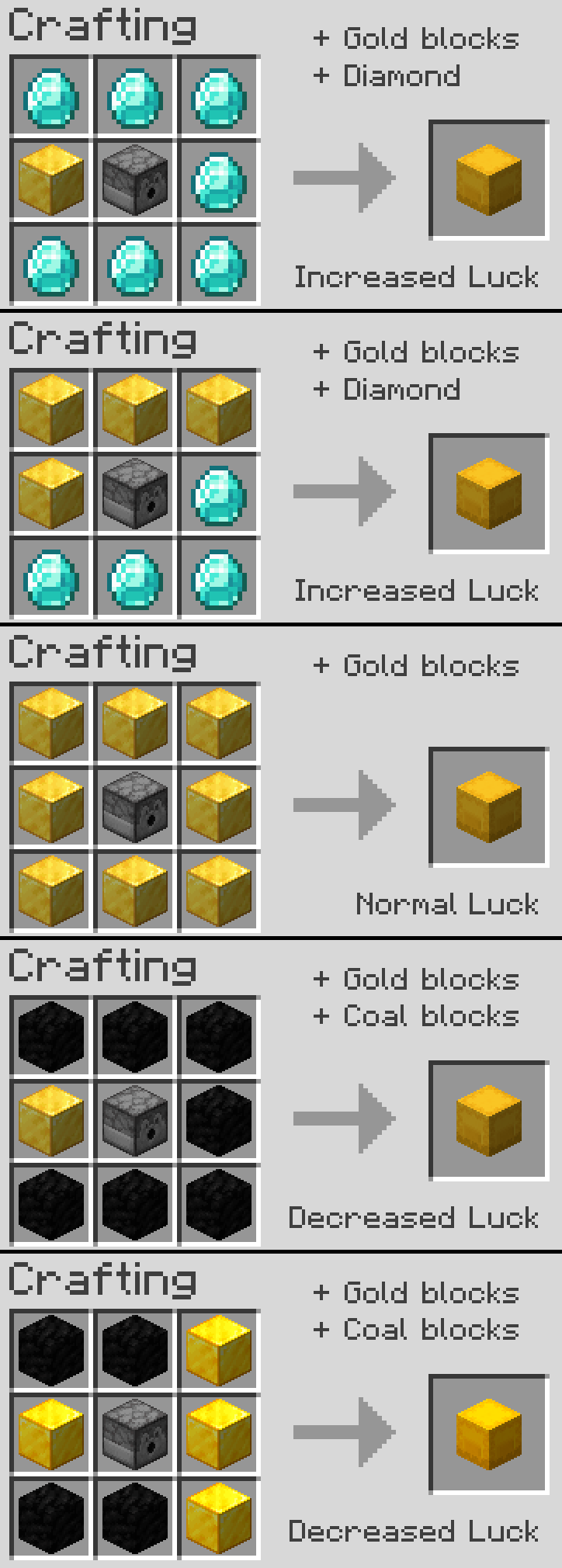
They can be crafted by surrounding a dispenser with either gold blocks, for a 0 Luck block, or you can replace some gold blocks with either coal blocks, or singular diamonds to increase or decrease luck
Includes a lot of possible different "Events" for each level of luck
From amazingly awesome! to frustratingly annoying.
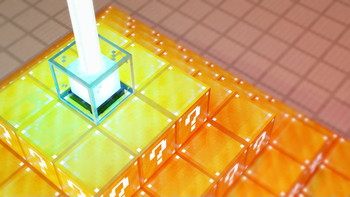
This Datapack also adds many other features such as Lucky beacons, when you place a Lucky Block ontop of a powered Beacon, and many others! that can be gotten through Events from the Lucky Blocks.
Notes:
This Datapack is currently using a system where a resource pack is not required or needed for convenience of use, but it still manages adds custom block "textures" This may change in the future.
I do not take any ownership or credit for the idea or original creation of the "Lucky Blocks" concept
This is by no means an optimized Datapack, as it is my first Datapack that I have created/worked on, and i have not worked with commands since Version "1.8.9" though I have put my best effort into making it run smoothly without hiccups!
Other:
You are free to use this pack in modpacks/youtube videos and many other forms of sharing
License: ATTRIBUTION-NONCOMMERCIAL-SHAREALIKE 4.0 INTERNATIONAL
If you would like me to port this to any other Minecraft version, i would be more than happy to do so, please contact me! my details are below.
If you do find any issues/have any recommendations, suggestions for optimizations, improvements, or new features to add, feel free to contact me!
Discord
@oSzoukaua

Technical details:
Verfügbare Versionen
oSzoukaua's: Lucky Blocks auf dem Server installieren
Server bestellen
Bestelle einen Minecraft Java Server mit mindestens 4 GB RAM (6 GB empfohlen).
datapack Loader setzen
Wähle im Panel unter "Egg" den datapack-Loader und die passende Minecraft-Version (1.20.1).
Mod installieren
Öffne den Mod-Browser im Dashboard und suche nach "oSzoukaua's: Lucky Blocks". Klicke "Installieren" – fertig! Alternativ: Lade die .jar via SFTP in den /mods Ordner.
Kompatibilität
Mod-Loader
Minecraft-Versionen
1.20.1, 1.20
Server-seitig
✓ ErforderlichEmpfohlener RAM
6 GB(min. 4 GB)Häufige Fragen
oSzoukaua's: Lucky Blocks Server crasht beim Start – was tun?
Häufigste Ursache: falsche datapack-Version oder zu wenig RAM. Prüfe im Server-Log (latest.log), ob ein "OutOfMemoryError" oder "Mixin"-Fehler auftritt. Bei Mado Hosting: Stelle sicher, dass mindestens 4 GB RAM zugewiesen sind und der Loader zur Mod-Version passt (1.20.1). Über das Panel kannst du den Loader mit einem Klick wechseln.
Ist oSzoukaua's: Lucky Blocks mit datapack und fabric und forge und quilt kompatibel?
oSzoukaua's: Lucky Blocks unterstützt offiziell datapack, fabric, forge, quilt für Minecraft 1.20.1, 1.20. Achtung: Forge- und Fabric-Mods sind NICHT untereinander kompatibel – wähle einen Loader und bleibe dabei. Im Mado Dashboard werden inkompatible Loader-Kombinationen automatisch erkannt.
Server laggt mit oSzoukaua's: Lucky Blocks – wie optimiere ich die Performance?
Empfohlener RAM: 6 GB (+1 GB pro 5 Spieler). Prüfe mit /spark profiler, ob oSzoukaua's: Lucky Blocks den meisten Tick-Time verbraucht. Häufige Fixes: Server-View-Distance auf 8-10 reduzieren, bei Forge "performant" oder "starlight" als Zusatz-Mod installieren. Bei Mado Hosting läuft dein Server auf NVMe-SSDs mit dedizierten CPU-Kernen für minimale Latenz.
Ähnliche Mods





Modded Server mieten
Installiere oSzoukaua's: Lucky Blocks mit nur einem Klick auf deinem Server.
Details
- Lizenz
- Creative Commons Attribution Non Commercial Share Alike 4.0 International
- Server-seitig
- Erforderlich