
PackCENHeaderFix
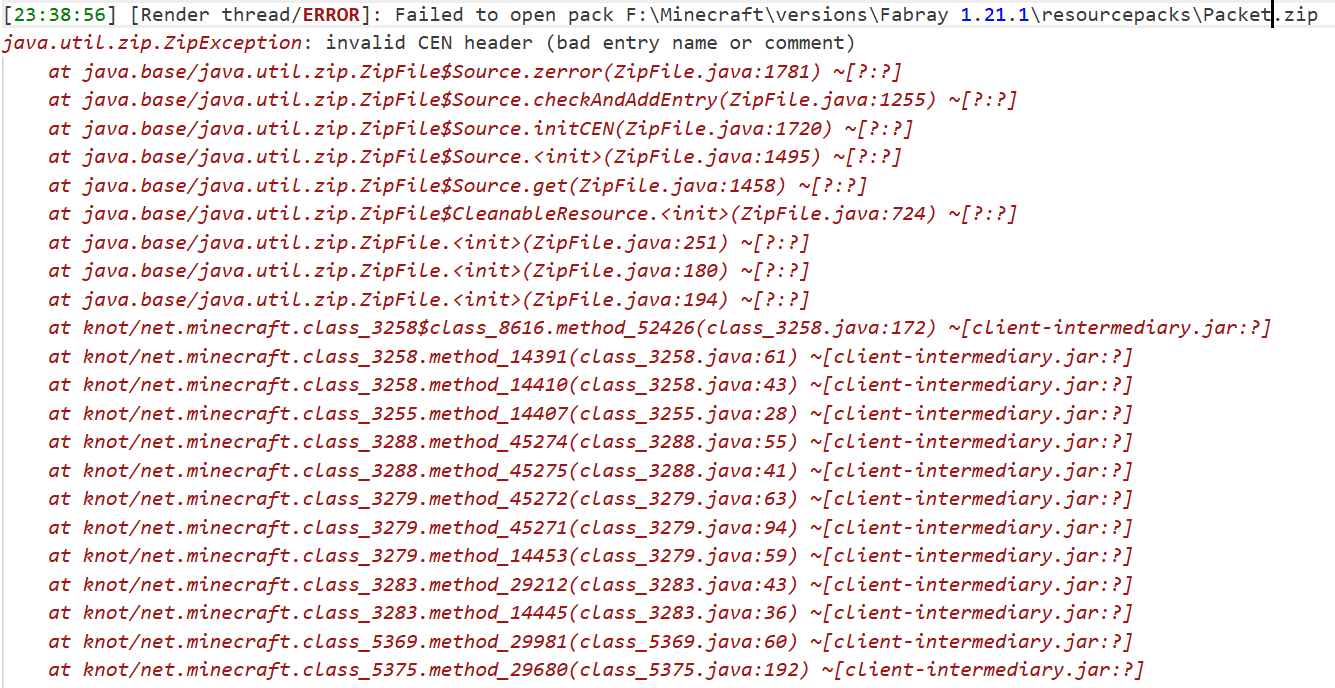
There is no longer an error `invalid CEN header (bad entry name or comment)
Screenshots
Über diese Mod
PackCENHeaderFix
There is no longer an error invalid CEN header (bad entry name or comment)
It solves this problem by replacing Java Zip implementation with Apache Commons Compress implementation.
Example Story
You downloaded a ResourcePack from a RP author. You put it in your RP folder and tried to load it as usual, but you don't see it in the RP selector.
Instead, Minecraft prints the following error in the log:
It doesn't appear in Mojira, precisely because it's a bug that only appears under very extreme conditions. I haven't seen it in the past few years of the game, and only very, very few RP authors have accidentally allowed their RP to be contaminated by this bug.
The cause of this bug is unknown, but it only affects the Java Zip implementation. RPs that experience this bug can still be force-loaded (although you won't be able to find them in the selector), but I think it's better to try to fix it.
About API
It's intended for use with another mod of mine, which will rely on this one for additional functionality.
If you want to do something with it, my advice is don't, I don't want it to behave unexpectedly.
How to build?
After the clone repository, be sure to use the ./gradlew clean build command to build,
rather than executing any of them separately.
After the build is completed, a jars folder will be generated in the root directory,
where the final build results will be stored.
For Modpack
If you comply with the license, you can use it freely for Modpack.
Modpacks that redistribute Minecraft game body (i.e. packages that package the entire Minecraft game including Mod files, Config, ShaderPacks, ResourcePacks, Library and launcher into a whole zip file) are not allowed to use this mod.
License
This work has a restrictive license in addition to the original license to prevent some unexpected behavior, see 404Setup Public License
Verfügbare Versionen
PackCENHeaderFix auf dem Server installieren
Server bestellen
Bestelle einen Minecraft Java Server mit mindestens 3 GB RAM (4 GB empfohlen).
fabric Loader setzen
Wähle im Panel unter "Egg" den fabric-Loader und die passende Minecraft-Version (26.1.1).
Mod installieren
Öffne den Mod-Browser im Dashboard und suche nach "PackCENHeaderFix". Klicke "Installieren" – fertig! Alternativ: Lade die .jar via SFTP in den /mods Ordner.
Kompatibilität
Mod-Loader
Minecraft-Versionen
26.1.1, 26.1, 1.21.11 (+98 weitere)
Server-seitig
~ OptionalEmpfohlener RAM
4 GB(min. 3 GB)Häufige Fragen
PackCENHeaderFix Server crasht beim Start – was tun?
Häufigste Ursache: falsche fabric-Version oder zu wenig RAM. Prüfe im Server-Log (latest.log), ob ein "OutOfMemoryError" oder "Mixin"-Fehler auftritt. Bei Mado Hosting: Stelle sicher, dass mindestens 3 GB RAM zugewiesen sind und der Loader zur Mod-Version passt (26.1.1). Über das Panel kannst du den Loader mit einem Klick wechseln.
Ist PackCENHeaderFix mit fabric und forge und neoforge und quilt kompatibel?
PackCENHeaderFix unterstützt offiziell fabric, forge, neoforge, quilt für Minecraft 26.1.1, 26.1, 1.21.11. Achtung: Forge- und Fabric-Mods sind NICHT untereinander kompatibel – wähle einen Loader und bleibe dabei. Im Mado Dashboard werden inkompatible Loader-Kombinationen automatisch erkannt.
Server laggt mit PackCENHeaderFix – wie optimiere ich die Performance?
Empfohlener RAM: 4 GB (+1 GB pro 8 Spieler). Prüfe mit /spark profiler, ob PackCENHeaderFix den meisten Tick-Time verbraucht. Häufige Fixes: Server-View-Distance auf 8-10 reduzieren, bei Forge "performant" oder "starlight" als Zusatz-Mod installieren. Bei Mado Hosting läuft dein Server auf NVMe-SSDs mit dedizierten CPU-Kernen für minimale Latenz.
Ähnliche Mods


Modded Server mieten
Installiere PackCENHeaderFix mit nur einem Klick auf deinem Server.