
Modrinth · Fabric, NeoForge, Quilt · Client-Mod
Particle Interactions
Particle Interactions ist eine clientseitige Mod. Du installierst sie auf deinem Rechner, auf dem Server ist sie nicht nötig.
Adds particles to more interactions in the game, such as placing blocks or stripping logs. Fully configurable and client side!
- Downloads
- 2.9M
- Autor
- enchanted-games
- Loader
- Fabric, NeoForge, Quilt
- Minecraft
- 1.21 – 26.3
- Aktualisiert
- –
Screenshots
So sieht Particle Interactions aus
 Wilderness Bound particles
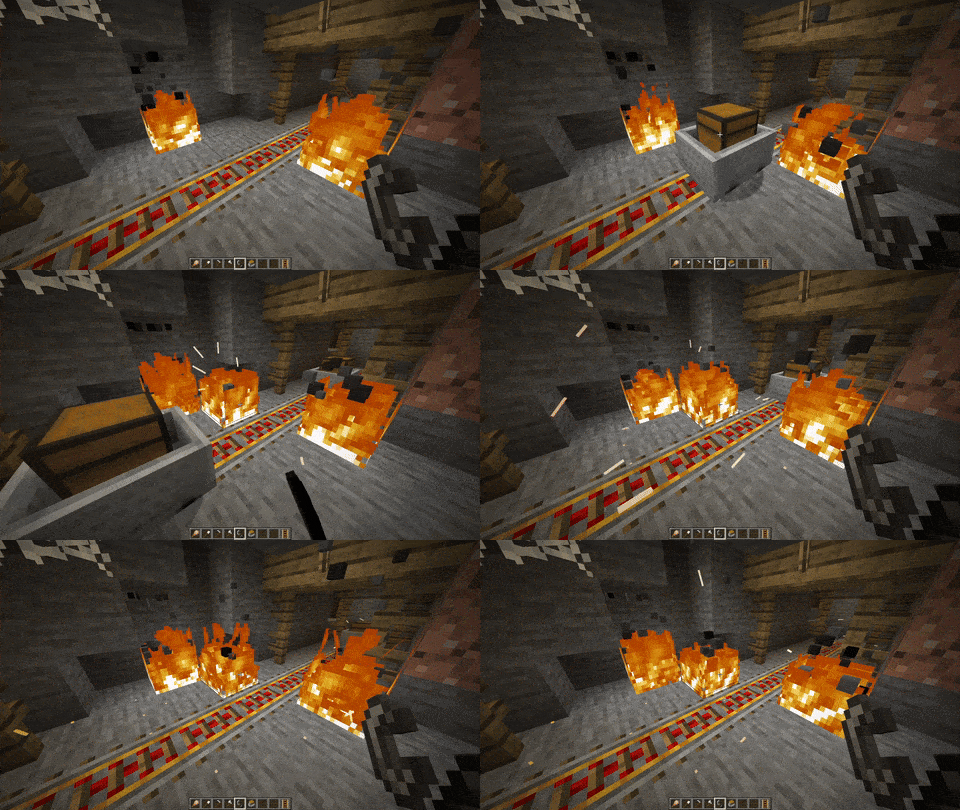 Example of the sparks introduced in v0.2
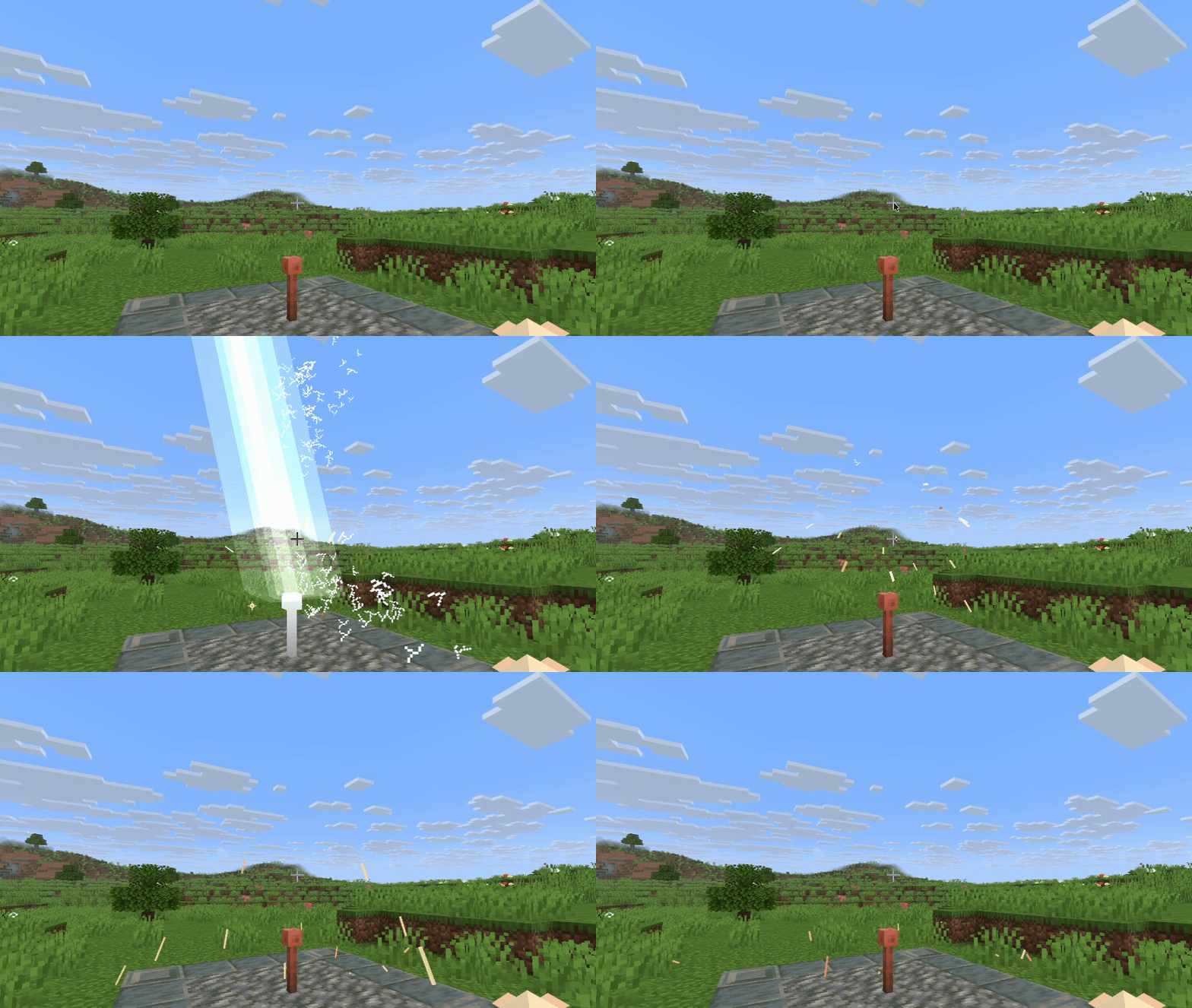 Lightning impact particles
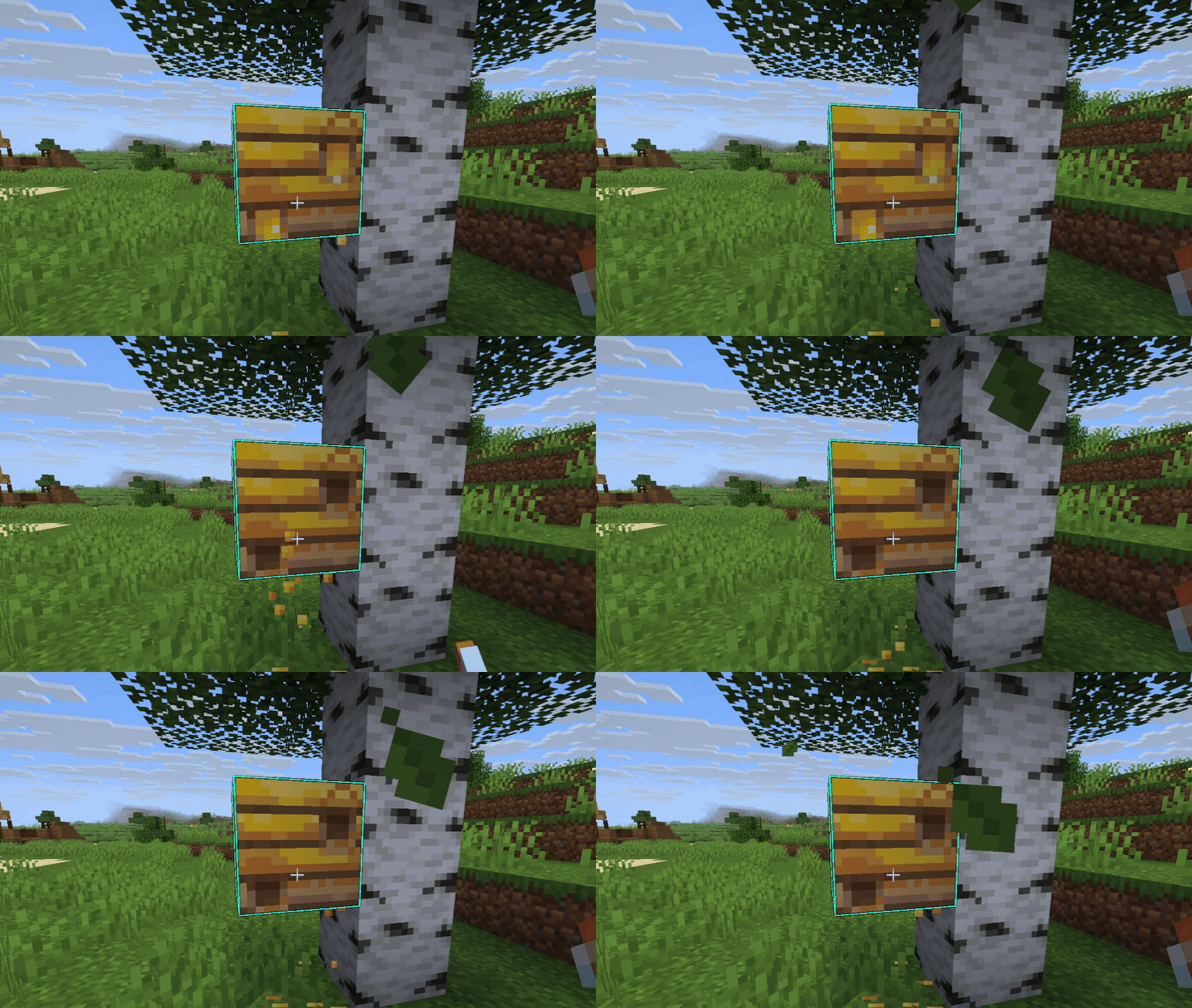 Honey collection particles
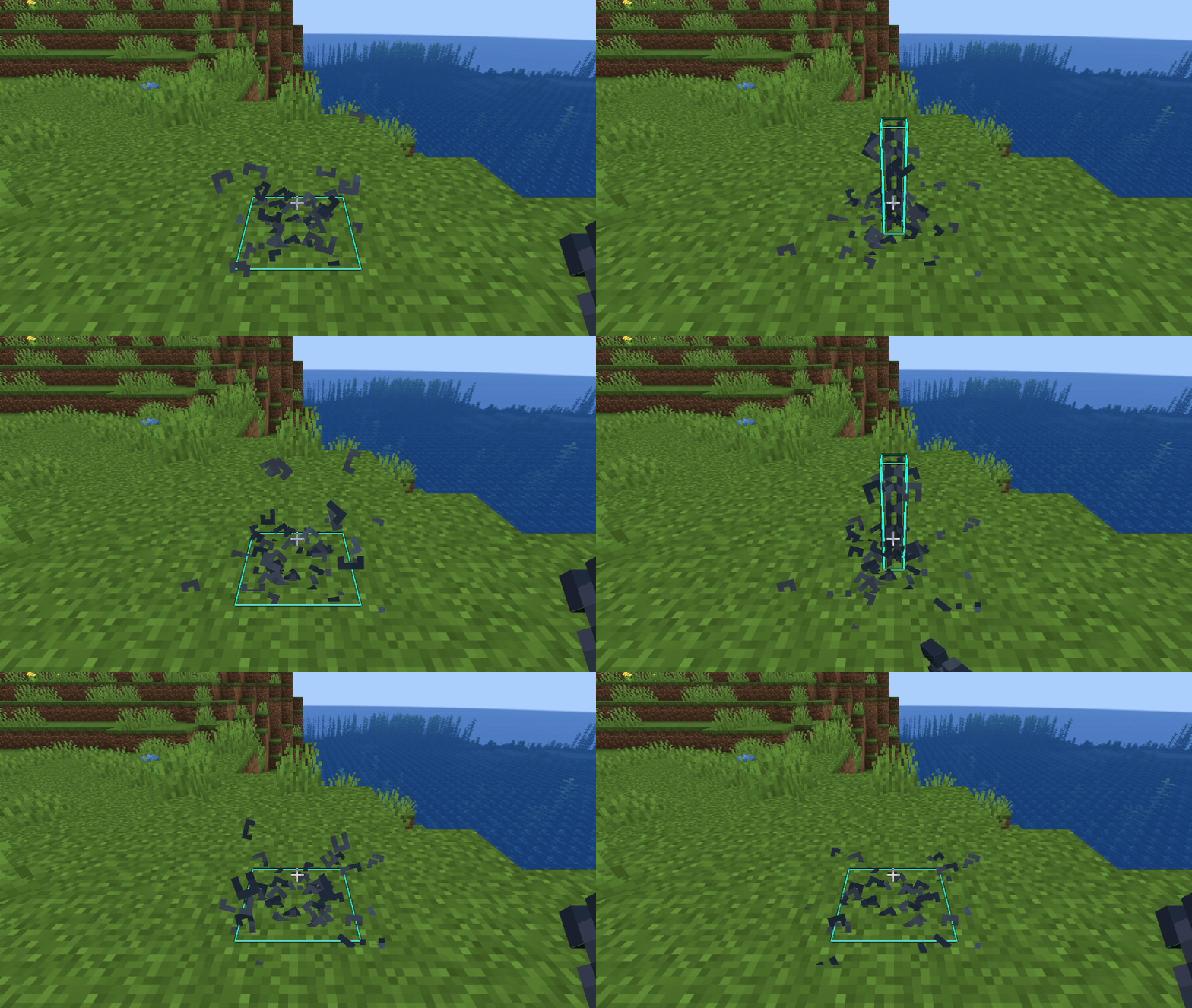 Chain links particle override
Bilder: Particle Interactions auf Modrinth, vom Projektteam veröffentlicht.
Einrichtung
Particle Interactions auf deinem Client installieren
Clientseitige Mods laufen nur auf deinem Rechner. Mehr Server-RAM ändert an ihrer Leistung nichts.
- 01
Loader lokal installieren
Installiere Fabric oder NeoForge oder Quilt für deine Minecraft-Version in deinem Launcher.
- 02
Datei herunterladen
Lade die Particle Interactions-Datei für deinen Loader und exakt deine Minecraft-Version herunter, zum Beispiel 26.3.
- 03
In den Mods-Ordner legen
Lege die .jar-Datei in den lokalen Ordner .minecraft/mods und entferne ältere Duplikate.
- 04
Starten
Starte Minecraft mit dem Loader-Profil. Auf dem Server musst du nichts ändern.
- Auf dem Server
- Nicht nötig
- Auf dem Client
- Erforderlich
- Loader
- Fabric, NeoForge, Quilt
- Minecraft
- 26.3, 26.2, 26.1.2 +18 weitere
- Lizenz
- Creative Commons Attribution Non Commercial 4.0 International
Versionen
Veröffentlichte Versionen
Nimm die Datei, die zu Loader und Minecraft-Version deines Servers passt. Server und Spieler brauchen dieselbe Version.
Particle Interactions · Modrinth- [NF] v0.10.5 for mc 26.310. Oktober 2026Minecraft 26.3 · NeoForge
- [Fabric] v0.10.5 for mc 26.310. Oktober 2026Minecraft 26.3 · Fabric
- [NF] v0.10.2 for mc 26.212. August 2026Minecraft 26.2 · NeoForge
- [Fabric] v0.10.2 for mc 26.212. August 2026Minecraft 26.2 · Fabric
- [NF] v0.10.2 for mc 26.112. August 2026Minecraft 26.1.2 · NeoForge
Originalbeschreibung des Projektautors
Particle Interactions
A mod that adds particles to more interactions in the game, such as when placing a block or stripping a log. The aim of this mod is to add particles to almost every interaction in the game while staying as close as possible to the vanilla design and aesthetic!
This mod is fully client side, however, a few particles added by the mod won't spawn when other players use certain items, place certain blocks, etc. Better multiplayer support is planned in the future, which may optionally require the mod to be installed server-side
Every single feature added by this mod can be adjusted or disabled in the mods' config menu or with a resourcepack! To access the config menu, click the Mods button on the title or pause screen (on Fabric you need Mod Menu), click on the Particle Interactions mod, and click the config button
The mod is currently only being actively updated for Minecraft 26.1.2 and 26.2.
This mod is in beta!
Some things may be changed or removed entirely before the full release. If you spot bugs / crashes / other mod incompatibilities, you can report them on the GitHub issue tracker!
Please test this with your favourite mods and report any issues or unexpected behaviour on the issue tracker!
Resourcepack Support
As of v0.10, this mod allows resourcepacks to define custom particles for blocks and fluids! The particles that spawn for each type of interaction can also be configured. See the docs for more info
Current Features as of v0.7
! NOTE !: Not all of these features are present in all versions! Check the changelogs for further detail. This section is in the process of being moved to the docs website to be much clearer and with images showcasing each feature.
Particles
- Unique block breaking/placement particles which appear when breaking, placing or sprinting on certain blocks (Block Particle Overrides)
Full list of block particle overrides
- Snowflakes (applies to snow blocks, snow layers, and powder snow by default)
- Firefly (applies to firefly bushes by default)
- Cherry petals (applies to cherry leaves, cherry saplings, and pink petals by default)
- Azalea and flowering azalea leaves (applies to (flowering) azalea and (flowering) azalea leaves by default)
- Pine Leaves (applies to every birch leaves and spruce leaves by default)
- Generic Leaves (applies to every other vanilla leaf block by default)
- Flower Petal (applies to cave vines, twisting vines, weeping vines, bushes, and most vanilla and modded flowers by default)
- Grass Blade (applies to grass blocks, grass, tall grass, seagrass, vines, glow lichen, dead bushes, and most vanilla and modded crops by default)
- Heavy Grass Blade (applies to hanging roots, pale hanging moss, cobwebs, and tripwire by default)
- Moss Clump (applies to moss and moss carpets by default)
- Pale Moss Clump (applies to pale moss and pale moss carpets by default, only in minecraft 1.21.2 and above)
- Dust (applies to sand, gravel, sus sand, sus gravel, concrete powder, soul sand, and soul soil by default)
- Redstone Dust (applies to redstone, redstone blocks, comparators, repeaters, and redstone torches by default)
- Block Shatter (applies to nether portals by default)
- Bubbles are spawned when placing or breaking blocks underwater
- Sparks are spawned when using a flint and steel
- Fire and smoke particles are spawned when using a fire charge
- Sparks occasionally fly out of campfires and regular fires (sparks are blue for soul fire)
- Ember particles float out of campfires and regular fires (embers are blue for soul fire)
- Particles when tilling dirt, stripping logs, and flattening dirt
- Sparks fly from minecart wheels when they are travelling close to full speed on a rail (by default, this only happens when there is a block or entity inside the minecart)
- Sparks spawn from blazes randomly and when they are damaged
- Sparks spawn when combining or grinding items in anvils and stonecutters
- Dust particles spawn when brushing blocks that don't have a Block Particle Override specified, can be toggled in the config menu
- Red dust particles are spawned when interacting with redstone components (includes redstone, comparators, and repeaters)
- Falling blocks have particle effects when falling and when landing (uses the Block Particle Override for the particle)
- Random bubble streams can spawn underwater from seagrass
- Lava now has a bubble popping animation that can randomly appear
- Most flowers, foliage, and some other blocks such as cobwebs now spawn particles when you walk, run, or jump through them
- Furnaces and blast furnaces now emit ember and spark particles when smelting
- Smokers now emit large smoke particles when smelting
- Dust particles spawn when interacting with item frames
- Blocks which use the grass blade particle override will occasionally spawn fireflies when interacted with in swampy biomes at night
Other Features
- Makes block breaking, block placing, eating, and similar particles pixel consistent
- Fixes particles z-fighting (glitching) with each other when looking straight down (MC-91873)
- A toggle to disable some extra physics calculations done by the mod to slightly improve performance
Planned Features
You can view the full list of planned features here!. Note that features may be added or removed at any time, however feel free to discuss or suggest new features on the GitHub page!
License
Particle Interactions by ioblackshaw (a.k.a. Enchanted_Games) is licensed under CC BY-NC 4.0


Muss Particle Interactions auf dem Minecraft Server installiert werden?
Nein. Modrinth kennzeichnet Particle Interactions serverseitig als nicht unterstützt. Installiere die Mod nur im lokalen Mods-Ordner. Dein Server kann unverändert bleiben, sofern die Projektseite keine zusätzliche Abhängigkeit nennt.
Welche Version und welchen Loader braucht Particle Interactions?
Nutze eine Datei für Fabric, NeoForge, Quilt und exakt deine Minecraft-Version. Unterstützt werden unter anderem 26.3, 26.2, 26.1.2. Dateien für verschiedene Loader sind nicht austauschbar.
Particle Interactions funktioniert nicht – was kann ich prüfen?
Prüfe zuerst Minecraft-Version, Loader-Version und erforderliche Abhängigkeiten. Da die Mod clientseitig ist, löst mehr Server-RAM das Problem nicht.
Ähnliche Mods
Beliebte Mods aus derselben Kategorie
 Server-fähig

VeinMiner
von Miraculixx
Mine the whole vein on mining a single ore/block. Make the tedious mining experience to something satisfying and fun! FTB Ultimine alternative
 Server-fähig

Geckolib
von Gecko
A 3D animation library for entities, blocks, items, armor, and more!
 Nur Client

VeinMiner Hotkey
von Miraculixx
Veinminer Addon - Use a hotkey to veinmine with a dynamic crosshair & block highlighting
 Server-fähig

Fzzy Config
von fzzyhmstrs
Config API with automatic GUIs, powerful validation options, server-client sync, and more!
Mods für deinen eigenen Server gesucht?
Im Katalog findest du Mods, die auf Minecraft Servern laufen.