
Particle Visor
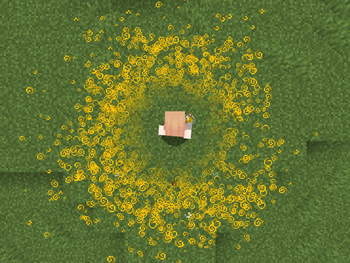
Removes/fades particles based on distance
Screenshots
Über diese Mod
Particle Visor
Removes/fades particles based on distance
Features
- Hides particles very close to the camera (so potion particles won't get in your way in fights)
- Lots of customization
Configuration
Particle Visor uses ukulib for its configuration.
You can either:
- Go to the Options menu, click the small, square button to the right of Credits and Attribution, and go into Particle Visor.
- Open Mod Menu and open the configuration menu from there
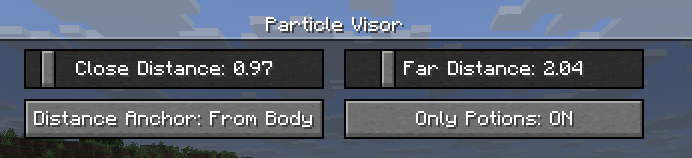
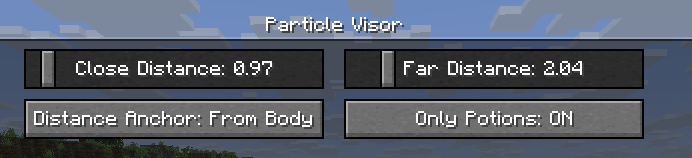
Close Distance: The farthest distance at which particles will still be visible. Anything closer than this won't render at all.Far Distance: The closest distance at which particles will be faded. Anything in between this value andClose Distancewill be faded. (you can set this to be the same asClose Distanceto make particles "pop in")Mod Enabled: General global toggle for the modDistance Anchor: The point on your player model where the distance will be determinedFrom Eyes: Distance determined from the "eye level"
From Body: Distance will be the same regardless of whether the particle is at your eyes or your feet, like a cylinder (though anything above or below that will be accounted for)
From Feet: Distance determined from the character's feet
On Camera: Distance determined from the actual camera position (so you can look through particles in third person)
Only Potions: Anything not considered a "spell particle" will be unaffected by the mod.Third Person Particles: If this is ON, the mod will do nothing in third person.
Compatibility
I've verified that the mod works with Sodium and Particle Core (and whatever else is in uku's pvp modpack), so I don't think there will be many incompatibilities. Feel free to make an issue if you find any!
License
This mod is under the MIT License. Feel free to include this mod in your modpack!
Verfügbare Versionen
Particle Visor auf deinem Client installieren
Mod-Loader lokal installieren
Installiere fabric für deine lokale Minecraft-Version.
Passende Datei herunterladen
Wähle die Particle Visor-Datei für fabric und Minecraft 26.2.
Mod installieren
Lege die .jar-Datei in deinem lokalen .minecraft/mods-Ordner ab und starte Minecraft neu. Eine Installation auf dem Server ist nicht nötig.
Kompatibilität
Mod-Loader
Minecraft-Versionen
26.2, 26.1.2, 26.1.1 (+6 weitere)
Server-seitig
✗ Nicht unterstütztEmpfohlener RAM
4 GB(min. 3 GB)Häufige Fragen
Muss Particle Visor auf dem Minecraft Server installiert werden?
Nein. Modrinth kennzeichnet Particle Visor serverseitig als nicht unterstützt. Installiere die Mod nur im lokalen Minecraft-Mods-Ordner. Dein Server kann unverändert bleiben, sofern die Mod-Seite keine zusätzliche Abhängigkeit nennt.
Welche Version und welchen Loader braucht Particle Visor?
Nutze eine Datei für fabric und exakt deine Minecraft-Version. Unterstützte Versionen sind unter anderem 26.2, 26.1.2, 26.1.1. Loader-Dateien sind nicht untereinander austauschbar.
Particle Visor funktioniert nicht – was kann ich prüfen?
Prüfe zuerst Minecraft-Version, Loader-Version und erforderliche Abhängigkeiten. Lege die .jar-Datei im lokalen .minecraft/mods-Ordner ab und entferne ältere Duplikate. Da die Mod clientseitig ist, löst mehr Server-RAM dieses Problem nicht.
Ähnliche Mods






Minecraft Server für deine Gruppe
Particle Visor bleibt auf deinem Client. Hoste dazu eine kompatible Welt für deine Mitspieler.