
Petrwolf's smoke generator
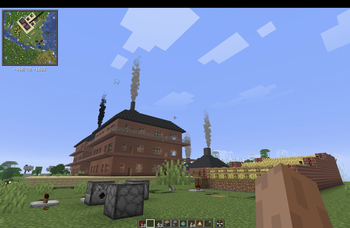
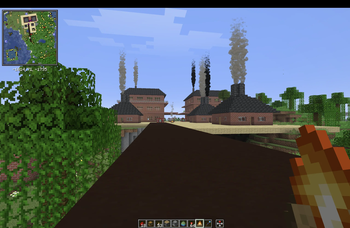
Add a placeable smoke generator block to create adjustable white or black chimney smoke with multiple intensity levels.
Screenshots
Über diese Mod
Smoke Generator
Bring your Minecraft builds to life with realistic chimney smoke.
Smoke Generator is a simple decorative block that can be placed on top of any structure you want to use as a chimney. Whether you’re building a small cottage, a factory, a steam locomotive, or an industrial power plant, you can easily add animated smoke without using redstone or complex contraptions.
Features
- Place the Smoke Generator on top of any block.
- Perfect for chimneys, furnaces, factories, locomotives, ships, and industrial buildings.
- Right-click the block to cycle through smoke modes.
- Choose between:
- White Smoke - Low
- White Smoke - Medium
- White Smoke - High
- Black Smoke - Low
- Black Smoke - Medium
- Black Smoke - High
- Instant visual changes with a single click.
- Lightweight and easy to use.
- Fully survival-friendly.
How It Works
- Place the Smoke Generator where your chimney ends.
- Right-click the block.
- Select the smoke color and intensity you want.
- Enjoy a more dynamic and realistic build.
Perfect For
- Houses and cottages
- Steam trains
- Factories
- Power plants
- Ships
- Medieval villages
- Industrial cities
- Custom adventure maps
Smoke Generator is designed to stay simple. No complicated setup, no wiring, just place it, choose your smoke, and make your builds feel alive.
Verfügbare Versionen
Petrwolf's smoke generator auf dem Server installieren
Server bestellen
Bestelle einen Minecraft Java Server mit mindestens 3 GB RAM (4 GB empfohlen).
fabric Loader setzen
Wähle im Panel unter "Egg" den fabric-Loader und die passende Minecraft-Version (26.2).
Mod installieren
Öffne den Mod-Browser im Dashboard und suche nach "Petrwolf's smoke generator". Klicke "Installieren" – fertig! Alternativ: Lade die .jar via SFTP in den /mods Ordner.
Kompatibilität
Mod-Loader
Minecraft-Versionen
26.2
Server-seitig
✓ ErforderlichEmpfohlener RAM
4 GB(min. 3 GB)Häufige Fragen
Petrwolf's smoke generator Server crasht beim Start – was tun?
Häufigste Ursache: falsche fabric-Version oder zu wenig RAM. Prüfe im Server-Log (latest.log), ob ein "OutOfMemoryError" oder "Mixin"-Fehler auftritt. Bei Mado Hosting: Stelle sicher, dass mindestens 3 GB RAM zugewiesen sind und der Loader zur Mod-Version passt (26.2). Über das Panel kannst du den Loader mit einem Klick wechseln.
Ist Petrwolf's smoke generator mit fabric kompatibel?
Petrwolf's smoke generator unterstützt offiziell fabric für Minecraft 26.2. Im Mado Dashboard werden inkompatible Loader-Kombinationen automatisch erkannt.
Server laggt mit Petrwolf's smoke generator – wie optimiere ich die Performance?
Empfohlener RAM: 4 GB (+1 GB pro 8 Spieler). Prüfe mit /spark profiler, ob Petrwolf's smoke generator den meisten Tick-Time verbraucht. Häufige Fixes: Server-View-Distance auf 8-10 reduzieren, bei Forge "performant" oder "starlight" als Zusatz-Mod installieren. Bei Mado Hosting läuft dein Server auf NVMe-SSDs mit dedizierten CPU-Kernen für minimale Latenz.
Ähnliche Mods

![[ETF] Entity Texture Features](https://cdn.modrinth.com/data/BVzZfTc1/af683d206d50b05258d865b0d6e4aa2f2cee12f2_96.webp)
![[EMF] Entity Model Features](https://cdn.modrinth.com/data/4I1XuqiY/6e5bbd0d06b1741bfdab6c0cfab6de8fdaf0064c_96.webp)



Modded Server mieten
Installiere Petrwolf's smoke generator mit nur einem Klick auf deinem Server.