
Philips Ruins
This mod adds ancient ruins to your Minecraft world
Screenshots
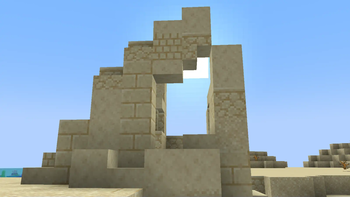
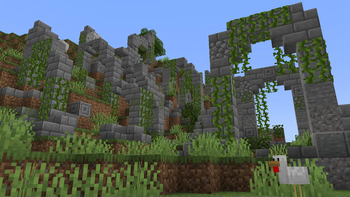
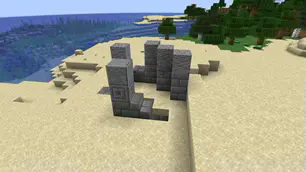
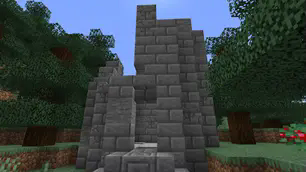
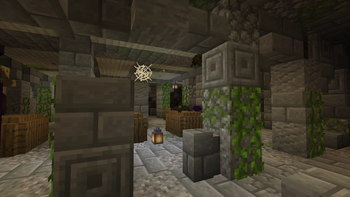
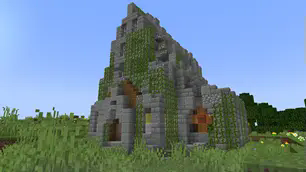
Über diese Mod
Philip’s Ruins is a Minecraft ruins generator mod for Forge and Fabric, and it supports the latest Minecraft versions to date. The mod adds over 190 different types of ruin variants to the game, each with their own unique custom loot tables. This includes some hidden bosses that you can discover while exploring the lost remnants of ruins. The mod aims to add ancient ruins similar to what you see in real life by introducing lore to Minecraft, thereby enhancing gameplay functionality.
Two interesting features of this mod are:
- Most loot will likely be buried underground or covered with stones from the ruins.
- Unlike other structure mods, Philip’s Ruins makes most of its structures look like actual ruins.
This is achieved by blending the ruin with the terrain instead of having a rigid drop-off at the end of a structure, which is common in most mods during rough terrain generation.
This approach makes the ruins you come across look like they were there before any other structures, like villages, came to pass. It gives a vintage, ancient look to the current ruins, maintaining the structure along with terrain erosion.
If you would like to support the mod’s development, join our Discord server. We post updates on what’s going on with the community, and you’re free to ask questions about the mod or any other topic. Also, if you would like to join our Patreon, click the Patreon button. We really appreciate the support, and every contribution goes to our team. Patrons will get a shout-out during the description of the mod and on our YouTube channel. So far, here are some people who have contributed to this project.

Verfügbare Versionen
Philips Ruins auf dem Server installieren
Server bestellen
Bestelle einen Minecraft Java Server mit mindestens 4 GB RAM (6 GB empfohlen).
fabric Loader setzen
Wähle im Panel unter "Egg" den fabric-Loader und die passende Minecraft-Version (1.21.11).
Mod installieren
Öffne den Mod-Browser im Dashboard und suche nach "Philips Ruins". Klicke "Installieren" – fertig! Alternativ: Lade die .jar via SFTP in den /mods Ordner.
Kompatibilität
Mod-Loader
Minecraft-Versionen
1.21.11, 1.21.10, 1.21.9 (+20 weitere)
Server-seitig
✓ ErforderlichEmpfohlener RAM
6 GB(min. 4 GB)Häufige Fragen
Philips Ruins Server crasht beim Start – was tun?
Häufigste Ursache: falsche fabric-Version oder zu wenig RAM. Prüfe im Server-Log (latest.log), ob ein "OutOfMemoryError" oder "Mixin"-Fehler auftritt. Bei Mado Hosting: Stelle sicher, dass mindestens 4 GB RAM zugewiesen sind und der Loader zur Mod-Version passt (1.21.11). Über das Panel kannst du den Loader mit einem Klick wechseln.
Ist Philips Ruins mit fabric und forge und neoforge kompatibel?
Philips Ruins unterstützt offiziell fabric, forge, neoforge für Minecraft 1.21.11, 1.21.10, 1.21.9. Achtung: Forge- und Fabric-Mods sind NICHT untereinander kompatibel – wähle einen Loader und bleibe dabei. Im Mado Dashboard werden inkompatible Loader-Kombinationen automatisch erkannt.
Server laggt mit Philips Ruins – wie optimiere ich die Performance?
Empfohlener RAM: 6 GB (+1 GB pro 5 Spieler). Prüfe mit /spark profiler, ob Philips Ruins den meisten Tick-Time verbraucht. Häufige Fixes: Server-View-Distance auf 8-10 reduzieren, bei Forge "performant" oder "starlight" als Zusatz-Mod installieren. Bei Mado Hosting läuft dein Server auf NVMe-SSDs mit dedizierten CPU-Kernen für minimale Latenz.
Ähnliche Mods




Modded Server mieten
Installiere Philips Ruins mit nur einem Klick auf deinem Server.