
planifolia
speedrunning sodium via mixins
Screenshots
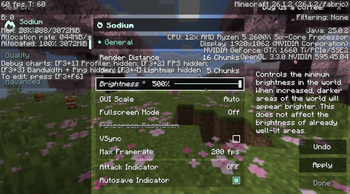
Über diese Mod
implements the some of the changes made in the speedrunning fork of sodium in the form of an add-on mod, to bring important vanilla parity fixes & functionality to later version runs that use upstream sodium.
this includes:
- showing the vanilla video settings menu when in a world
- e counter saying -1 when entity culling is on
- right side of subchunk counter showing static capacity instead of generated chunks
- leaves having black pixels with fast graphics on pre 1.21.11
- minimizing sodium f3 changes
- reverting resource pack and datapack changes in menus and world files
- adding options for entity culling and fog occlusion to the vanilla video settings menu
- disabling lithium optimizations that break pie-ray
- adding back filterempty and renderLayer profiler entries
- removing weather and leaves independent quality options
- fixing crashes
additionally, with or without sodium:
- allows the use of gamma 5 on 1.19+ (can only set from title screen or options.txt)
this mod is only intended to work with the latest version of sodium for any subversion of minecraft.
Verfügbare Versionen
planifolia auf deinem Client installieren
Mod-Loader lokal installieren
Installiere fabric für deine lokale Minecraft-Version.
Passende Datei herunterladen
Wähle die planifolia-Datei für fabric und Minecraft 26.1.2.
Mod installieren
Lege die .jar-Datei in deinem lokalen .minecraft/mods-Ordner ab und starte Minecraft neu. Eine Installation auf dem Server ist nicht nötig.
Kompatibilität
Mod-Loader
Minecraft-Versionen
26.1.2, 26.1.1, 26.1 (+29 weitere)
Server-seitig
✗ Nicht unterstütztEmpfohlener RAM
4 GB(min. 3 GB)Häufige Fragen
Muss planifolia auf dem Minecraft Server installiert werden?
Nein. Modrinth kennzeichnet planifolia serverseitig als nicht unterstützt. Installiere die Mod nur im lokalen Minecraft-Mods-Ordner. Dein Server kann unverändert bleiben, sofern die Mod-Seite keine zusätzliche Abhängigkeit nennt.
Welche Version und welchen Loader braucht planifolia?
Nutze eine Datei für fabric und exakt deine Minecraft-Version. Unterstützte Versionen sind unter anderem 26.1.2, 26.1.1, 26.1. Loader-Dateien sind nicht untereinander austauschbar.
planifolia funktioniert nicht – was kann ich prüfen?
Prüfe zuerst Minecraft-Version, Loader-Version und erforderliche Abhängigkeiten. Lege die .jar-Datei im lokalen .minecraft/mods-Ordner ab und entferne ältere Duplikate. Da die Mod clientseitig ist, löst mehr Server-RAM dieses Problem nicht.
Ähnliche Mods


Minecraft Server für deine Gruppe
planifolia bleibt auf deinem Client. Hoste dazu eine kompatible Welt für deine Mitspieler.