
Plushables
Cute plushies for your home
Screenshots
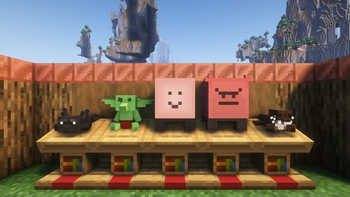
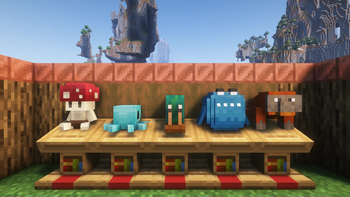
Über diese Mod
🏷️ This description may not reflect the version of the mod you’re using.
If you have questions or need help, ask in the #support channel on my Discord server.







About
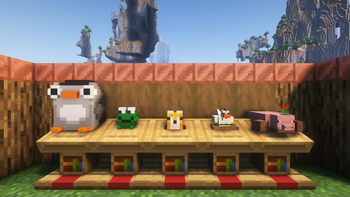
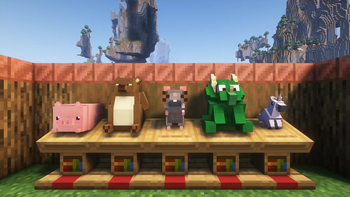
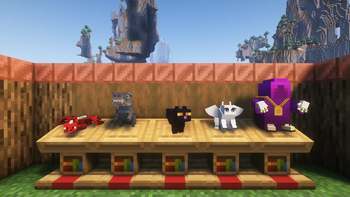
Plushables adds over 45 craftable plushies that you can hold, place and wear. Check them out in
the Gallery.
- Craft plushies with wool, a Heart of Gold and one thematic item, or find them in a loot chest
- Discover original plushies and collaborations with other mods
- Display plushies as cozy decoration and interact with them for different sound effects and
particles
This mod prides itself on offering a diverse mix of plushies that anyone and everyone can enjoy. The
primary focus is on a wide array of original designs and adapting animals that don't already exist
within Minecraft.
Plushables is always expanding. At the mod's inception in 2019 there were only 3 plushies. The list
is evergrowing, and constructive feedback and ideas are always appreciated.
Getting Started
Finding any type of flower, a gold nugget or a bottle of honey will all unlock the
Heart of Gold recipe for you.
Every plushable is crafted shapelessly from one wool block (of varying colour), one heart of
gold, and one other thematic item. Every recipe is unlocked in your recipe book once you craft
your first Heart of Gold.
Collaborations
You might recognize some plushables from other mods. Those authors have been kind enough to allow
their amazing models to be used or adapted to be in Plushables! If you like a mod's plushie, why not
check out the mod itself?
The following plushables exist thanks to generous mod authors and artists:
- Plushable Conductor by the Steam n' Rails
team from Create: Steam n' Rails - Plushable Animatronic by Sammy from
CC:C Bridge - Plushable Moobloom by CrysanthCow from
Bovines and Buttercups - Plushable Blåhaj by hibi from
Blåhaj - Plushable Ribbit by Joosh from
Ribbits - Plushable Stoneling by wiiv from Quark
Frequently Asked Questions
I accidentally put an item in a plushable, how do I get it out?
Shift + Right Click with an empty hand to take items out of plushables.
Is there a (fabric/forge/neoforge/risugami's modloader) version?
Plushables exists on both Fabric and NeoForge. If you're running Quilt, use the Fabric jar.
Can you backport the mod to Minecraft 1.X.X?
Plushables will not be backported. The mod will however support new major versions of Minecraft.
I found a bug / my game crashed
If you find any problems with Plushables, please feel encouraged to create an issue on the GitHub
repository issue tracker. Bug reports are incredibly useful and help this mod reach its full potential.

Verfügbare Versionen
Plushables auf dem Server installieren
Server bestellen
Bestelle einen Minecraft Java Server mit mindestens 3 GB RAM (4 GB empfohlen).
fabric Loader setzen
Wähle im Panel unter "Egg" den fabric-Loader und die passende Minecraft-Version (26.3).
Mod installieren
Öffne den Mod-Browser im Dashboard und suche nach "Plushables". Klicke "Installieren" – fertig! Alternativ: Lade die .jar via SFTP in den /mods Ordner.
Kompatibilität
Mod-Loader
Minecraft-Versionen
26.3, 26.1.2, 26.1.1 (+11 weitere)
Server-seitig
✓ ErforderlichEmpfohlener RAM
4 GB(min. 3 GB)Häufige Fragen
Plushables Server crasht beim Start – was tun?
Häufigste Ursache: falsche fabric-Version oder zu wenig RAM. Prüfe im Server-Log (latest.log), ob ein "OutOfMemoryError" oder "Mixin"-Fehler auftritt. Bei Mado Hosting: Stelle sicher, dass mindestens 3 GB RAM zugewiesen sind und der Loader zur Mod-Version passt (26.3). Über das Panel kannst du den Loader mit einem Klick wechseln.
Ist Plushables mit fabric und forge und neoforge und quilt kompatibel?
Plushables unterstützt offiziell fabric, forge, neoforge, quilt für Minecraft 26.3, 26.1.2, 26.1.1. Achtung: Forge- und Fabric-Mods sind NICHT untereinander kompatibel – wähle einen Loader und bleibe dabei. Im Mado Dashboard werden inkompatible Loader-Kombinationen automatisch erkannt.
Server laggt mit Plushables – wie optimiere ich die Performance?
Empfohlener RAM: 4 GB (+1 GB pro 8 Spieler). Prüfe mit /spark profiler, ob Plushables den meisten Tick-Time verbraucht. Häufige Fixes: Server-View-Distance auf 8-10 reduzieren, bei Forge "performant" oder "starlight" als Zusatz-Mod installieren. Bei Mado Hosting läuft dein Server auf NVMe-SSDs mit dedizierten CPU-Kernen für minimale Latenz.
Ähnliche Mods




Modded Server mieten
Installiere Plushables mit nur einem Klick auf deinem Server.