
Purescale
A performance mod that uses the upscaling and frame generation features.
Screenshots


Über diese Mod

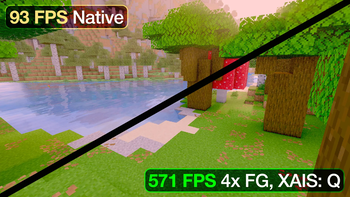
Purescale is a client-side mod for getting more FPS out of the GPU you already have. It combines upscaling and frame generation, and runs on pretty much any GPU.
It renders the game at a lower resolution, then rebuilds the image back to your screen’s resolution. Fewer pixels to render means less work for your GPU. You lose a little detail depending on the settings, but you can usually keep a sharp image while getting a useful performance boost.
Your HUD and menus stay at native resolution. Chat, inventory icons, all that stuff stays crisp.
There are several upscalers to play around with, including AMD’s FSR1 and my own XSSS and XAIS reconstruction methods. Available options vary by Minecraft version. Frame generation adds extra frames between rendered ones to make movement look smoother.

You’ll usually get the most out of it at higher resolutions or with demanding shaders and path tracing, where your GPU has plenty of work to do already. Try a few settings. The sharpest option isn’t always the one that feels best while playing.
Sodium is required. On Forge and NeoForge 1.20.1, use Embeddium instead.
Verfügbare Versionen
Purescale auf deinem Client installieren
Mod-Loader lokal installieren
Installiere fabric für deine lokale Minecraft-Version.
Passende Datei herunterladen
Wähle die Purescale-Datei für fabric und Minecraft 26.3.
Mod installieren
Lege die .jar-Datei in deinem lokalen .minecraft/mods-Ordner ab und starte Minecraft neu. Eine Installation auf dem Server ist nicht nötig.
Kompatibilität
Mod-Loader
Minecraft-Versionen
26.3, 26.2, 26.1.2 (+16 weitere)
Server-seitig
✗ Nicht unterstütztEmpfohlener RAM
4 GB(min. 3 GB)Häufige Fragen
Muss Purescale auf dem Minecraft Server installiert werden?
Nein. Modrinth kennzeichnet Purescale serverseitig als nicht unterstützt. Installiere die Mod nur im lokalen Minecraft-Mods-Ordner. Dein Server kann unverändert bleiben, sofern die Mod-Seite keine zusätzliche Abhängigkeit nennt.
Welche Version und welchen Loader braucht Purescale?
Nutze eine Datei für fabric, forge, legacy-fabric, neoforge, quilt und exakt deine Minecraft-Version. Unterstützte Versionen sind unter anderem 26.3, 26.2, 26.1.2. Loader-Dateien sind nicht untereinander austauschbar.
Purescale funktioniert nicht – was kann ich prüfen?
Prüfe zuerst Minecraft-Version, Loader-Version und erforderliche Abhängigkeiten. Lege die .jar-Datei im lokalen .minecraft/mods-Ordner ab und entferne ältere Duplikate. Da die Mod clientseitig ist, löst mehr Server-RAM dieses Problem nicht.
Ähnliche Mods






Minecraft Server für deine Gruppe
Purescale bleibt auf deinem Client. Hoste dazu eine kompatible Welt für deine Mitspieler.