
Realistic Death Visuals
Replaces the boring death screen.
Screenshots
Über diese Mod
Realistic Death Visuals
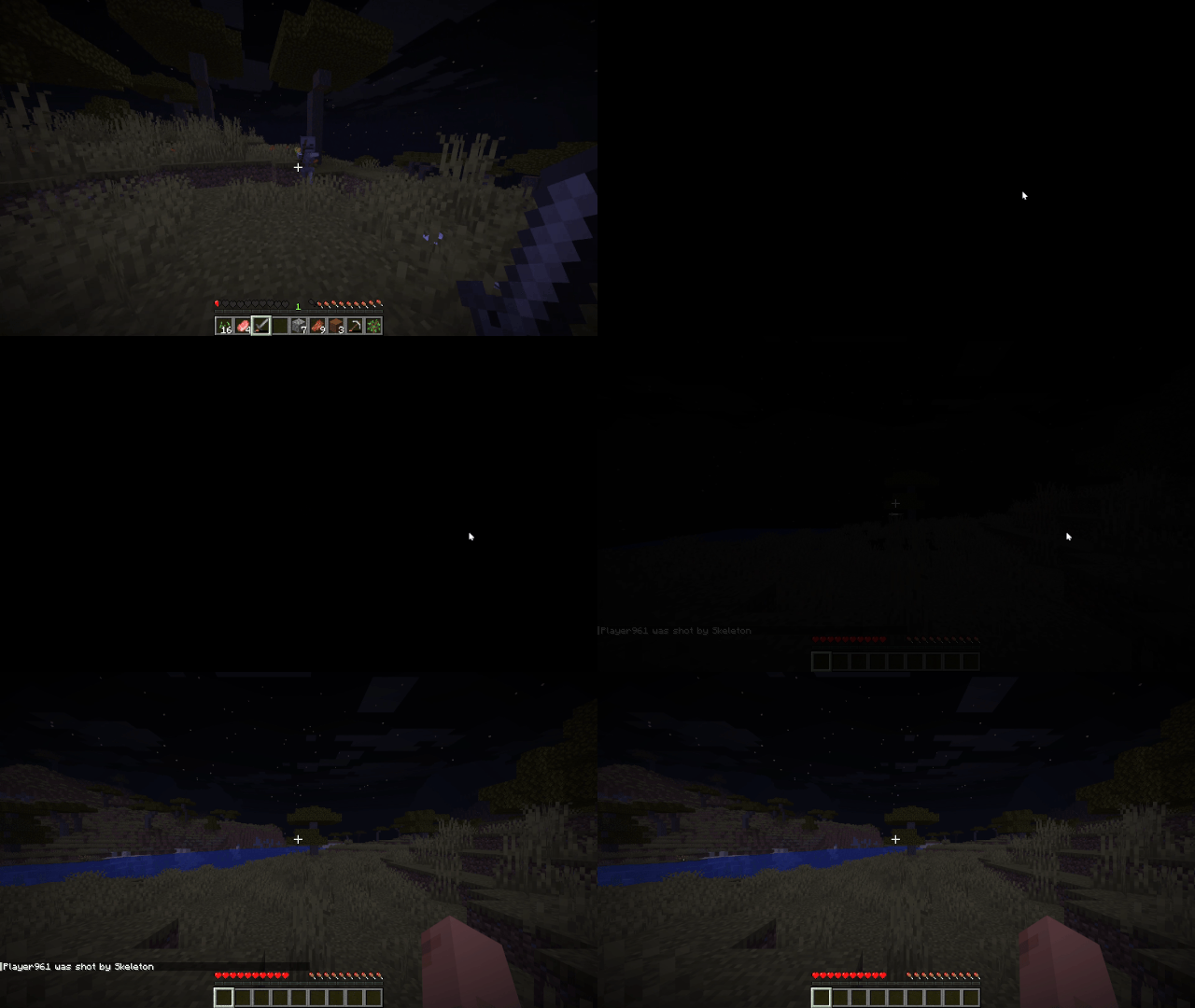
Realistic Death Visuals replaces Minecraft’s default death screen with a more realistic and dramatic death screen that actually feels like you died, instead of just “died”.
Instead of the usual “You Died” screen with the death message, score, and buttons immediately taking over your screen, the moment of death is changed into a short visual transition. You get a quick flash of white, followed by a black screen that feels closer to what it would look like if your character actually lost consciousness or died.
On top of that, the normal death options are removed entirely. The “Respawn” and “Return to Title Screen” buttons are disabled so you don’t get pulled into a menu at all. Instead, the game automatically respawns you, keeping the experience continuous and removing the interruption of the vanilla death screen UI.
The goal of this mod is not to change gameplay, difficulty, or mechanics at all, but to completely change how death feels in the moment. Vanilla Minecraft death screens are very UI-heavy and break immersion instantly, so this replaces that with something more atmospheric and less game-like.
Built for Fabric 1.21.11, and designed to stay lightweight and compatible with most other mods, since it only touches the visual side of the death screen and the flow after death, without changing core gameplay logic.
If you’re looking for a more immersive experience where death feels less like a menu and more like an event, this mod is made for that.
Verfügbare Versionen
Realistic Death Visuals auf dem Server installieren
Server bestellen
Bestelle einen Minecraft Java Server mit mindestens 3 GB RAM (4 GB empfohlen).
fabric Loader setzen
Wähle im Panel unter "Egg" den fabric-Loader und die passende Minecraft-Version (1.21.11).
Mod installieren
Öffne den Mod-Browser im Dashboard und suche nach "Realistic Death Visuals". Klicke "Installieren" – fertig! Alternativ: Lade die .jar via SFTP in den /mods Ordner.
Kompatibilität
Mod-Loader
Minecraft-Versionen
1.21.11
Server-seitig
✗ Nicht unterstütztEmpfohlener RAM
4 GB(min. 3 GB)Häufige Fragen
Realistic Death Visuals Server crasht beim Start – was tun?
Häufigste Ursache: falsche fabric-Version oder zu wenig RAM. Prüfe im Server-Log (latest.log), ob ein "OutOfMemoryError" oder "Mixin"-Fehler auftritt. Bei Mado Hosting: Stelle sicher, dass mindestens 3 GB RAM zugewiesen sind und der Loader zur Mod-Version passt (1.21.11). Über das Panel kannst du den Loader mit einem Klick wechseln.
Ist Realistic Death Visuals mit fabric kompatibel?
Realistic Death Visuals unterstützt offiziell fabric für Minecraft 1.21.11. Im Mado Dashboard werden inkompatible Loader-Kombinationen automatisch erkannt.
Server laggt mit Realistic Death Visuals – wie optimiere ich die Performance?
Empfohlener RAM: 4 GB (+1 GB pro 8 Spieler). Prüfe mit /spark profiler, ob Realistic Death Visuals den meisten Tick-Time verbraucht. Häufige Fixes: Server-View-Distance auf 8-10 reduzieren, bei Forge "performant" oder "starlight" als Zusatz-Mod installieren. Bei Mado Hosting läuft dein Server auf NVMe-SSDs mit dedizierten CPU-Kernen für minimale Latenz.
Ähnliche Mods






Modded Server mieten
Installiere Realistic Death Visuals mit nur einem Klick auf deinem Server.