![[Reforged] Accurate Block Placement](https://cdn.modrinth.com/data/tOVrxqLR/a0b2994f59740edeefea794c16c03279c59a7698_96.webp)
[Reforged] Accurate Block Placement
makes placing blocks a smooth and reliable process when holding right click.
Über diese Mod
[Reforged] Accurate Block Placement: Reborn
Original mod for fabric here
Although many experienced minecraft players know exactly how to time their clicks in order to rapidly place blocks with no mistakes, why should it be that difficult? In this mod, if you hold your 'use key' (usually RMB) and look at a new block it will automatically place it no matter how fast you move. No more need to time when you click or look in order to accurately place blocks quickly!
Features
WARNING: This mod may be considered a "cheat" on some servers (and detected as such)! Please check the server's rules before using this mod. Use this at your own risk.
Accurate Block Placement
Accurate Block Placement makes placing blocks a smooth and reliable process when holding right click. The best way to explain it is the following GIF:
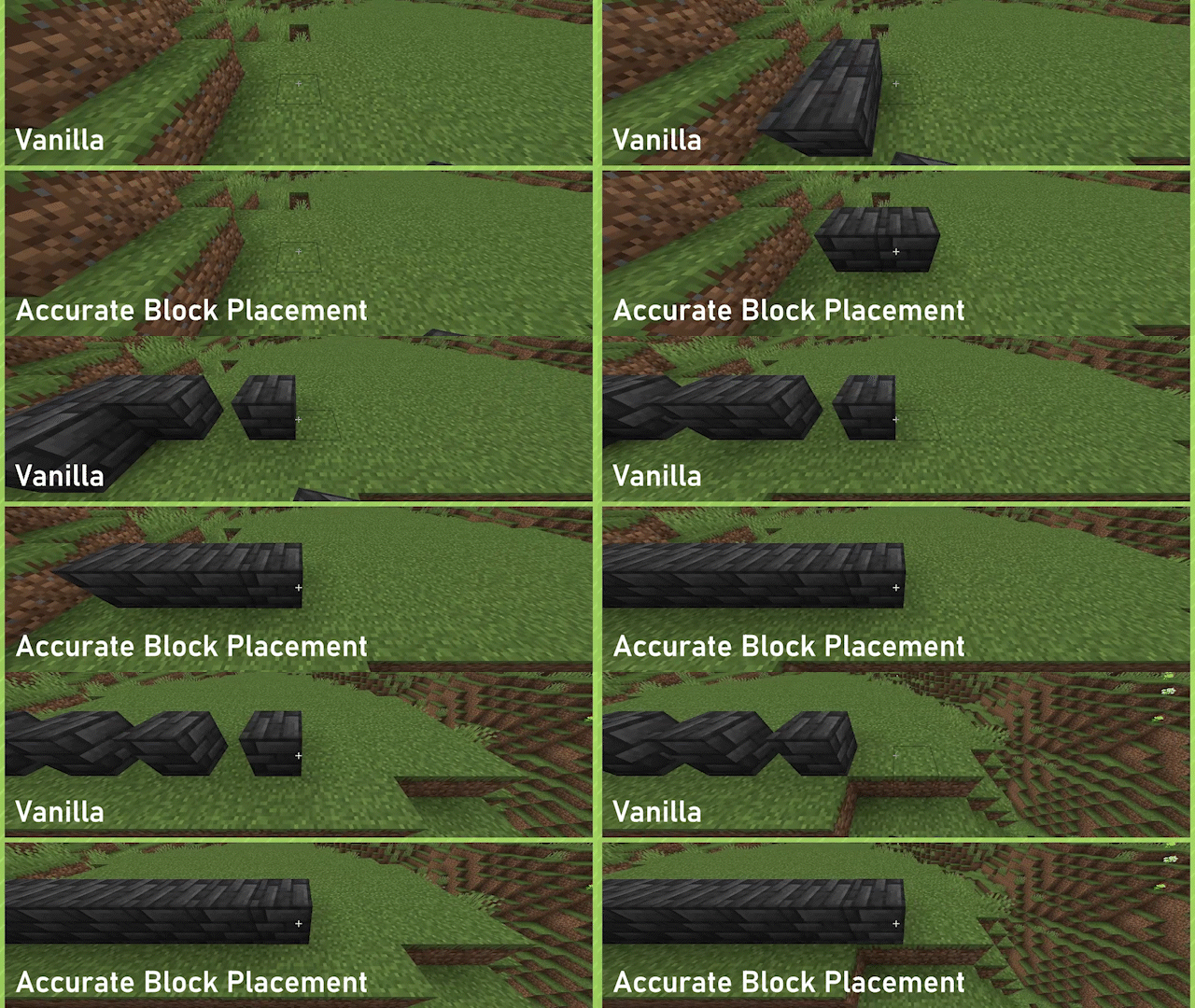
Enabled by default, can be toggled on or off through the config or by way of a configurable keybind (default: Not Bound).
Fast Block Breaking
Fast Block Breaking makes breaking blocks much easier and more consistent, by removing the Mining Cooldown when breaking blocks.
No GIF for this one yet :(, essentially haste insta-mining but for creative mode
Disabled by default, can be toggled on or off through the config or by way of a configurable keybind (default: Not Bound).
Verfügbare Versionen
[Reforged] Accurate Block Placement auf deinem Client installieren
Mod-Loader lokal installieren
Installiere forge für deine lokale Minecraft-Version.
Passende Datei herunterladen
Wähle die [Reforged] Accurate Block Placement-Datei für forge und Minecraft 1.21.8.
Mod installieren
Lege die .jar-Datei in deinem lokalen .minecraft/mods-Ordner ab und starte Minecraft neu. Eine Installation auf dem Server ist nicht nötig.
Kompatibilität
Mod-Loader
Minecraft-Versionen
1.21.8, 1.21.7, 1.21.6 (+5 weitere)
Server-seitig
✗ Nicht unterstütztEmpfohlener RAM
4 GB(min. 3 GB)Häufige Fragen
Muss [Reforged] Accurate Block Placement auf dem Minecraft Server installiert werden?
Nein. Modrinth kennzeichnet [Reforged] Accurate Block Placement serverseitig als nicht unterstützt. Installiere die Mod nur im lokalen Minecraft-Mods-Ordner. Dein Server kann unverändert bleiben, sofern die Mod-Seite keine zusätzliche Abhängigkeit nennt.
Welche Version und welchen Loader braucht [Reforged] Accurate Block Placement?
Nutze eine Datei für forge, neoforge und exakt deine Minecraft-Version. Unterstützte Versionen sind unter anderem 1.21.8, 1.21.7, 1.21.6. Loader-Dateien sind nicht untereinander austauschbar.
[Reforged] Accurate Block Placement funktioniert nicht – was kann ich prüfen?
Prüfe zuerst Minecraft-Version, Loader-Version und erforderliche Abhängigkeiten. Lege die .jar-Datei im lokalen .minecraft/mods-Ordner ab und entferne ältere Duplikate. Da die Mod clientseitig ist, löst mehr Server-RAM dieses Problem nicht.
Ähnliche Mods






Minecraft Server für deine Gruppe
[Reforged] Accurate Block Placement bleibt auf deinem Client. Hoste dazu eine kompatible Welt für deine Mitspieler.