Modrinth · Forge, NeoForge
Repurposed Structures - Neoforge/Forge auf deinem Minecraft Server
Repurposed Structures - Neoforge/Forge läuft auf Minecraft Servern mit Forge oder NeoForge. Bestell deinen Server, stell den Loader im Panel ein und installiere die Mod mit einem Klick im Mod-Browser.
Adds more variations of vanilla structures and features such as a Jungle Fortress!
- Downloads
- 5.5M
- Autor
- TelepathicGrunt
- Loader
- Forge, NeoForge
- Minecraft
- 1.16.5 – 26.3
- Aktualisiert
- –
Screenshots
So sieht Repurposed Structures - Neoforge/Forge aus
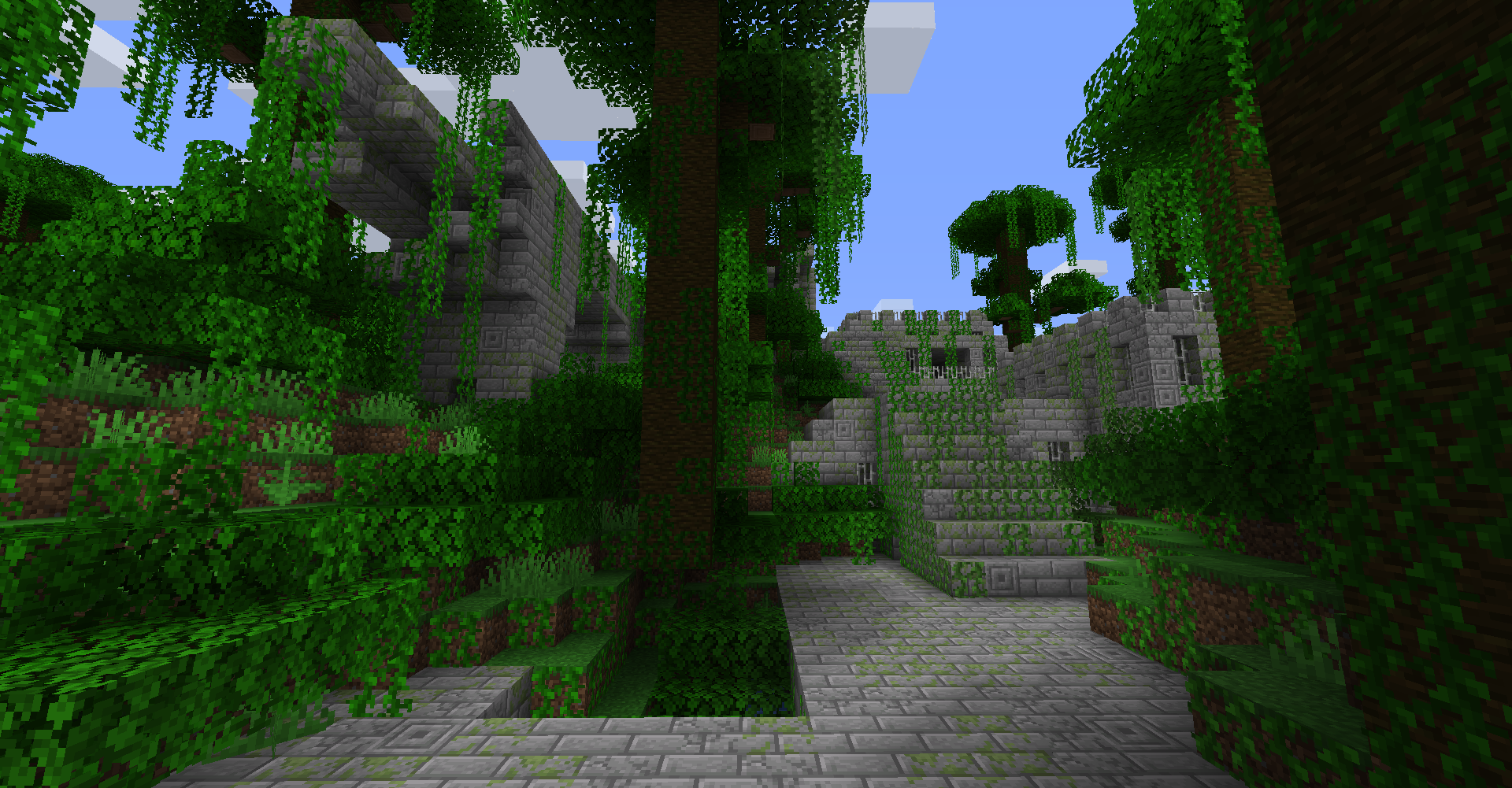 Jungle Fortress
 Dappled Forest Structures
 Abandoned Camps in Nether!
 Pale Garden Village
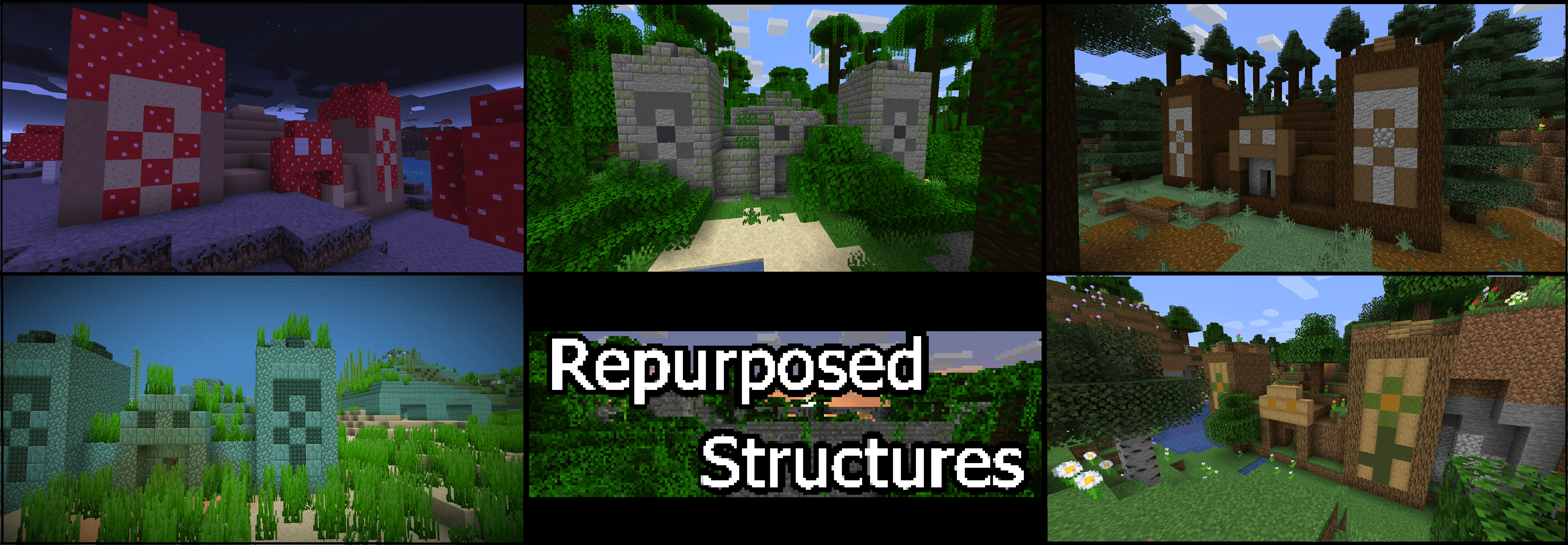 Some Pyramids added!
Bilder: Repurposed Structures - Neoforge/Forge auf Modrinth, vom Projektteam veröffentlicht.
Einrichtung
Repurposed Structures - Neoforge/Forge auf dem Server installieren
Server und Spieler brauchen denselben Loader und dieselbe Minecraft-Version. Sichere die Welt, bevor du Mods hinzufügst oder aktualisierst.
- 01
Konfigurieren
6 GB RAM sind vorausgewählt. Laufzeit und Add-ons wählst du selbst, bezahlt wird per Kreditkarte oder PayPal.
- 02
Loader einstellen
Stell im Panel die Serversoftware auf Forge oder NeoForge und wähl die passende Minecraft-Version, zum Beispiel 26.3.
- 03
Mod installieren
Such im Mod-Browser nach „Repurposed Structures - Neoforge/Forge“ und installiere die Version für deinen Loader. Alternativ lädst du die .jar per SFTP in den Ordner mods. Erforderliche Abhängigkeiten stehen auf der Projektseite.
- 04
Verbinden
Repurposed Structures - Neoforge/Forge ist auf dem Client nicht nötig. Spieler verbinden sich über die Serveradresse aus dem Panel.
- Auf dem Server
- Erforderlich
- Auf dem Client
- Nicht nötig
- Loader
- Forge, NeoForge
- Minecraft
- 26.3, 26.2, 26.1 +25 weitere
- Lizenz
- GNU Lesser General Public License v3.0 only
Das Panel
Mods installieren, Fehler finden.
Echte Screenshots aus dem Mado Panel. Beides ist bei jedem Minecraft Server enthalten.
Mod-Browser
Modrinth und CurseForge direkt im Panel.
Der Browser filtert nach deiner Minecraft-Version. Mods installierst du mit einem Klick, ohne .jar-Dateien hochzuladen.

KI-Crash-Analyse
Wenn ein Mod crasht, liest die Analyse das Log.
Mods scheitern oft an einer falschen Loader-Version, Java-Version oder fehlenden Abhängigkeit. Die Analyse nennt eine wahrscheinliche Ursache und einen Lösungsvorschlag.

Versionen
Veröffentlichte Versionen
Nimm die Datei, die zu Loader und Minecraft-Version deines Servers passt. Server und Spieler brauchen dieselbe Version.
Repurposed Structures - Neoforge/Forge · Modrinth- Repurposed Structures v7.8.5 (26.3 MC Neoforge)20. November 2026Minecraft 26.3 · NeoForge
- Repurposed Structures v7.7.6 (26.2 MC Neoforge)20. August 2026Minecraft 26.2 · NeoForge
- Repurposed Structures v7.7.6 (26.1 MC Neoforge)20. August 2026Minecraft 26.1 · NeoForge
- Repurposed Structures v7.5.22 (1.21.1 MC Neoforge)20. August 2026Minecraft 1.21.1 · NeoForge
- Repurposed Structures v7.1.25 (1.20.1 MC Forge)20. August 2026Minecraft 1.20.1 · Forge
Originalbeschreibung des Projektautors

Works serverside too so vanilla clients can connect!
CLICK HERE FOR QUILT/FABRIC MC PORT: https://modrinth.com/mod/repurposed-structures-fabric
WHAT IS REPURPOSED STRUCTURES?
Repurposed Structures is a mod about taking existing vanilla features and structures and creating new variants or modifications to them! Originally, most of the structures and features in this mod was actually made for my Ultra Amplified Dimension mod. but then I realized these features and structures would look great in the Overworld as well so I decided to take those structures and features and split them into their own mod and continue to add MORE biome variants of vanilla structures! And over time, some other people even help contribute more vanilla styled structures!
Check out the wiki below for all the info! It is kept up to date on latest Repurposed Structures releases.
https://github.com/TelepathicGrunt/RepurposedStructures/wiki
Frequently Asked Questions:
Q: Can this mod work serverside and let vanilla clients connect?
- A: Yep! This mod does not add any new blocks or mobs so it can be ran entirely serverside and is safe for vanilla clients.
Q: How do I turn off RS structures in 1.18.2 or newer MC?
- A: 1.18.2 did a lot of changes and as a result, all of RS's structures are now in datapack form. Click here for more info and leads you to the config datapack that lets you turn off structures or changing spawnrates. Don't be afraid to ask me questions if you get stuck!
Q: Does this mod work with YUNG's Better Strongholds, YUNG's Better Mineshafts, and other Yungs mods mod?
- A: Yes all of Yung's mods will work with Repurposed Structures. Both mod's structures will continue to spawn. Note: RS’s structures will remain the same and will not be in the same style as yung’s structures unless you put on special datapacks. See the Pre-Datapack section for changing RS's strongholds, dungeons, and other structures to be in the style of Yung's structures! (Mineshafts does not have a datapack because Yung's Better Mineshafts already have biome variants)
Q: Does this mod conflict with ___ mod?
- A: Highly unlikely. My mod adds structures to biomes directly so any conflict would be extremely rare. Best way to know is to just try my mod with the other mod. If you find they do conflict somehow, PLEASE let me know so I can investigate and release a fix! :) In fact, some mods like Signpost may have direct compatibility with Repurposed Structures's structures!
Q: I heard this mod has banners in chests but none show up for me. Why?
- A: You'll have to use the latest version of Repurposed Structures and have the Luck status effect or attribute. Luck is not able to be obtained in vanilla so you'll have to use another mod or datapack. The banners are more like a cool Easter Egg collectable so check out what mods or datapacks can give you some Luck! Good luck and have fun collecting banners!
Q: The advancements are annoying! I want to turn them off!
- A: There are datapacks to turn off the advancements. Click here for the datapack to use to make all RS advancements disabled. You can delete the files of the structures you do want advancements for from that datapack.
Q: How can I change the language that this mod uses?
- A: You can use a Resourcepack to add new languages and help contribute! You can grab this datapack, delete the data folder from it, and use it as a resourcepack and add new languages you want!
Q: Can I use this mod in a modpack?
- A: Yep! You can use this mod in a modpack :)
Q: Can I modify the source code of this mod to make changes?
- A: You can but just make sure you respect my license which is LGPL. That means, if you plan on distributing a modified Repurposed Structures jar, you should open source it by making the modified source code visible and licensed under an open source license. But truthfully, if you want to make a change, ask me first or make a PR into my mod as I might actually add it to the base mod itself!
🏠 HOW CAN I CONFIGURE THIS MOD? 🏠
1.18.2 and newer info:
As of 1.18.2 and newer, most of Repurposed Structures can be changed by datapack now. Including turning off or on structures or changing spawnrates. Click the below link to get an example datapack to edit and some pointers for what to edit to turn off structures. There's a huge amount of stuff you can change by datapack though such as changing what height RS Mineshafts spawn at or how large RS villages are and much more that was not configurable in 1.18.1 and below. Enjoy!
Click here to go to config datapack download page
Note: Be sure to read the instructions in the above link's page to make it easier to know what to edit
By default, RS will do its best to import modded loot into its structures's loot. If this is not desired behavior, you can disable this in the normal RS config file in config folder above mods folder.
Furthermore, you can make datapacks to modify or change how RS structures look! Here's a flat world of all the pieces of my structures. Use this to make editing and overriding structure pieces easier with datapacks: Repurposed Structures - pieces world (click here)**
For the expert datapackers, there's actually a hidden neat way to add new pieces to any Jigsaw Structure without overriding their pool file! (Villages, outposts, all of RS's structures minus mansions, etc) For example, instead of overriding data\repurposed_structures\worldgen\template_pool\village\birch\houses.json to add new houses to my Birch Village, replace worldgen\template in the datapack with pool_additions and have the template pool file only have the entries you want merged into the main pool file. Repurposed Structures will detect these files from ALL datapacks and merge the pool_additions pool entries into the actual template pool file that the path points to. Yes, Repurposed Structures will read all pool_additions files from all datapacks that even have the same path so that the datapacks do not override each other's pool_additions! Neat stuff! And it works with other pools too! Just make sure the piece you are adding has a Jigsaw Block with the right name so the actual structure can connect and spawn the piece.
To help you with this cool pool_additions feature, this 18 minute tutorial should help walk you through creating a building, saving it, and adding it to RS's structures with a datapack! https://youtu.be/kzRQrQqlYjw
1.18.1 and older info:
To reach this mod's config file, go into the config folder that is above the mods folder and go into the repurposed_structures-forge folder to change the configs. The config is split up into many files for better organization and ease of editing. Then exit/restart Minecraft for all changes to take effect. Do note that the config will affect all worlds so keep that in mind
Right now, there are lots of config options. The big one that you may be interested in is the spawnrate config for every structure and yes, you can even fully turn off the structures too. The config comments will help walk you through on how to adjust the rates. Furthermore, you can even blacklist dimensions or biomes as well! For some structures, you can change the maximum and minimum y value that they can start their generation at and far more! Check out the config for everything you can do!
Furthermore, you can make datapacks to modify or change a huge amount of stuff in my mod including modifying how structures look! Here's a flat world of all the pieces of my nbt-based structures. Use this to make editing and overriding structure pieces easier with datapacks: Repurposed Structures - pieces world (click here)
If you want to change the loot tables that the structures in this mod uses, you can override my loot tables with a data pack! Here's a datapack with the default loot tables: Repurposed_Structures-Loottables (click here)
The mob spawner for all none-nbt based structures can be changed with datapacks as well! You can download the spawner datapack here and change the entries inside the json files to add, remove, or change mob chances in spawners!: Repurposed_Structures-Mob_Spawners (click here)
And all structure pieces such as Wells, Villages, Outposts, Shipwrecks, Pyramids, and Igloos can also be overridden with datapacks. Furthermore, the template pools that holds structure pieces for Villages and other structures can also be overridden with datapacks to add your own pieces to the villages or other structures! You can find what pieces or pools can be replaced and their filenames here but be sure to switch the branch to the MC version you are on: Overridable structure nbt files (click here)Overridable structure pool files (click here)
For the expert datapackers, there's actually a hidden neat way to add new pieces to any Jigsaw Structure without overriding their pool file! (Villages, outposts, all of RS's structures minus mansions, etc) For example, instead of overriding data\repurposed_structures\worldgen\template_pool\village\birch\houses.json to add new houses to my Birch Village, replace worldgen\template in the datapack with pool_additions and have the template pool file only have the entries you want merged into the main pool file. Repurposed Structures will detect these files from ALL datapacks and merge the pool_additions pool entries into the actual template pool file that the path points to. Yes, Repurposed Structures will read all pool_additions files from all datapacks that even have the same path so that the datapacks do not override each other's pool_additions! Neat stuff! And it works with other pools too! Just make sure the piece you are adding has a Jigsaw Block with the right name so the actual structure can connect and spawn the piece.
To help you with this cool pool_additions feature, this 18 minute tutorial should help walk you through creating a building, saving it, and adding it to RS's structures with a datapack! https://youtu.be/kzRQrQqlYjw
If you get stuck or confused on how to configure something, just ask and I'll try and help out!
🏠 PRE-MADE DATAPACKS 🏠
Since the overwhelming majority of my structures uses nbt files, template pools, and/or processors, you can override all of this with datapacks! That means you can customize the blocks in those structures with other mod's blocks or add pieces of other mod's villages into RS's villages! If you decide to use the datapacks below, download it, go into your world's save folder, and put the zipped folder into the datapack folder. Now when you load the game, the datapack should take effect! (Also, you can share mod-compat datapacks you made to me and I'll add it below after I check it out and like it!)
Check out the wiki below for some links to premade datapacks!
https://github.com/TelepathicGrunt/RepurposedStructures/wiki#-pre-made-datapacks-
Special thanks to:
/r/l-ll-ll-l_IsDisLoss from Reddit for allowing me to use his Nether Pyramid and Nether Crimson Outpost design!
cannon_foddr for allowing me to use his Nether Brick Outpost and End/Nether Bricks Shipwreck design!
miguelforge for allowing me to use his Crimson and Warped Shipwreck, End Ruined Portal, Nether Ruins, and other designs!
*If you find an issue, glitch, or have a suggestion about my mod, let me know! But if you don't have a GitHub account to report in the Issue tab above, just comment what the problem is below and I'll try and get back to you ASAP! Or you can contact me on Discord :)
Repurposed Structures - Neoforge/Forge Server crasht beim Start – was tun?
Häufige Ursachen: Loader- oder Minecraft-Version passen nicht zur Mod-Datei, eine Abhängigkeit fehlt oder der RAM reicht nicht. Such im Log (latest.log) nach „OutOfMemoryError“, „Mixin“ oder fehlenden Mods. Bei Mado wertet die KI-Crash-Analyse das Log aus und schlägt eine Ursache vor. Loader und Version änderst du im Panel.
Mit welchem Loader läuft Repurposed Structures - Neoforge/Forge?
Laut Modrinth unterstützt Repurposed Structures - Neoforge/Forge Forge, NeoForge für Minecraft 26.3, 26.2, 26.1.
Wie viel RAM braucht ein Server mit Repurposed Structures - Neoforge/Forge?
Als Orientierung 4–6 GB für einen Server mit dieser Mod. Das ist eine Schätzung, keine gemessene Mindestanforderung. Weitere Mods, viele Spieler und große Sichtweiten brauchen mehr. Ob eine Mod die Tick-Zeit belastet, siehst du mit dem spark-Profiler.
Ähnliche Mods
Beliebte Mods aus derselben Kategorie
 Server-fähig

TerraBlender
von Adubbz
A library mod for adding biomes in a simple and compatible manner!
 Server-fähig

Biomes O' Plenty
von Forstride
Adds 50+ unique biomes to enhance your world, with new trees, flowers, and more!
 Server-fähig

Cobblemon
von CobbledStudios
A Pokémon mod for Fabric and NeoForge
 Server-fähig

YUNG's API
von YUNGNICKYOUNG
Library mod for YUNG's mods.
Bereit für deinen Server mit Repurposed Structures - Neoforge/Forge?
6 GB RAM ab 12,00 € im Monat. 35 % auf den 1. Monat mit MADO35.