
ResBundler
A simple mod to sort through your resource packs. Inspired by 'recursive resources" and this was made over a weekend. Works well!
Screenshots


Über diese Mod
ResBundler
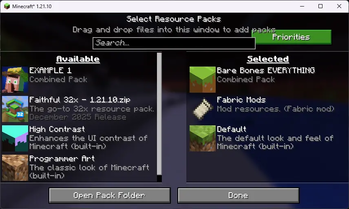
Organize your resource packs into folders and manage their load order with granular precision!
ResBundler is a quality-of-life mod designed for players who love customizing their game but hate the clutter of having dozens of individual packs in their list. This mod allows you to group multiple resource packs into subfolders within your standard resourcepacks directory, treating each folder as a single, unified entry in the Minecraft resource pack selection screen.
✨ Key Features
📂 Folder-Based Organization
Clean up your resource pack menu! Simply create a subfolder inside your .minecraft/resourcepacks/ directory (e.g., resourcepacks/PvP_Bundle/ or resourcepacks/Skyblock_Addons/) and drop your resource pack ZIPs or folders inside it. The mod automatically detects these subfolders and presents them as a single pack to the game.
🔢 Advanced Priority System
Stop renaming files to "!!a_pack" just to get them to load first. We provide a dedicated Priority Configuration Screen (accessible via Mod Menu) that gives you full control over the load order of packs within your bundles.
- Lower Number = Higher Priority: Want a specific UI tweak to override everything else? Give it a low number (e.g.,
1,10, or even negative numbers). - 0 = Lowest Priority (Default): All packs default to priority
0. In our system,0is treated as the lowest possible priority, placing these packs at the very bottom of the stack (sorted alphabetically). This ensures that any pack you explicitly prioritize will always override the defaults. - Duplicate Prevention: The intelligent UI prevents you from assigning the same non-zero priority number to multiple packs, ensuring a conflict-free and deterministic load order.
🛠️ User-Friendly Interface
- Collapsible Categories: The configuration menu groups your packs by their parent folder. You can expand or collapse these folders to easily manage huge collections without endless scrolling.
- Instant Reload: No need to restart! A built-in "Reload Resources" button in the config menu saves your changes and refreshes the game's resources immediately, so you can see your changes in real-time.
📦 Requirements & Installation
This mod requires the following dependencies to function:
- Fabric Loader (Latest version recommended)
- Fabric API
- Cloth Config API (Required for the configuration screen)
To Install:
- Download the
.jarfile. - Make sure you have Fabric API and Cloth Config API installed in your
modsfolder. - Drop
ResBundler-x.x.x.jarinto yourmodsfolder. - Launch Minecraft and start organizing!
💡 Why use this?
If you use many small "tweak" packs—like a custom crosshair, a dark mode UI, and a specific sound pack—your resource pack list can quickly become unmanageable. With Combined Resource Packs, you can bundle all those tweaks into a single "Tweaks" folder. They stay separate on your disk (making them easy to update individually) but act as one unit in-game. Plus, with the priority system, you ensure your dark mode always overlays correctly without manually merging zip files!
Verfügbare Versionen
ResBundler auf deinem Client installieren
Mod-Loader lokal installieren
Installiere fabric für deine lokale Minecraft-Version.
Passende Datei herunterladen
Wähle die ResBundler-Datei für fabric und Minecraft 1.21.11.
Mod installieren
Lege die .jar-Datei in deinem lokalen .minecraft/mods-Ordner ab und starte Minecraft neu. Eine Installation auf dem Server ist nicht nötig.
Kompatibilität
Mod-Loader
Minecraft-Versionen
1.21.11, 1.21.10
Server-seitig
✗ Nicht unterstütztEmpfohlener RAM
4 GB(min. 3 GB)Häufige Fragen
Muss ResBundler auf dem Minecraft Server installiert werden?
Nein. Modrinth kennzeichnet ResBundler serverseitig als nicht unterstützt. Installiere die Mod nur im lokalen Minecraft-Mods-Ordner. Dein Server kann unverändert bleiben, sofern die Mod-Seite keine zusätzliche Abhängigkeit nennt.
Welche Version und welchen Loader braucht ResBundler?
Nutze eine Datei für fabric und exakt deine Minecraft-Version. Unterstützte Versionen sind unter anderem 1.21.11, 1.21.10. Loader-Dateien sind nicht untereinander austauschbar.
ResBundler funktioniert nicht – was kann ich prüfen?
Prüfe zuerst Minecraft-Version, Loader-Version und erforderliche Abhängigkeiten. Lege die .jar-Datei im lokalen .minecraft/mods-Ordner ab und entferne ältere Duplikate. Da die Mod clientseitig ist, löst mehr Server-RAM dieses Problem nicht.
Ähnliche Mods




![[ETF] Entity Texture Features](https://cdn.modrinth.com/data/BVzZfTc1/af683d206d50b05258d865b0d6e4aa2f2cee12f2_96.webp)

Minecraft Server für deine Gruppe
ResBundler bleibt auf deinem Client. Hoste dazu eine kompatible Welt für deine Mitspieler.