
Restart Detector
Stop sensitive farms and flying machines from breaking on server restarts.
Screenshots

Über diese Mod
Restart Detector
This fully server-side mod adds Restart Detectors, a new block that will output a redstone signal before server shutdowns.
These new blocks can be used to disable sensitive redstone contraptions to prevent expensive breakages, and can even be used on flying machines due to their lightweight design™! (no blockentity required)
By default, this mod hijacks the behaviour of the /stop command to use a countdown before actually shutting down the server, giving restart detectors time to activate. It also adds a few subcommands to manage this behaviour.
Visuals
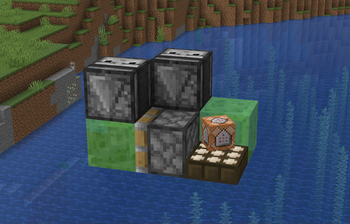
The Restart detector uses the model of a daylight sensor,
but distinguishes itself by having a fake command block hovering above it.
This allows it to work fully server-side, while still being visually distinct.

Functionality
All Restart Detectors that are loaded will output a redstone signal when the server is about to shut down,
starting at strength 1, and slowly increasing to 15 until the actual shutdown.
When the server comes back online, the signal will slowly decay back to 0
to makes sure the world has time to load before contraptions are started back up.
Restart Detectors CAN be moved by pistons.
This lets you make use of them on flying machines and other moving contraptions!

Commands
The /stop command is modified by this mod to wait a configurable amount of time before actually shutting down the server,
it is within this window that all Restart Detectors will output a signal.
It also adds a /stop cancel and /stop now command to cancel and bypass the countdown respectively.
Configuration
This mod creates a config file at config/restart_detector.json with the following options:
hijackStopCommand(default:true): Whether to hijack the vanilla/stopcommand to add a countdown.stopCountdownTicks(default:600(30s)): The amount of ticks to wait before actually shutting down the server.
The server must be restarted for changes to the config to take effect.
Verfügbare Versionen
Restart Detector auf dem Server installieren
Server bestellen
Bestelle einen Minecraft Java Server mit mindestens 3 GB RAM (4 GB empfohlen).
fabric Loader setzen
Wähle im Panel unter "Egg" den fabric-Loader und die passende Minecraft-Version (26.2).
Mod installieren
Öffne den Mod-Browser im Dashboard und suche nach "Restart Detector". Klicke "Installieren" – fertig! Alternativ: Lade die .jar via SFTP in den /mods Ordner.
Kompatibilität
Mod-Loader
Minecraft-Versionen
26.2, 26.1.2, 26.1.1 (+21 weitere)
Server-seitig
✓ ErforderlichEmpfohlener RAM
4 GB(min. 3 GB)Häufige Fragen
Restart Detector Server crasht beim Start – was tun?
Häufigste Ursache: falsche fabric-Version oder zu wenig RAM. Prüfe im Server-Log (latest.log), ob ein "OutOfMemoryError" oder "Mixin"-Fehler auftritt. Bei Mado Hosting: Stelle sicher, dass mindestens 3 GB RAM zugewiesen sind und der Loader zur Mod-Version passt (26.2). Über das Panel kannst du den Loader mit einem Klick wechseln.
Ist Restart Detector mit fabric kompatibel?
Restart Detector unterstützt offiziell fabric für Minecraft 26.2, 26.1.2, 26.1.1. Im Mado Dashboard werden inkompatible Loader-Kombinationen automatisch erkannt.
Server laggt mit Restart Detector – wie optimiere ich die Performance?
Empfohlener RAM: 4 GB (+1 GB pro 8 Spieler). Prüfe mit /spark profiler, ob Restart Detector den meisten Tick-Time verbraucht. Häufige Fixes: Server-View-Distance auf 8-10 reduzieren, bei Forge "performant" oder "starlight" als Zusatz-Mod installieren. Bei Mado Hosting läuft dein Server auf NVMe-SSDs mit dedizierten CPU-Kernen für minimale Latenz.
Ähnliche Mods






Modded Server mieten
Installiere Restart Detector mit nur einem Klick auf deinem Server.