
Locator Bar
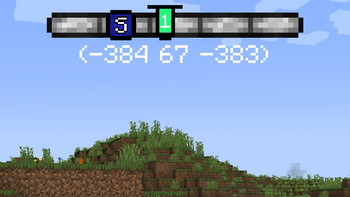
Recreated concept of a player locator bar for Minecraft. Simple, clean bar at the top of your screen.
Screenshots
Über diese Mod

Locator Bar implements the reworked concept of a player locator bar for Minecraft. Simple, clean bar at the top of your screen.

How to install?
- Ensure you are using a correct version of the mod loader.
- Download the correct jar for your loader:
*-fabric-*.jaror*-neoforge-*.jar. - Drop the downloaded mod into your
modsfolder. - Launch the game. The mod is now installed, and you can config it in Minecraft options.
Features
🧭 Locator Bar
The mod adds a locator bar that helps you read a direction at a glance.
You can also show coordinates and in-game day counter under the bar.
World direction markers (N, S, E, W) can be shown directly on the bar.
There are multiple bar styles:
- Reworked style (custom top HUD style)
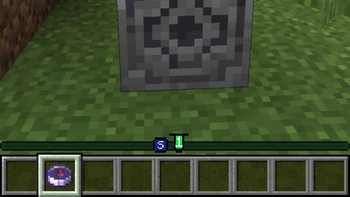
- Classic style (vanilla-like style near the XP bar).
😀 Players
Other players are shown as head markers on the locator bar, so you can quickly see where they are.
A player marker is hidden when:
- the player is crouching
- the player wears a carved pumpkin
- the player wears a mob head
📍 Waypoints
The waypoint system is based on paired lodestone compasses in your inventory.
These compasses create waypoint markers on the locator bar and point you toward their target location.
This gives you a simple navigation system without opening maps or extra screens.
Credits
- This project is an implementation of TIDZIMI idea for locator bar.
Translations
- en_us.json - Fuzja Jądrowa
- pl_pl.json - Fuzja Jądrowa
- pt_br.json - guigiffoni
License
This project is distributed under the GPL-3.0 license.
Verfügbare Versionen
Locator Bar auf dem Server installieren
Server bestellen
Bestelle einen Minecraft Java Server mit mindestens 3 GB RAM (4 GB empfohlen).
fabric Loader setzen
Wähle im Panel unter "Egg" den fabric-Loader und die passende Minecraft-Version (26.3).
Mod installieren
Öffne den Mod-Browser im Dashboard und suche nach "Locator Bar". Klicke "Installieren" – fertig! Alternativ: Lade die .jar via SFTP in den /mods Ordner.
Kompatibilität
Mod-Loader
Minecraft-Versionen
26.3, 26.2, 26.1.2 (+7 weitere)
Server-seitig
~ OptionalEmpfohlener RAM
4 GB(min. 3 GB)Häufige Fragen
Locator Bar Server crasht beim Start – was tun?
Häufigste Ursache: falsche fabric-Version oder zu wenig RAM. Prüfe im Server-Log (latest.log), ob ein "OutOfMemoryError" oder "Mixin"-Fehler auftritt. Bei Mado Hosting: Stelle sicher, dass mindestens 3 GB RAM zugewiesen sind und der Loader zur Mod-Version passt (26.3). Über das Panel kannst du den Loader mit einem Klick wechseln.
Ist Locator Bar mit fabric und forge und neoforge kompatibel?
Locator Bar unterstützt offiziell fabric, forge, neoforge für Minecraft 26.3, 26.2, 26.1.2. Achtung: Forge- und Fabric-Mods sind NICHT untereinander kompatibel – wähle einen Loader und bleibe dabei. Im Mado Dashboard werden inkompatible Loader-Kombinationen automatisch erkannt.
Server laggt mit Locator Bar – wie optimiere ich die Performance?
Empfohlener RAM: 4 GB (+1 GB pro 8 Spieler). Prüfe mit /spark profiler, ob Locator Bar den meisten Tick-Time verbraucht. Häufige Fixes: Server-View-Distance auf 8-10 reduzieren, bei Forge "performant" oder "starlight" als Zusatz-Mod installieren. Bei Mado Hosting läuft dein Server auf NVMe-SSDs mit dedizierten CPU-Kernen für minimale Latenz.
Ähnliche Mods






Modded Server mieten
Installiere Locator Bar mit nur einem Klick auf deinem Server.