
Scoreboard Overhaul
An improved, cuter, and non-invasive scoreboard sidebar UI redesign!
Screenshots
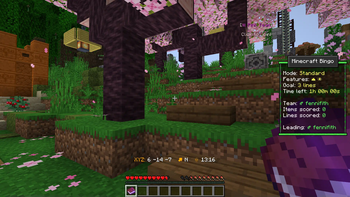
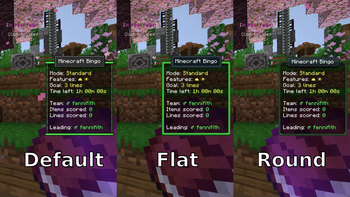
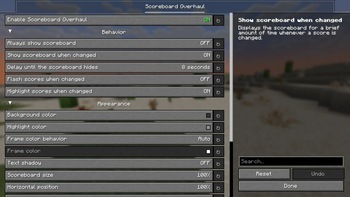
Über diese Mod
Scoreboard Overhaul



This mod redesigns the Minecraft scoreboard/sidebar to make it easier to use and somewhat better looking!
Make sure to also download the Fabric API! You'll also want to install Mod Menu and YetAnotherConfigLib to change any of the settings (but these are not required for it to run).

Features
Auto-hides the scoreboard when it isn't being used
By default, the scoreboard is shown for a brief period when either a score is changed or the Tab key is pressed.
This can be configured in the settings!Highlights score entries when updated
When a score is updated, it has a background "highlight" for a brief period.
There is an additional option to make scores flash when updated to make them more noticeable (turned off by default).Shows the player's current team color
If the player is on a team, the scoreboard border shows their team's color!
Config Options
Note: Options can only be configured if both Mod Menu and YetAnotherConfigLib are installed!

- Enable Scoreboard Overhaul: Controls whether the mod is active (if turned off, uses the vanilla scoreboard).
- Always show scoreboard: Overrides the dynamic hiding behavior, and makes the scoreboard always visible (like the vanilla scoreboard).
- Show scoreboard when changed: Displays the scoreboard for a brief amount of time whenever a score is changed.
- Delay until the scoreboard hides: How long the scoreboard should remain visible for after being shown.
- Background color: Background color of the scoreboard content
- Scoreboard size: The size of the scoreboard, in percent (relative to the current GUI scale)
- Horizontal position: The horizontal alignment of the scoreboard, in percent (0 is left, 100 is right)
- Vertical position: The vertical alignment of the scoreboard, in percent (0 is top, 100 is bottom)
- Flash scores when changed: Whether scores should flicker to indicate which entries have changed.
- Highlight scores when changed: Whether scores should be highlighted to indicate which entries have changed.
- Highlight color: The color to highlight changed scoreboard items with.
Verfügbare Versionen
Scoreboard Overhaul auf deinem Client installieren
Mod-Loader lokal installieren
Installiere fabric für deine lokale Minecraft-Version.
Passende Datei herunterladen
Wähle die Scoreboard Overhaul-Datei für fabric und Minecraft 26.3.
Mod installieren
Lege die .jar-Datei in deinem lokalen .minecraft/mods-Ordner ab und starte Minecraft neu. Eine Installation auf dem Server ist nicht nötig.
Kompatibilität
Mod-Loader
Minecraft-Versionen
26.3, 26.2, 26.1.2 (+19 weitere)
Server-seitig
✗ Nicht unterstütztEmpfohlener RAM
4 GB(min. 3 GB)Häufige Fragen
Muss Scoreboard Overhaul auf dem Minecraft Server installiert werden?
Nein. Modrinth kennzeichnet Scoreboard Overhaul serverseitig als nicht unterstützt. Installiere die Mod nur im lokalen Minecraft-Mods-Ordner. Dein Server kann unverändert bleiben, sofern die Mod-Seite keine zusätzliche Abhängigkeit nennt.
Welche Version und welchen Loader braucht Scoreboard Overhaul?
Nutze eine Datei für fabric, quilt und exakt deine Minecraft-Version. Unterstützte Versionen sind unter anderem 26.3, 26.2, 26.1.2. Loader-Dateien sind nicht untereinander austauschbar.
Scoreboard Overhaul funktioniert nicht – was kann ich prüfen?
Prüfe zuerst Minecraft-Version, Loader-Version und erforderliche Abhängigkeiten. Lege die .jar-Datei im lokalen .minecraft/mods-Ordner ab und entferne ältere Duplikate. Da die Mod clientseitig ist, löst mehr Server-RAM dieses Problem nicht.
Ähnliche Mods






Minecraft Server für deine Gruppe
Scoreboard Overhaul bleibt auf deinem Client. Hoste dazu eine kompatible Welt für deine Mitspieler.
Details
- Lizenz
- GNU Lesser General Public License v3.0 only
- Server-seitig
- Nicht unterstützt