
Server Tab Info
A client and/or server mod that gives nice a way to view the mean tick time and ticks per second (TPS) of the game
Über diese Mod
Should really be called Tab Info, because it now also works when in singleplayer!
Introduction
This is a mod that can be installed on both the client and the server without causing missing mods errors for clients without the mod or servers without the mod.
When connected to a server the mod only works when the server also has the mod.
The version on the server does not need to match the version on the client, but if the client connects to a server with an too old version some features will be missing.
Features showcase
The new and improved dimension tps list
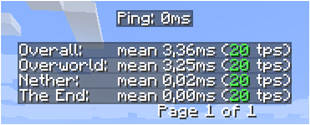
The new player list

Inspiration
The inspiration for the mod and the presentation have been based on a small feature from MineTogether, where if an optional mod was installed on the server and query feature was active, you could view information like tps and entities in world. It would present this information like the player tab list, when pressing Tab + Ctrl.
The spark for me was that it stopped working, therefore I made this small mod to view tps for all dimensions.
To activate the gui press Tab + Ctrl (standard but configuable in keybindings) then you are presented with the tps overall for the server and for each dimension.
Know issues
- If MineTogether is installed and siv intregration is enabled and ServerInfoProvider is not installed, you can get lag issues when using the keybind for the tps page, because they use the same keybinds.
To fix this issue either, disable siv intregration under MineTogether or change the keybind for tps page.
Verfügbare Versionen
Server Tab Info auf dem Server installieren
Server bestellen
Bestelle einen Minecraft Java Server mit mindestens 3 GB RAM (4 GB empfohlen).
forge Loader setzen
Wähle im Panel unter "Egg" den forge-Loader und die passende Minecraft-Version (1.20.4).
Mod installieren
Öffne den Mod-Browser im Dashboard und suche nach " Server Tab Info". Klicke "Installieren" – fertig! Alternativ: Lade die .jar via SFTP in den /mods Ordner.
Kompatibilität
Mod-Loader
Minecraft-Versionen
1.20.4, 1.20.1, 1.20 (+5 weitere)
Server-seitig
~ OptionalEmpfohlener RAM
4 GB(min. 3 GB)Häufige Fragen
Server Tab Info Server crasht beim Start – was tun?
Häufigste Ursache: falsche forge-Version oder zu wenig RAM. Prüfe im Server-Log (latest.log), ob ein "OutOfMemoryError" oder "Mixin"-Fehler auftritt. Bei Mado Hosting: Stelle sicher, dass mindestens 3 GB RAM zugewiesen sind und der Loader zur Mod-Version passt (1.20.4). Über das Panel kannst du den Loader mit einem Klick wechseln.
Ist Server Tab Info mit forge und neoforge kompatibel?
Server Tab Info unterstützt offiziell forge, neoforge für Minecraft 1.20.4, 1.20.1, 1.20. Im Mado Dashboard werden inkompatible Loader-Kombinationen automatisch erkannt.
Server laggt mit Server Tab Info – wie optimiere ich die Performance?
Empfohlener RAM: 4 GB (+1 GB pro 8 Spieler). Prüfe mit /spark profiler, ob Server Tab Info den meisten Tick-Time verbraucht. Häufige Fixes: Server-View-Distance auf 8-10 reduzieren, bei Forge "performant" oder "starlight" als Zusatz-Mod installieren. Bei Mado Hosting läuft dein Server auf NVMe-SSDs mit dedizierten CPU-Kernen für minimale Latenz.
Ähnliche Mods




![[ETF] Entity Texture Features](https://cdn.modrinth.com/data/BVzZfTc1/af683d206d50b05258d865b0d6e4aa2f2cee12f2_96.webp)

Modded Server mieten
Installiere Server Tab Info mit nur einem Klick auf deinem Server.