SettingsManagerLib
A simple, easy-to-set-up config library using YACL and Mod Menu to create simple or complex config menus
Über diese Mod
A simple settings manager library, which implements YACL to easily generate config screens for Mod Menu.
If you would like to use this mod to generate config menus for your own mod, I recommend contacting me, as I may not keep this page updated as the mod updates.
NOTE: This mod does nothing by itself. It is a library for other mods.
Features:
- Easy and quick setup
- Easy implementation
- Easy access to settings
- Built-in config file generation to save settings between client restarts
- Built-in chroma manager to sync chroma features across files
- Supports nearly all YACL fields
Setup:
Add the mod as a dependency:
in build.gradle
repositories {
    maven { url = "https://api.modrinth.com/maven" }
    maven {
        name = "Terraformers"
        url = "https://maven.terraformersmc.com/"}
    maven {
        name 'Xander Maven'
        url 'https://maven.isxander.dev/releases'}
}

dependencies {
    modImplementation("maven.modrinth:settingsmanagerlib:${project.modmenu_version}")
    modImplementation("com.terraformersmc:modmenu:${project.modmenu_version}")
    modImplementation "dev.isxander:yet-another-config-lib:${project.yacl_version}"
}
in gradle.properties
settingsmanagerlib_version=LATEST_VERSION_NUMBER (e.g. 1.0.0+1.21.11)
modmenu_version=LATEST_VERSION_NUMBER (e.g. 15.0.0)
yacl_version=LATEST_VERSION_NUMBER (e.g. 3.7.1+1.21.6-fabric)
in fabric.mod.json
"entrypoints": {
"modmenu": [ "com.example.mod.ModMenuAPI" ]
}
Then create a new class ModMenuAPI
public class ModMenuAPI implements ModMenuApi {
	 @Override
	 public ConfigScreenFactory<?> getModConfigScreenFactory() {
			return parentScreen -> ExampleModClient.settings.getConfig(parentScreen);
	 }
}
Set up the mod:
in ExampleModClient
public static Settings settings;

@Override
public void onInitializeClient() {
	 settings = new Settings().setup("Example Mod", "examplemod");
	 settings.loadFromFile();
}
To add a setting:
Note: supports Strings, Booleans, Integers, Floats, Colors, and custom Enums.
Standard Strings/Integers/Floats
in ExampleModClient
@Override
public void onInitializeClient() {
	 settings.add(String settingId, String page, String group, String/int/float defaultValue, String settingName, String description)

	 settings.add("guiName", "Visual Settings", "Overlay", "Default Gui Name", "Gui Scale", "This text will appear as a tooltip when you click on the option.");
}
Integer/Float Sliders
in ExampleModClient
@Override
public void onInitializeClient() {
	 settings.addSlider(String settingId, String page, String group, int/float defaultValue, String settingName, String description, int/float min, int/float max, int/float step)

	 settings.add("guiScale", "Visual Settings", "Overlay", 1.0f, "Gui Scale", "This text will appear as a tooltip when you click on the option.", 0.5f, 5.0f, 0.1f);
}
Booleans
in ExampleModClient
@Override
public void onInitializeClient() {
	 settings.addSlider(String settingId, String page, String group, boolean defaultValue, String settingName, String description, BooleanFormat valueFormat)

	 settings.add("doRenderGui", "Visual Settings", "Overlay", true, "Render Gui", "This text will appear as a tooltip when you click on the option.", BooleanFormat.ONOFF);
}
BooleanFormat - the displayed value of the boolean:
BooleanFormat.ONOFF- "On" or "Off"BooleanFormat.TRUEFALSE- "True" or "False"BooleanFormat.YESNO- "Yes" or "No"BooleanFormat.TICKBOX- A box that is either checked or unchecked
Colors
in ExampleModClient
@Override
public void onInitializeClient() {
	 settings.addColor(String settingId, String page, String group, int defaultValue, String settingName, String description)

	 settings.addColor("guiBackgroundColor", "Visual Settings", "Overlay", net.minecraft.util.Colors.GRAY, "Gui Background Color", "This text will appear as a tooltip when you click on the option.");
}
Custom Enum
Documentation coming soon. Contact for detailsNote that the value of settings automatically persist after restarting the client, however, you still need to add them to the config menu, which can be accomplished by creating the config menu inside onInitializeClient()
Accessing Values:
Getting The Value of a Setting:
To get the value of a setting, use the following where typeInstance is a value with the same type as the value of the setting you are getting. Refer to the examples below for implementations. Note that the second parameter of settings.get() is irrelevant; only its type needs to be the same as the return type.
ExampleModClient.settings.get("settingId", typeInstance);

ExampleModClient.settings.get("doRenderGui", true); //to return a boolean
ExampleModClient.settings.get("guiBackgroundColor", net.minecraft.util.Colors.GRAY); //to return a color
ExampleModClient.settings.get("guiScale", 1.0f); //to return a float
ExampleModClient.settings.get("guiName", "Default Gui Name"); //to return a string
ExampleModClient.settings.get("guiSliderMin", 1); //to return an integer
Setting the Value of a Setting:
By default, the value of a setting is set to its default value, unless the user changes it. To manually set the value of a setting, use the following.
ExampleModClient.settings.set("settingId", newValue);

ExampleModClient.settings.set("doRenderGui", false); //example with a boolean
Pages/Groups:
Settings are organized by pages and groups. Refer to the image below for an example. The page is the bar at the top, and you can open one page at a time. A group is a collapsible collection of settings. You can have unlimited groups and unlimited settings on each page. Each setting must have a page, but does not require a group. To create a setting without a group as shown in the image below, set the group to "" or "none".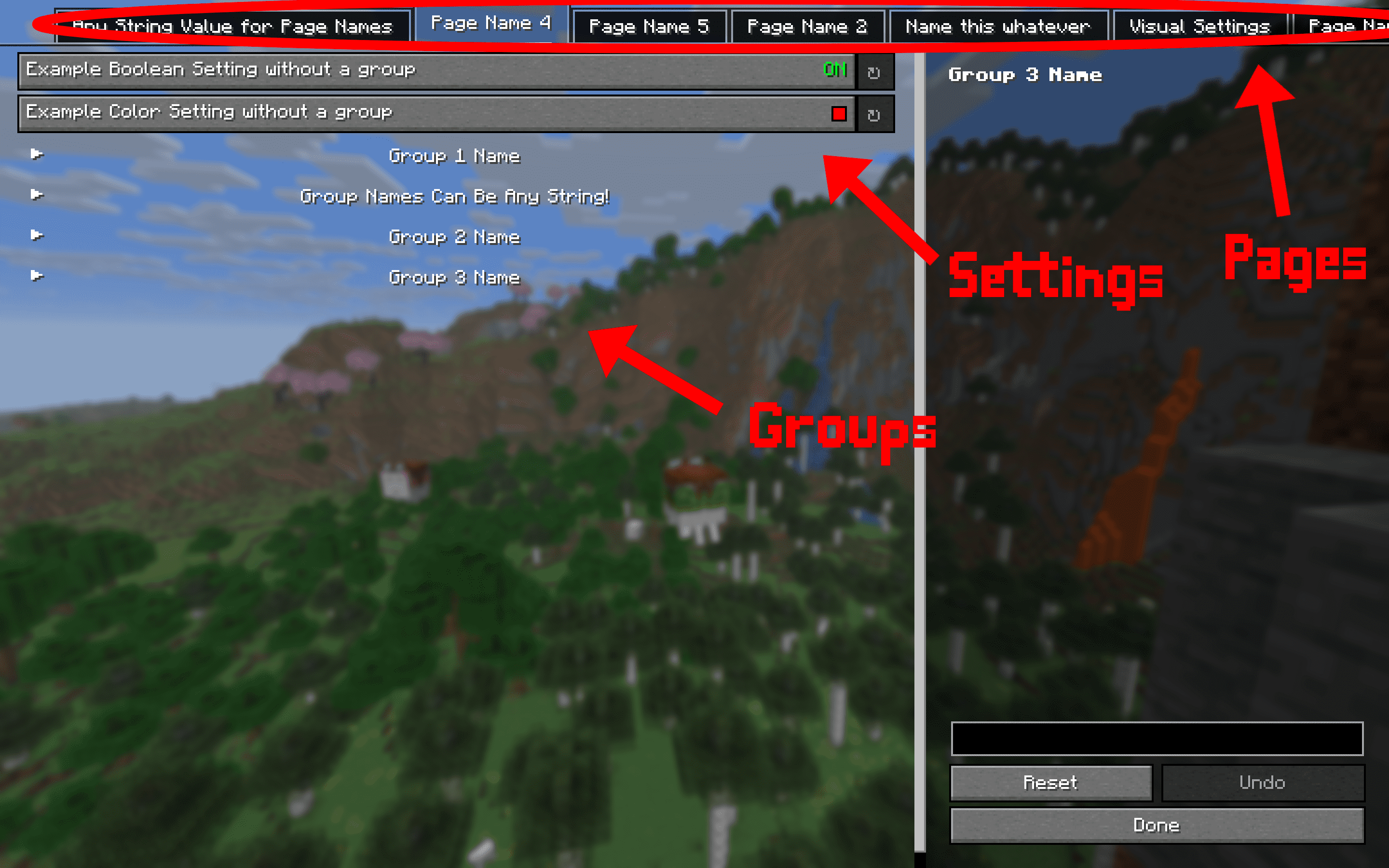
Dependencies:
This mod requires multiple other mods in order to function.
- YACL
- Mod Menu
- Fabric API
Verfügbare Versionen
SettingsManagerLib auf deinem Client installieren
Mod-Loader lokal installieren
Installiere fabric für deine lokale Minecraft-Version.
Passende Datei herunterladen
Wähle die SettingsManagerLib-Datei für fabric und Minecraft 26.1.2.
Mod installieren
Lege die .jar-Datei in deinem lokalen .minecraft/mods-Ordner ab und starte Minecraft neu. Eine Installation auf dem Server ist nicht nötig.
Kompatibilität
Mod-Loader
Minecraft-Versionen
26.1.2, 26.1.1, 26.1 (+9 weitere)
Server-seitig
✗ Nicht unterstütztEmpfohlener RAM
4 GB(min. 3 GB)Häufige Fragen
Muss SettingsManagerLib auf dem Minecraft Server installiert werden?
Nein. Modrinth kennzeichnet SettingsManagerLib serverseitig als nicht unterstützt. Installiere die Mod nur im lokalen Minecraft-Mods-Ordner. Dein Server kann unverändert bleiben, sofern die Mod-Seite keine zusätzliche Abhängigkeit nennt.
Welche Version und welchen Loader braucht SettingsManagerLib?
Nutze eine Datei für fabric und exakt deine Minecraft-Version. Unterstützte Versionen sind unter anderem 26.1.2, 26.1.1, 26.1. Loader-Dateien sind nicht untereinander austauschbar.
SettingsManagerLib funktioniert nicht – was kann ich prüfen?
Prüfe zuerst Minecraft-Version, Loader-Version und erforderliche Abhängigkeiten. Lege die .jar-Datei im lokalen .minecraft/mods-Ordner ab und entferne ältere Duplikate. Da die Mod clientseitig ist, löst mehr Server-RAM dieses Problem nicht.
Ähnliche Mods



Minecraft Server für deine Gruppe
SettingsManagerLib bleibt auf deinem Client. Hoste dazu eine kompatible Welt für deine Mitspieler.
Details
- Lizenz
- GNU Lesser General Public License v3.0 only
- Server-seitig
- Nicht unterstützt