
Shifty Hotbar
A utility mod that implements the hotbar shifting ability, inspired by Stardew Valley.
Über diese Mod

Shifty Hotbar





A fully client-side utility mod that implements the hotbar shifting ability, inspired by Stardew Valley.
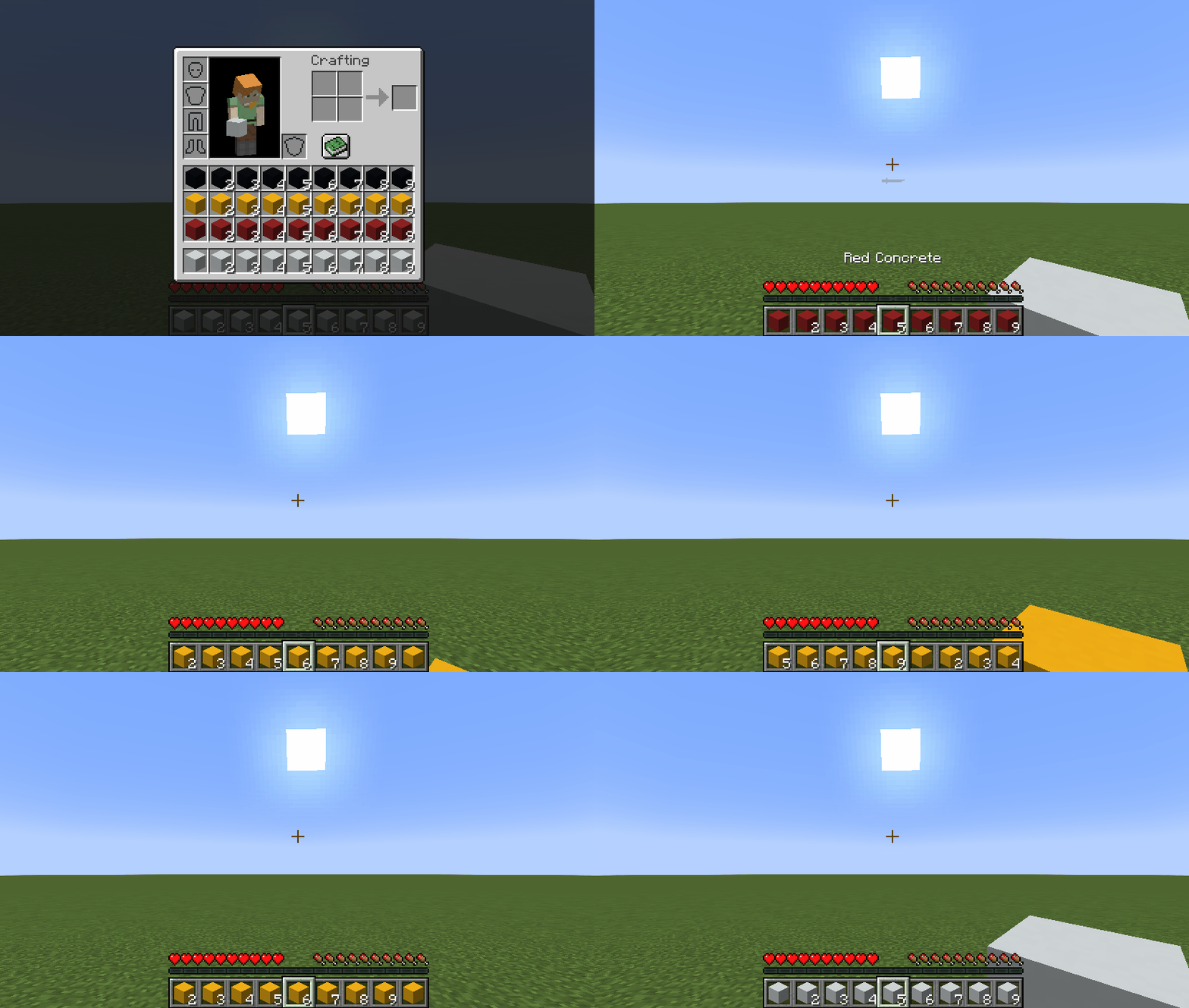
I know that there are mods like this in the wild, but none of them did suit me whatsoever. Therefore, I made the ultimate version that consists of every feature a mod like this can possibly provide:
- You can shift inventory rows in both directions (
Up ArrowandDown Arrowby default) - You can shift inventory columns in both directions (
Right ArrowandLeft Arrowby default) - You can shift slots in your hotbar in both directions
- You can shift slots in the selected column in both directions
- You can shift rows, columns and slots via mouse scroll while pressing a
modifierkey (Left Altby default) - You can quickly shift to a row, a column, or a slot via hotbar hotkeys (
1...9) while pressing amodifierkey (Left Altby default)
Key Binds
Key binds can be configured just like vanilla ones:
- Go to
Options... - Select
Controls... - Then choose
Key Binds... - Scroll down to the
Shifty Hotbarsection
| Name | Description | Default |
|---|---|---|
Row modifier |
When pressed, it allows you to shift rows instead of choosing a slot via mouse scroll/hotkeys (1...9) |
Left Alt |
Previous row |
Shifts all rows in your inventory so that the topmost row in your inventory becomes the hotbar | Down Arrow |
Next row |
Shifts all rows in your inventory so that the row above your hotbar becomes the hotbar | Up Arrow |
Row-in-column modifier |
When pressed, it allows you to shift slots in the selected column instead of choosing one via mouse scroll | |
Previous row-in-column |
Shifts all slots in the selected column so that the topmost slot in your inventory becomes the hotbar slot | |
Next row-in-column |
Shifts all slots in the selected column so that the slot above your hotbar slot becomes the hotbar slot | |
Column modifier |
When pressed, it allows you to shift columns instead of choosing a slot via mouse scroll/hotkeys (1...9) |
|
Previous column |
Shifts all columns in your inventory so that the slot before your selected slot becomes the selected slot | Left Arrow |
Next column |
Shifts all columns in your inventory so that the slot after your selected slot becomes the selected slot | Right Arrow |
Column-in-row modifier |
When pressed, it allows you to shift slots in the hotbar instead of choosing one via mouse scroll | |
Previous column-in-row |
Shifts all slots in your hotbar so that the slot before your selected slot becomes the selected slot | |
Next column-in-row |
Shifts all slots in your hotbar so that the slot after your selected slot becomes the selected slot |
Config
If you have Cloth Config installed, you can customize the behavior of the mod. A config is usually located at ./config/shifty_hotbar.json and by default looks like this:
{
  "invertRowScroll": false,
  "invertColumnScroll": false
}
| Name | Description | Default value |
|---|---|---|
invertRowScroll |
Inverts mouse scroll when row or row-in-column modifier is pressed |
false |
invertColumnScroll |
Inverts mouse scroll when column or column-in-row modifier is pressed |
false |
You can edit any of these values directly in the config file or via ModMenu.
Installation
Requirements:
- Minecraft
>=1.14.x - Fabric Loader
>=0.7.0 - Fabric API
>=0.25.0
You can download the mod from:
- GitHub Releases (recommended)
- Modrinth
- CurseForge
- GitHub Actions (these builds may be unstable, but they represent the actual state of the development)
Building from sources
Requirements:
- JDK
17
Linux/MacOS
git clone https://github.com/Kir-Antipov/shifty-hotbar.git
cd shifty-hotbar

chmod +x ./gradlew
./gradlew build
cd build/libs
Windows
git clone https://github.com/Kir-Antipov/shifty-hotbar.git
cd shifty-hotbar

gradlew build
cd build/libs
Verfügbare Versionen
Shifty Hotbar auf deinem Client installieren
Mod-Loader lokal installieren
Installiere fabric für deine lokale Minecraft-Version.
Passende Datei herunterladen
Wähle die Shifty Hotbar-Datei für fabric und Minecraft 1.20.4.
Mod installieren
Lege die .jar-Datei in deinem lokalen .minecraft/mods-Ordner ab und starte Minecraft neu. Eine Installation auf dem Server ist nicht nötig.
Kompatibilität
Mod-Loader
Minecraft-Versionen
1.20.4, 1.20.3, 1.20.2 (+26 weitere)
Server-seitig
✗ Nicht unterstütztEmpfohlener RAM
4 GB(min. 3 GB)Häufige Fragen
Muss Shifty Hotbar auf dem Minecraft Server installiert werden?
Nein. Modrinth kennzeichnet Shifty Hotbar serverseitig als nicht unterstützt. Installiere die Mod nur im lokalen Minecraft-Mods-Ordner. Dein Server kann unverändert bleiben, sofern die Mod-Seite keine zusätzliche Abhängigkeit nennt.
Welche Version und welchen Loader braucht Shifty Hotbar?
Nutze eine Datei für fabric und exakt deine Minecraft-Version. Unterstützte Versionen sind unter anderem 1.20.4, 1.20.3, 1.20.2. Loader-Dateien sind nicht untereinander austauschbar.
Shifty Hotbar funktioniert nicht – was kann ich prüfen?
Prüfe zuerst Minecraft-Version, Loader-Version und erforderliche Abhängigkeiten. Lege die .jar-Datei im lokalen .minecraft/mods-Ordner ab und entferne ältere Duplikate. Da die Mod clientseitig ist, löst mehr Server-RAM dieses Problem nicht.
Ähnliche Mods




![[ETF] Entity Texture Features](https://cdn.modrinth.com/data/BVzZfTc1/af683d206d50b05258d865b0d6e4aa2f2cee12f2_96.webp)

Minecraft Server für deine Gruppe
Shifty Hotbar bleibt auf deinem Client. Hoste dazu eine kompatible Welt für deine Mitspieler.