
Show Me What You Got
Allows displaying your items in chat. Brag about your cool equipment!
Über diese Mod
Show Me What You Got
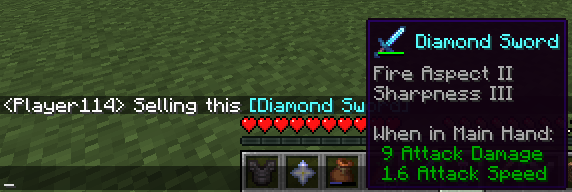
A simple mod which allows displaying your items to other users in chat.
While in your inventory, hold ctrl and then press your chat key while hovering over an item to share it. (so Ctrl+T by default).
Your chat window will open with the linked item inside. Feel free to write a message before or after the item (or both) before sending!
Client or Server?
The mod should be installed on the client and the server in order to function properly.
Clients without the mod can still see items shared by others with the mod in chat, but can't share items themselves and also won't see the shared item's texture in the tooltip. If you use this mod on your client and try to share an item on a server without the mod installed, you will just send text with the item name.
Verfügbare Versionen
Show Me What You Got auf dem Server installieren
Server bestellen
Bestelle einen Minecraft Java Server mit mindestens 3 GB RAM (4 GB empfohlen).
fabric Loader setzen
Wähle im Panel unter "Egg" den fabric-Loader und die passende Minecraft-Version (1.21.3).
Mod installieren
Öffne den Mod-Browser im Dashboard und suche nach "Show Me What You Got". Klicke "Installieren" – fertig! Alternativ: Lade die .jar via SFTP in den /mods Ordner.
Kompatibilität
Mod-Loader
Minecraft-Versionen
1.21.3, 1.20.2, 1.20.1 (+17 weitere)
Server-seitig
✓ ErforderlichEmpfohlener RAM
4 GB(min. 3 GB)Häufige Fragen
Show Me What You Got Server crasht beim Start – was tun?
Häufigste Ursache: falsche fabric-Version oder zu wenig RAM. Prüfe im Server-Log (latest.log), ob ein "OutOfMemoryError" oder "Mixin"-Fehler auftritt. Bei Mado Hosting: Stelle sicher, dass mindestens 3 GB RAM zugewiesen sind und der Loader zur Mod-Version passt (1.21.3). Über das Panel kannst du den Loader mit einem Klick wechseln.
Ist Show Me What You Got mit fabric und quilt kompatibel?
Show Me What You Got unterstützt offiziell fabric, quilt für Minecraft 1.21.3, 1.20.2, 1.20.1. Im Mado Dashboard werden inkompatible Loader-Kombinationen automatisch erkannt.
Server laggt mit Show Me What You Got – wie optimiere ich die Performance?
Empfohlener RAM: 4 GB (+1 GB pro 8 Spieler). Prüfe mit /spark profiler, ob Show Me What You Got den meisten Tick-Time verbraucht. Häufige Fixes: Server-View-Distance auf 8-10 reduzieren, bei Forge "performant" oder "starlight" als Zusatz-Mod installieren. Bei Mado Hosting läuft dein Server auf NVMe-SSDs mit dedizierten CPU-Kernen für minimale Latenz.
Ähnliche Mods



![[TaCZ] Timeless and Classics Zero](https://cdn.modrinth.com/data/SzzJttH8/fd27766d2bb8390d284696b1dbd358f87e081439_96.webp)


Modded Server mieten
Installiere Show Me What You Got mit nur einem Klick auf deinem Server.