
Show My Skin Parts
Always show your skin parts.
Screenshots
Über diese Mod
Show My Skin Parts
A simple mod for Minecraft.
The configure screen requires Cloth Config and Mod Menu to open (or you can edit the configuration file manually).
Why use it and What does it do?
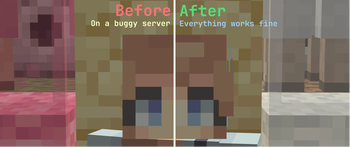
For some reason, some minecraft servers (especially 1.19.3) won't send you your skin parts if you enter another dimension,
and it makes your skin looks ugly.
With this mod, your skin parts will always be shown (Following the client's skin options).
And it will automatically "refresh" your skin parts in order to enable your skin parts to be seen to others (It's configurable).
If other players still cannot see your skin parts, you can simply press N to refresh your skin parts manually.
Notice
This mod doesn't seem work well with 3d-Skin-Layers, so please disable it first and try again before reporting bugs if it's installed.
Verfügbare Versionen
Show My Skin Parts auf deinem Client installieren
Mod-Loader lokal installieren
Installiere fabric für deine lokale Minecraft-Version.
Passende Datei herunterladen
Wähle die Show My Skin Parts-Datei für fabric und Minecraft 1.21.10.
Mod installieren
Lege die .jar-Datei in deinem lokalen .minecraft/mods-Ordner ab und starte Minecraft neu. Eine Installation auf dem Server ist nicht nötig.
Kompatibilität
Mod-Loader
Minecraft-Versionen
1.21.10, 1.21.9, 1.21.8 (+20 weitere)
Server-seitig
✗ Nicht unterstütztEmpfohlener RAM
4 GB(min. 3 GB)Häufige Fragen
Muss Show My Skin Parts auf dem Minecraft Server installiert werden?
Nein. Modrinth kennzeichnet Show My Skin Parts serverseitig als nicht unterstützt. Installiere die Mod nur im lokalen Minecraft-Mods-Ordner. Dein Server kann unverändert bleiben, sofern die Mod-Seite keine zusätzliche Abhängigkeit nennt.
Welche Version und welchen Loader braucht Show My Skin Parts?
Nutze eine Datei für fabric und exakt deine Minecraft-Version. Unterstützte Versionen sind unter anderem 1.21.10, 1.21.9, 1.21.8. Loader-Dateien sind nicht untereinander austauschbar.
Show My Skin Parts funktioniert nicht – was kann ich prüfen?
Prüfe zuerst Minecraft-Version, Loader-Version und erforderliche Abhängigkeiten. Lege die .jar-Datei im lokalen .minecraft/mods-Ordner ab und entferne ältere Duplikate. Da die Mod clientseitig ist, löst mehr Server-RAM dieses Problem nicht.
Ähnliche Mods


Minecraft Server für deine Gruppe
Show My Skin Parts bleibt auf deinem Client. Hoste dazu eine kompatible Welt für deine Mitspieler.